This post is older than 2 years and might not be relevant anymore
More Info: Consider searching for newer posts

Provisioner and server

Hey 

This is sumanth. I have worked on light switch example with server, client and mobile as provisioner. I would like to develop a mesh network where the server has to calculate the RSSI of client signal while receiving data and display it through UART or in mobile or store it in memory of server. I found a structure in nRF_mesh.h file which deals about the RSSI of received packet. How can i use this structure? and make it work.

second one is if i want to send data from server to UART, how can i achieve it? 

Thanking You

Sumanth 

Parents
  • Hello,

    Please see this ticket regarding RSSI in the Mesh SDK.

    You must use the UART peripheral. Look in the ble_app_uart example (from the normal SDK). Look for the function named uart_init(). This is the function you want to use. You must also include the files that this function's internal functions uses. Give it a go, and let me know if you are stuck.

    Best regards,

    Edvin

  • Hey thanks Edvin, I am able to find the RSSI of received packet from client when i wrote the code like below mentioned in the function 

    static void app_onoff_server_set_cb(const app_onoff_server_t * p_server, bool onoff ) {

    __LOG(LOG_SRC_APP, LOG_LEVEL_INFO, "RSSI: %d\n",- ((int32_t) NRF_RADIO->RSSISAMPLE));

    }

    I am getting an error like this

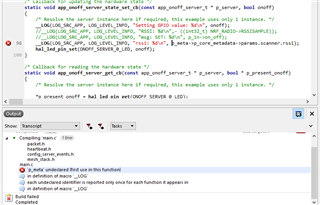
    'p_data' undeclared 

    when i am using this line in the same function. 

    __LOG(LOG_SRC_APP, LOG_LEVEL_INFO, "rssi: %d\n", p_meta->p_core_metadata->params.scanner.rssi);

    Thank you

  • Well, the difference between app_onoff_server_state_set_cb() and app_onoff_server_set_cb() is that the first is the function that is called when the server receives a message from a client to turn on of off the lights, while the second is the function that decides which function that is the callback function.

    You need to use app_onoff_server_state_set_cb(), and not app_onoff_server_set_cb().

Reply
  • Well, the difference between app_onoff_server_state_set_cb() and app_onoff_server_set_cb() is that the first is the function that is called when the server receives a message from a client to turn on of off the lights, while the second is the function that decides which function that is the callback function.

    You need to use app_onoff_server_state_set_cb(), and not app_onoff_server_set_cb().

Children
  • Oh. I see. 

    You need to use the function app_onoff_server_state_set_cb() in the app_onoff.c file. It looks like this:

    static void generic_onoff_state_set_cb(const generic_onoff_server_t * p_self,
                                           const access_message_rx_meta_t * p_meta,
                                           const generic_onoff_set_params_t * p_in,
                                           const model_transition_t * p_in_transition,
                                           generic_onoff_status_params_t * p_out)
    {
        __LOG(LOG_SRC_APP, LOG_LEVEL_INFO, "msg: SET: %d\n", p_in->on_off);
    
        app_onoff_server_t   * p_server = PARENT_BY_FIELD_GET(app_onoff_server_t, server, p_self);
    
        /* Update internal representation of OnOff value, process timing */
        p_server->value_updated = false;
        p_server->state.target_onoff = p_in->on_off;
        if (p_in_transition == NULL)
        {
            p_server->state.delay_ms = 0;
            p_server->state.remaining_time_ms = 0;
        }
        else
        {
            p_server->state.delay_ms = p_in_transition->delay_ms;
            p_server->state.remaining_time_ms = p_in_transition->transition_time_ms;
        }
    
        onoff_state_value_update(p_server);
        onoff_state_process_timing(p_server);
    
        /* Prepare response */
        if (p_out != NULL)
        {
            p_out->present_on_off = p_server->state.present_onoff;
            p_out->target_on_off = p_server->state.target_onoff;
            p_out->remaining_time_ms = p_server->state.remaining_time_ms;
        }
    }

    So as you can see, it has a pointer p_meta in the function variables.

Related