This post is older than 2 years and might not be relevant anymore
More Info: Consider searching for newer posts

nRF9160 DK testing

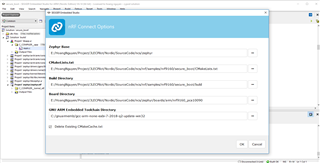
nRF9160 DK: I followed the userguide , devzone.nordicsemi.com/.../getting-started-with-nrf9160-dk

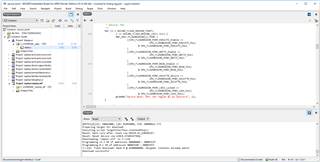
I done with 2 examples: AT Client and Asset Tracker examples. I passed Build and Run. Then, used nRF Connect to check, but nothing came. AT commands didnt work, AssetTracker neither. The led3 and led4 were OFF. Whats wrong?
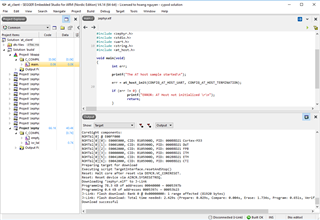
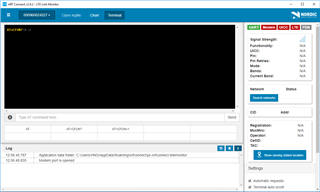
The LTE didnt ON yet!

The led3 and led4 were OFF.

I am using the gcc arm 7-2018 ( i couldnt run with version 8-2018)
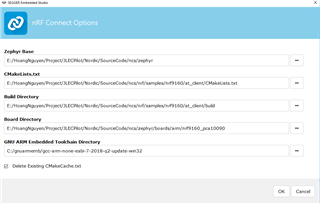
Can you tell me why, did I do something wrong?

Hng 

Cypod Solution 

942 06 177

Horten

Parents Reply Children
  • Hi Øyvind, 

    I tried again step by step to understand more about nrf9160 DK

    1. 

    nRF9160: Secure Boot

    Connect nRF9160 DK , turn on and SW5 to nRF91: Build and Run

    Preparing target for download
    Executing script TargetInterface.resetAndStop()
    Reset: Halt core after reset via DEMCR.VC_CORERESET.
    Reset: Reset device via AIRCR.SYSRESETREQ.
    Downloading ‘zephyr.elf’ to J-Link
    Programming 13.3 KB of addresses 00000000 — 0000353f
    Programming 0.1 KB of addresses 00003540 — 000035f3
    J-Link: Flash download: Bank 0 @ 0x00000000: Skipped. Contents already match
    Download successful

    Run: nRF Connect v2.6.2 - LTE Link Monitor , Select device 

    2019-03-02T09:46:15.689Z DEBUG modem << Secure Boot: configure peripherals\x0D\x0A
    2019-03-02T09:46:15.710Z DEBUG modem << Secure Boot: MSP_NS ffffffff\x0D\x0A
    2019-03-02T09:46:15.730Z DEBUG modem << Secure Boot: prepare to jump to Non-Secure image\x0D\x0A
    2019-03-02T09:46:15.750Z DEBUG modem << ***** Booting Zephyr OS v1.13.99-ncs2 *****\x0D\x0A
    2019-03-02T09:46:15.771Z DEBUG modem << Secure Boot: configure flash\x0D\x0A
    2019-03-02T09:46:15.794Z DEBUG modem << Secure Boot: SPU: set region 0 as Secure\x0D\x0A
    2019-03-02T09:46:15.815Z DEBUG modem << Secure Boot: SPU: set region 1 as Secure\x0D\x0A
    2019-03-02T09:46:15.835Z DEBUG modem << Secure Boot: SPU: set region 2 as Secure\x0D\x0A
    2019-03-02T09:46:15.857Z DEBUG modem << Secure Boot: SPU: set region 3 as Secure\x0D\x0A
    2019-03-02T09:46:15.876Z DEBUG modem << Secure Boot: SPU: set region 4 as Secure\x0D\x0A
    2019-03-02T09:46:15.897Z DEBUG modem << Secure Boot: SPU: set region 5 as Secure\x0D\x0A
    2019-03-02T09:46:15.918Z DEBUG modem << Secure Boot: SPU: set region 6 as Secure\x0D\x0A
    2019-03-02T09:46:15.939Z DEBUG modem << Secure Boot: SPU: set region 7 as Secure\x0D\x0A
    2019-03-02T09:46:15.960Z DEBUG modem << Secure Boot: SPU: set Flash region 8 as Non-Secure\x0D\x0A
    2019-03-02T09:46:15.980Z DEBUG modem << Secure Boot: SPU: set Flash region 9 as Non-Secure\x0D\x0A
    2019-03-02T09:46:15.999Z DEBUG modem << Secure Boot: SPU: set Flash region 10 as Non-Secure\x0D\x0A
    2019-03-02T09:46:16.019Z DEBUG modem << Secure Boot: SPU: set Flash region 11 as Non-Secure\x0D\x0A
    2019-03-02T09:46:16.039Z DEBUG modem << Secure Boot: SPU: set Flash region 12 as Non-Secure\x0D\x0A
    2019-03-02T09:46:16.060Z DEBUG modem << Secure Boot: SPU: set Flash region 13 as Non-Secure\x0D\x0A
    2019-03-02T09:46:16.079Z DEBUG modem << Secure Boot: SPU: set Flash region 14 as Non-Secure\x0D\x0A
    2019-03-02T09:46:16.099Z DEBUG modem << Secure Boot: SPU: set Flash region 15 as Non-Secure\x0D\x0A
    2019-03-02T09:46:16.119Z DEBUG modem << Secure Boot: SPU: set Flash region 16 as Non-Secure\x0D\x0A
    2019-03-02T09:46:16.138Z DEBUG modem << Secure Boot: SPU: set Flash region 17 as Non-Secure\x0D\x0A
    2019-03-02T09:46:16.159Z DEBUG modem << Secure Boot: SPU: set Flash region 18 as Non-Secure\x0D\x0A
    2019-03-02T09:46:16.179Z DEBUG modem << Secure Boot: SPU: set Flash region 19 as Non-Secure\x0D\x0A
    2019-03-02T09:46:16.201Z DEBUG modem << Secure Boot: SPU: set Flash region 20 as Non-Secure\x0D\x0A
    2019-03-02T09:46:16.224Z DEBUG modem << Secure Boot: SPU: set Flash region 21 as Non-Secure\x0D\x0A
    2019-03-02T09:46:16.248Z DEBUG modem << Secure Boot: SPU: set Flash region 22 as Non-Secure\x0D\x0A
    2019-03-02T09:46:16.270Z DEBUG modem << Secure Boot: SPU: set Flash region 23 as Non-Secure\x0D\x0A
    2019-03-02T09:46:16.292Z DEBUG modem << Secure Boot: SPU: set Flash region 24 as Non-Secure\x0D\x0A
    2019-03-02T09:46:16.314Z DEBUG modem << Secure Boot: SPU: set Flash region 25 as Non-Secure\x0D\x0A
    2019-03-02T09:46:16.334Z DEBUG modem << Secure Boot: SPU: set Flash region 26 as Non-Secure\x0D\x0A
    2019-03-02T09:46:16.353Z DEBUG modem << Secure Boot: SPU: set Flash region 27 as Non-Secure\x0D\x0A
    2019-03-02T09:46:16.374Z DEBUG modem << Secure Boot: SPU: set Flash region 28 as Non-Secure\x0D\x0A
    2019-03-02T09:46:16.393Z DEBUG modem << Secure Boot: SPU: set Flash region 29 as Non-Secure\x0D\x0A
    2019-03-02T09:46:16.413Z DEBUG modem << Secure Boot: SPU: set Flash region 30 as Non-Secure\x0D\x0A
    2019-03-02T09:46:16.435Z DEBUG modem << Secure Boot: SPU: set Flash region 31 as Non-Secure\x0D\x0A
    2019-03-02T09:46:16.454Z DEBUG modem << Secure Boot: configure SRAM\x0D\x0A
    2019-03-02T09:46:16.474Z DEBUG modem << Secure Boot: SPU: set SRAM region 0 as Secure\x0D\x0A
    2019-03-02T09:46:16.496Z DEBUG modem << Secure Boot: SPU: set SRAM region 1 as Secure\x0D\x0A

    LED3 and LED4 are OFF

    Is it correct for SecureBoot?

  • I am not able to see the attached images, they are too small.

    LED3 and LED4 are OFF

    Is it correct for SecureBoot?

    Yes, this is correct for the SecureBoot application.

    -Oeyvind

  • Hi Hoang,

    We apologize for the inconvenience.  Can you please provide us with the ICCID's for your esims?  We would like to check from our end why you are having trouble connecting.

    Kind Regards,

    iBasis Tech Support

Related