This post is older than 2 years and might not be relevant anymore
More Info: Consider searching for newer posts

nRF9160 DK nRF52

Dear, 

I have nRF9160 DK, and I tried to control SW5 to debug/programme for nRF91 or nRF52. 

I could programme for nRF91, but I couldnt do it for nRF52, for example, Im trying with /nrf/samples/bluetooth/central_uart/
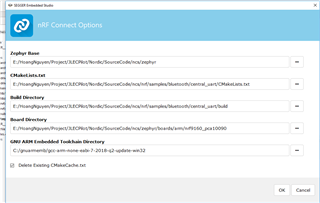
  

and SW5 to nRF52, then Build and Run:
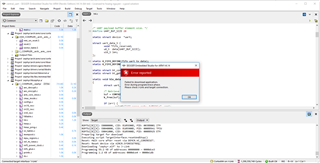
Did I do something wrong? misunderstand somewhere?

Regards, 

hng

Parents
  • Hello Hoang,

    You cannot build/flash bluetooth samples to "nrf9160_pca10090" since it is not a chip that supports BLE.

    If you are building for the nrf52840 chip that is on the nrf91DK you need to change the "Board directory" to "nrf52840_pca10090".

    - nrf9160/nrf52840 (decides which chip)

    - pca10090 (is the name of the nrf91 DK)


    A recommended exercise for you to do is to build/flash the LTE Sensor Gateway sample.

    Since there you will need to build/flash one sample to the nrf9160 and one for the nrf52840. (remember to use SW5 to the correct chip you want to program)

    if you have a Thingy:52 as well you can now test out that sample by turning the Thingy:52 to each side and you will see on the nRF Cloud that an alarm will be sent each time the THingy:52 is on a specific side.

    Hope this makes things a bit clearer. 

    Best Regards,

    Martin L.

  • Dear Martin, 

    I tried to follow the userguide:
    1. Programmed Bluetooth: HCI UART for nRF52: done

    2. Programmed Secure Boot and LTE_BLE_Gateway for nRF91: Done

    then run Putty to test: 

    Secure Boot: SPU: set SRAM region 12 as Non-Secure
    Secure Boot: SPU: set SRAM region 13 as Non-Secure
    Secure Boot: SPU: set SRAM region 14 as Non-Secure
    Secure Boot: SPU: set SRAM region 15 as Non-Secure
    Secure Boot: SPU: set SRAM region 16 as Non-Secure
    Secure Boot: SPU: set SRAM region 17 as Non-Secure
    Secure Boot: SPU: set SRAM region 18 as Non-Secure
    Secure Boot: SPU: set SRAM region 19 as Non-Secure
    Secure Boot: SPU: set SRAM region 20 as Non-Secure
    Secure Boot: SPU: set SRAM region 21 as Non-Secure
    Secure Boot: SPU: set SRAM region 22 as Non-Secure
    Secure Boot: SPU: set SRAM region 23 as Non-Secure
    Secure Boot: SPU: set SRAM region 24 as Non-Secure
    Secure Boot: SPU: set SRAM region 25 as Non-Secure
    Secure Boot: SPU: set SRAM region 26 as Non-Secure
    Secure Boot: SPU: set SRAM region 27 as Non-Secure
    Secure Boot: SPU: set SRAM region 28 as Non-Secure
    Secure Boot: SPU: set SRAM region 29 as Non-Secure
    Secure Boot: SPU: set SRAM region 30 as Non-Secure
    Secure Boot: SPU: set SRAM region 31 as Non-Secure
    Secure Boot: configure peripherals
    Secure Boot: MSP_NS 2002c898
    Secure Boot: prepare to jump to Non-Secure image
    ***** Booting Zephyr OS v1.13.99-ncs2 *****
    Application started
    Bluetooth init failed (err -19)
    [00:00:28.585,662] <err> bt_hci_core.bt_enable: No HCI driver registered

    How can i fix it ?

    Regards, 

    hng

Reply
  • Dear Martin, 

    I tried to follow the userguide:
    1. Programmed Bluetooth: HCI UART for nRF52: done

    2. Programmed Secure Boot and LTE_BLE_Gateway for nRF91: Done

    then run Putty to test: 

    Secure Boot: SPU: set SRAM region 12 as Non-Secure
    Secure Boot: SPU: set SRAM region 13 as Non-Secure
    Secure Boot: SPU: set SRAM region 14 as Non-Secure
    Secure Boot: SPU: set SRAM region 15 as Non-Secure
    Secure Boot: SPU: set SRAM region 16 as Non-Secure
    Secure Boot: SPU: set SRAM region 17 as Non-Secure
    Secure Boot: SPU: set SRAM region 18 as Non-Secure
    Secure Boot: SPU: set SRAM region 19 as Non-Secure
    Secure Boot: SPU: set SRAM region 20 as Non-Secure
    Secure Boot: SPU: set SRAM region 21 as Non-Secure
    Secure Boot: SPU: set SRAM region 22 as Non-Secure
    Secure Boot: SPU: set SRAM region 23 as Non-Secure
    Secure Boot: SPU: set SRAM region 24 as Non-Secure
    Secure Boot: SPU: set SRAM region 25 as Non-Secure
    Secure Boot: SPU: set SRAM region 26 as Non-Secure
    Secure Boot: SPU: set SRAM region 27 as Non-Secure
    Secure Boot: SPU: set SRAM region 28 as Non-Secure
    Secure Boot: SPU: set SRAM region 29 as Non-Secure
    Secure Boot: SPU: set SRAM region 30 as Non-Secure
    Secure Boot: SPU: set SRAM region 31 as Non-Secure
    Secure Boot: configure peripherals
    Secure Boot: MSP_NS 2002c898
    Secure Boot: prepare to jump to Non-Secure image
    ***** Booting Zephyr OS v1.13.99-ncs2 *****
    Application started
    Bluetooth init failed (err -19)
    [00:00:28.585,662] <err> bt_hci_core.bt_enable: No HCI driver registered

    How can i fix it ?

    Regards, 

    hng

Children
No Data
Related