This post is older than 2 years and might not be relevant anymore
More Info: Consider searching for newer posts

ble_app_uart__saadc_timer_driven__scan_mode example for Segger

Hello,


I’m looking for an example using the Segger IDE that would read the SAADC and transmit via BLE.


The following example seemed like a good starting place:


https://github.com/NordicPlayground/nRF52-ADC-examples/tree/master/ble_app_uart__saadc_timer_driven__scan_mode


After downloading from github, I found:


…\nRF52-ADC-examples-master\ble_app_uart__saadc_timer_driven__scan_mode\pca10056\s140


And


…\nRF5_SDK_15.2.0_9412b96\examples\ble_get_hub\nRF52-ADC-examples-master\saadc_low_power\pca10056\blank


I did not see a folder for Segger (ses).


Is there an example for the Segger IDE?


I also am looking at


https://www.nordicsemi.com/DocLib/Content/User_Guides/gsg_ses/latest/UG/gsg/intro


I think there are steps to convert from Keil to Segger, but some of them don’t seem to match my system.


I’m running

SEGGER Embedded Studio for ARM Release 4.12  Build 2018112601.37855 Windows x64


Could you post a Segger version of the example?

I may have missed an better example, so if that is available could you provide a link?


Thank you

  • Hi,

    The github repo you linked to has a SDK 15.2 branch with SES projects. See this link.

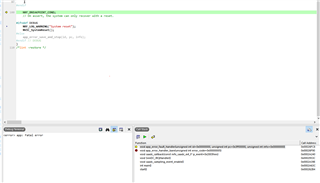
  • Thank you for the link.  I download the 2 examples/folders.  One of the examples seems to produce an error.  When I "Build and Debug" the example "ble_app_uart__saadc_timer_driven__scan_mode", I see the following.  I'm using nrf52840 DK.

    Not sure if you can see the picture.  It seems to indicate a "Fatal error".  The error code seems to be 5.  I am new to Segger, so if there is something I can provide to help, please let me know.

    Not sure if it would be related:  When I tried to import the example from the "arm5_no_packs" folder following the directions from the link above (https://www.nordicsemi.com/DocLib/Content/User_Guides/gsg_ses/latest/UG/gsg/intro    section 8.2), I changed the "Linker" from Segger to GNU.  I also made other changes to the IDE, so I uninstalled/reinstalled Segger today.  The error is still there.

    Thanks.

  • Try to modify saadc_callback() so it looks like this instead:

    void saadc_callback(nrf_drv_saadc_evt_t const * p_event)
    {
        if (p_event->type == NRF_DRV_SAADC_EVT_DONE)
        {
            ret_code_t err_code;
            uint16_t adc_value;
            uint8_t value[SAADC_SAMPLES_IN_BUFFER*2];
            uint16_t bytes_to_send;
         
            // set buffers
            err_code = nrf_drv_saadc_buffer_convert(p_event->data.done.p_buffer, SAADC_SAMPLES_IN_BUFFER);
            APP_ERROR_CHECK(err_code);
    						
            // print samples on hardware UART and parse data for BLE transmission
            printf("ADC event number: %d\r\n",(int)m_adc_evt_counter);
            for (int i = 0; i < SAADC_SAMPLES_IN_BUFFER; i++)
            {
                printf("%d\r\n", p_event->data.done.p_buffer[i]);
    
                adc_value = p_event->data.done.p_buffer[i];
                value[i*2] = adc_value;
                value[(i*2)+1] = adc_value >> 8;
            }
    				
            // Send data over BLE via NUS service. Makes sure not to send more than 20 bytes.
            if((SAADC_SAMPLES_IN_BUFFER*2) <= 20) 
            {
                bytes_to_send = (SAADC_SAMPLES_IN_BUFFER*2);
            }
            else 
            {
                bytes_to_send = 20;
            }
            err_code = ble_nus_data_send(&m_nus, value, &bytes_to_send, m_conn_handle);
            if ((err_code != NRF_ERROR_INVALID_STATE) && (err_code != NRF_ERROR_NOT_FOUND)) 
            {
                APP_ERROR_CHECK(err_code);
            }
    						
            m_adc_evt_counter++;
        }
    }

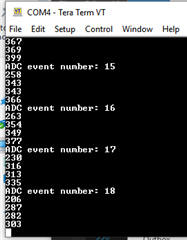
  • Very helpful. 

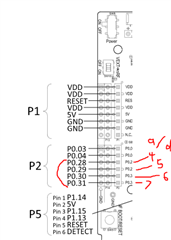
    Now seeing the following output (looks like for a/d 4, 5 ,6, and 7).

    pinout I used:

    Thank you.

Related