This post is older than 2 years and might not be relevant anymore
More Info: Consider searching for newer posts

Having a problem with Preprocessor options

I need to add ARM_MATH_CM4 to my preprocessor definitions using Segger Embedded Studio.

I know this has been dealt with in "nRF52832: How to Include the "arm_math.h" library"

However, the SES Project->Options in that answers shows a "Preprocesor" selection under "Code".

On my screen for Project->Options under "Code" it only has 4 selection "Build", "File", "General" and "Source Code".
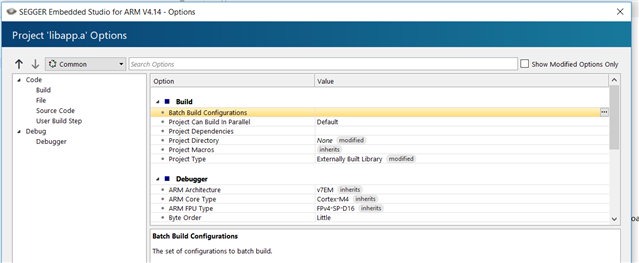
What am missing/failing to do?

-Craig Goldman 

Parents
  • Hi,

    Take a look at our Introduction to SES videos. You should also use one of our example projects as a template. 

    This thread also provides some suggestions. 

    Best regards,

    Amanda 

  • I'll take a look at the suggestions.

    However, I have two additional pieces of information.

    This project was created by following the directions in "NRF Connect" "Getting Started Assistant".

    Also, my version of the "asset_tracker" project (built following the same directions and which runs successfully), does not show a "Preprocesor" selection under "Code" either.

    Could this be some setting in emStudio instead of something project-based?

  • In experimenting I have noted that a new emStudio project that I created using "File->New Project" have all of the Options under "Code" such as"Preprocessor".  The project above and "asset_tracker" was built following the instructions in "Getting Started Assistant" and was built using "File->Open NRF Connect SDK Project".

    Was I supposed to build a new project in SES by first using "File->New Project" and the use ""File->Open NRF Connect SDK Project"?

    -Craig

  • Hi, 

    Do you develop the project on nrf9160 DK? The ARM_MATH_CM4 is suitable for nrf52 with Cortex-M4 instead of nRF9160 (Cortex-M33 inside). arm_math.h also does not support Cortex-M33 now.

    If you try to use the functions from e.g. math.h, you need to set CONFIG_NEWLIB_LIBC=y in the prj.conf.  

    craig.goldman said:
    Was I supposed to build a new project in SES by first using "File->New Project" and the use ""File->Open NRF Connect SDK Project"?

     You should also use one of our example projects as a template. 

    -Amanda 

  • This is a nRF52840 project which I am developing on the nRF52840 DK.  It is based on a previously working nRF52840 project to which we now want to add Zephyr.  At the suggestion of Simon (in a different case) I built this new nRF52840 project by following the instructions in "Getting Started" which lists how to clone Zephyr, the nrf libraries etc.  The project now builds with Zephyr but it will not compile the processing module because of the missing math library.

    I note again, that I also have built the "asset_tracker" project example.  It is working.  As I built it, the project options look like the snap shot I attached above; there is no "Preprocessing" selection under "Code".  So whatever is happening - whatever building step I missed or did incorrectly - is not fixed by starting with a Nordic project as a template.

Reply
  • This is a nRF52840 project which I am developing on the nRF52840 DK.  It is based on a previously working nRF52840 project to which we now want to add Zephyr.  At the suggestion of Simon (in a different case) I built this new nRF52840 project by following the instructions in "Getting Started" which lists how to clone Zephyr, the nrf libraries etc.  The project now builds with Zephyr but it will not compile the processing module because of the missing math library.

    I note again, that I also have built the "asset_tracker" project example.  It is working.  As I built it, the project options look like the snap shot I attached above; there is no "Preprocessing" selection under "Code".  So whatever is happening - whatever building step I missed or did incorrectly - is not fixed by starting with a Nordic project as a template.

Children
  • Additional follow-up information

    1) Nordic Semiconductor does not have an example project for an nRF52840 with Zephyr

    2) I ran some new experiments.

    If I build an emStudio project using File->New Project..., I get a project with the full set of "Options" under "Code".  If I then do a "File->Open NRF SDK Connect Project..., these options no longer exist and the project options look like the snap shot attached at the beginning of this case.

    In other words, if I try to get Zephyr into the my project build using "Open NRF SDK Connect Project...", it actually removes the project options and changes the options possibly by changing the Common Configuration file.

    BTW the advice given to me to try and use ""Open NRF SDK Connect Project..." came from Nordic Semi in another one of my case questions about including Zephyr in an nRF52840 project.

    So it looks like I've come full circle on these problems.
    I still need to build an SES project for nRF52840 with Zephyr.

    Should we continue discussion in this case or should I re-open the previous case

  • Sorry, I should have given you the case number.

    Previous questions about nRF52840 and Zephyr are in case id: 225308. 

  • Hi, 

    Please help me confirm that your situation is 

    You want to run Zephyr on nRF52840 DK. Is that right?

    If so, I will suggest to start from 

    1. nRF5x support within the Zephyr Project RTOS
    2. fw-nrfconnect-zephyr

    Then, we might close this thread and start a new case to discuss the developing problems in the future. Please kindly let me know if you have any thought. Thanks.

    -Amanda  

  • My original question is how to build a zephyr project for nRF52840 (initially I will run on nRF52840 DK) using Segger Embedded Studio.  Neither of your suggestions involves SES.

    The problem is getting SES to include and build the Zephyr files as part of the project.  I managed to make this happen by following the Getting Started instructions for the "asset_tracker" project, but I now know that the "Open NRF SDK Connect Project..." menu selection changes the configuration so I no longer have access to important project options like "Preprocesor".  (Why does this happen?)  I need to modify "Preprocess" options so I can get the project to include the ARM math libraries.

    All of my work for the past two weeks has brought me full circle.
    Do you have a blog or example of an nRF52840 project with Zephyr using Segger Embedded Studio?

  • Hi, 

    craig.goldman said:
    I no longer have access to important project options like "Preprocesor".  (Why does this happen?)  I need to modify "Preprocess" options so I can get the project to include the ARM math libraries.

    Asset_tracker is a sample for nRF9160, you should not even try to use that sample on nRF52840. Please see this disclaimer at the end of the https://github.com/NordicPlayground/fw-nrfconnect-nrf :

    "nRF Connect SDK supports development with nRF9160 Cellular IoT devices. It contains references and code for Bluetooth Low Energy devices in the nRF52 Series, though development on these devices is not currently supported with the nRF Connect SDK. "

    The SES might work for nRF52840, but it's not tested for that. The scope for the "Zephyr SES" is for now nRF9160.

    craig.goldman said:
    Do you have a blog or example of an nRF52840 project with Zephyr using Segger Embedded Studio?

    Unfortuately, we only have this post nRF5x support within the Zephyr Project RTOS related to your requirement.

    You might need to look into device-tree and Kconfig: https://docs.zephyrproject.org/1.13.0/application/application.html#device-tree-overlays

    For questions directly related to the zephyr project, you can check out their Slack or IRC channel. https://d

    ocs.zephyrproject.org/latest/introduction/index.html#resources 

    -Amanda


Related