This post is older than 2 years and might not be relevant anymore
More Info: Consider searching for newer posts

question about CONFIG_NRF_CLOUD_PROVISION_CERTIFICATES

Hi, 

If I understand corrctly, the flag CONFIG_NRF_CLOUD_PROVISION_CERTIFICATES=y should only be used once,

after that, the certificates are saved inside the modem.

when I disable this flag, the nordic would not connect due to certificate issue.

any thoughts? 

Parents
  • Hi Moshe,

    You could either use AT-Commands or the function nrf_inbuilt_key_write() function which you can see how it's used in the nrf_cloud_transport.c file.

  • Hi Martin,

    I see in  nrf_cloud_transport.c that nrf_inbuilt_key_write() is called when CONFIG_NRF_CLOUD_PROVISION_CERTIFICATES=y 

    Doesn't it mean that the certificate are saved in the modem when the flag is on  ?

    Am I missing something? 

    Just to further clarify my question .

    I would expect that after I ran the code with this flag, I can flash it again without that flag and it would be able to connect.

  • Hi Moshe,

    Your assumption would be correct.

    Please update your modem firmware to the newest version:https://www.nordicsemi.com/Products/Low-power-cellular-IoT/nRF9160/Download#infotabs

    It may actually be the cause for your issue, since I remember that there was an issue with an older modem firmware with regards to this.

    IMPORTANT NOTE:

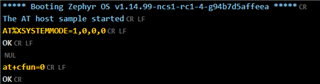
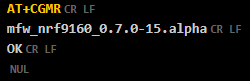
    • There is a bug in the modem firmware version -> "mfw_nrf9160_0.7.0-15.alpha" which makes it start in "nb-iot mode" as default. 
      To change to the "LTE-M" mode you need to send an  AT-Command.
      AT%XSYSTEMMODE=1,0,0,0 and then AT+CFUN=0 to save the changes into the modem flash.

    When you restart your device it will now go into the LTE-M mode. 


    For your convenience I have added a precompiled .hex file which has merged the "at_client" and the "spm" (secure partition manager) (before: secure_boot):at_client.hex

    Please flash via the command line: nrfjprog --program at_client.hex -f nrf91 --sectorerase -r --verify

    And then connect the board and run the LTE link Monitor.

    • Send the command "AT+CGMR" to verify that the modem firmware has been updated to the correct version.


    Best regards,

    Martin L.

  • Hi Martin, Thanks for the detailed answer,

    Running the same code that worked before, just with the updated firmware,  now I get err=1 on nrf_inbuilt_key_write.

    any Idea why ?

  • Hi Moshe,
    If we look into the possible return values for the function nrf_inbuilt_key_write():

    /**@brief Provision new or update credential in persistent storage.
     *
     * This function will store the credential referenced to be stored persistently.
     * The credential can later be referenced for use or managed by nrf_inbuilt_key module
     * by using the application defined sec_tag.
     *
     * @param[in]  sec_tag        Application defined tag for this credential to be referred
     *                            to in setting up a BSD Secure Socket or to manage the credential
     *                            using nrf_key_mgmt module to read/delete/search the key.
     * @param[in]  cred_type      Type of credential being created and stored for later use.
     * @param[in]  p_buffer       Buffer containing the credential data.
     * @param[in]  buffer_len     Length of the buffer holding the credential data.
     *
     * @retval 0            If create operation was successful.
     * @retval NRF_EIO      If operation was not successful due to internal error or uninitialized
     *                      module.
     * @retval NRF_ENOBUFS  If the operation could not be performed because it could not allocate
     *                      enough intermediate buffers to perform the operation.
     * @retval NRF_ENOENT   If the sec_tag indicated cannot be written.
     * @retval NRF_ENOMEM   If there was not memory enough to store the credential data.
     * @retval NRF_EPERM    If the application did not have permission to do the operation.
     * @retval NRF_EACCES   If the operation could not be performed while modem is in active state.
     * @retval NRF_EINVAL   If one or more of the provided parameters are not valid.
     */

    These return values can be looked up in the nrf_errno.h file.

    #define NRF_EPERM            1
    #define NRF_ENOENT           2
    #define NRF_EIO              5
    #define NRF_EBADF            9
    #define NRF_ENOMEM          12
    #define NRF_EACCES          13
    #define NRF_EFAULT          14
    #define NRF_EINVAL          22
    #define NRF_EMFILE          24
    #define NRF_EAGAIN          35
    #define NRF_EPROTOTYPE      41
    #define NRF_ENOPROTOOPT     42
    #define NRF_EPROTONOSUPPORT 43
    #define NRF_ESOCKTNOSUPPORT 44
    #define NRF_EOPNOTSUPP      45
    #define NRF_EAFNOSUPPORT    47
    #define NRF_EADDRINUSE      48
    #define NRF_ENETDOWN        50
    #define NRF_ENETUNREACH     51
    #define NRF_ECONNRESET      54
    #define NRF_EISCONN         56
    #define NRF_ENOTCONN        57
    #define NRF_ETIMEDOUT       60
    #define NRF_ENOBUFS         105

    Since you got the error 1 that would be the 'NRF_EPERM' -> which you would get "If the application did not have permission to do the operation."

Reply
  • Hi Moshe,
    If we look into the possible return values for the function nrf_inbuilt_key_write():

    /**@brief Provision new or update credential in persistent storage.
     *
     * This function will store the credential referenced to be stored persistently.
     * The credential can later be referenced for use or managed by nrf_inbuilt_key module
     * by using the application defined sec_tag.
     *
     * @param[in]  sec_tag        Application defined tag for this credential to be referred
     *                            to in setting up a BSD Secure Socket or to manage the credential
     *                            using nrf_key_mgmt module to read/delete/search the key.
     * @param[in]  cred_type      Type of credential being created and stored for later use.
     * @param[in]  p_buffer       Buffer containing the credential data.
     * @param[in]  buffer_len     Length of the buffer holding the credential data.
     *
     * @retval 0            If create operation was successful.
     * @retval NRF_EIO      If operation was not successful due to internal error or uninitialized
     *                      module.
     * @retval NRF_ENOBUFS  If the operation could not be performed because it could not allocate
     *                      enough intermediate buffers to perform the operation.
     * @retval NRF_ENOENT   If the sec_tag indicated cannot be written.
     * @retval NRF_ENOMEM   If there was not memory enough to store the credential data.
     * @retval NRF_EPERM    If the application did not have permission to do the operation.
     * @retval NRF_EACCES   If the operation could not be performed while modem is in active state.
     * @retval NRF_EINVAL   If one or more of the provided parameters are not valid.
     */

    These return values can be looked up in the nrf_errno.h file.

    #define NRF_EPERM            1
    #define NRF_ENOENT           2
    #define NRF_EIO              5
    #define NRF_EBADF            9
    #define NRF_ENOMEM          12
    #define NRF_EACCES          13
    #define NRF_EFAULT          14
    #define NRF_EINVAL          22
    #define NRF_EMFILE          24
    #define NRF_EAGAIN          35
    #define NRF_EPROTOTYPE      41
    #define NRF_ENOPROTOOPT     42
    #define NRF_EPROTONOSUPPORT 43
    #define NRF_ESOCKTNOSUPPORT 44
    #define NRF_EOPNOTSUPP      45
    #define NRF_EAFNOSUPPORT    47
    #define NRF_EADDRINUSE      48
    #define NRF_ENETDOWN        50
    #define NRF_ENETUNREACH     51
    #define NRF_ECONNRESET      54
    #define NRF_EISCONN         56
    #define NRF_ENOTCONN        57
    #define NRF_ETIMEDOUT       60
    #define NRF_ENOBUFS         105

    Since you got the error 1 that would be the 'NRF_EPERM' -> which you would get "If the application did not have permission to do the operation."

Children
Related