This post is older than 2 years and might not be relevant anymore
More Info: Consider searching for newer posts

question about CONFIG_NRF_CLOUD_PROVISION_CERTIFICATES

Hi, 

If I understand corrctly, the flag CONFIG_NRF_CLOUD_PROVISION_CERTIFICATES=y should only be used once,

after that, the certificates are saved inside the modem.

when I disable this flag, the nordic would not connect due to certificate issue.

any thoughts? 

Parents
  • Hi Moshe,

    You could either use AT-Commands or the function nrf_inbuilt_key_write() function which you can see how it's used in the nrf_cloud_transport.c file.

  • Hi Martin,

    I see in  nrf_cloud_transport.c that nrf_inbuilt_key_write() is called when CONFIG_NRF_CLOUD_PROVISION_CERTIFICATES=y 

    Doesn't it mean that the certificate are saved in the modem when the flag is on  ?

    Am I missing something? 

    Just to further clarify my question .

    I would expect that after I ran the code with this flag, I can flash it again without that flag and it would be able to connect.

  • Hi Moshe,

    Your assumption would be correct.

    Please update your modem firmware to the newest version:https://www.nordicsemi.com/Products/Low-power-cellular-IoT/nRF9160/Download#infotabs

    It may actually be the cause for your issue, since I remember that there was an issue with an older modem firmware with regards to this.

    IMPORTANT NOTE:

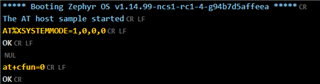
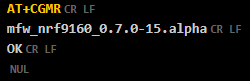
    • There is a bug in the modem firmware version -> "mfw_nrf9160_0.7.0-15.alpha" which makes it start in "nb-iot mode" as default. 
      To change to the "LTE-M" mode you need to send an  AT-Command.
      AT%XSYSTEMMODE=1,0,0,0 and then AT+CFUN=0 to save the changes into the modem flash.

    When you restart your device it will now go into the LTE-M mode. 


    For your convenience I have added a precompiled .hex file which has merged the "at_client" and the "spm" (secure partition manager) (before: secure_boot):at_client.hex

    Please flash via the command line: nrfjprog --program at_client.hex -f nrf91 --sectorerase -r --verify

    And then connect the board and run the LTE link Monitor.

    • Send the command "AT+CGMR" to verify that the modem firmware has been updated to the correct version.


    Best regards,

    Martin L.

  • Hi Martin, Thanks for the detailed answer,

    Running the same code that worked before, just with the updated firmware,  now I get err=1 on nrf_inbuilt_key_write.

    any Idea why ?

  • Hi Moshe,
    If we look into the possible return values for the function nrf_inbuilt_key_write():

    /**@brief Provision new or update credential in persistent storage.
     *
     * This function will store the credential referenced to be stored persistently.
     * The credential can later be referenced for use or managed by nrf_inbuilt_key module
     * by using the application defined sec_tag.
     *
     * @param[in]  sec_tag        Application defined tag for this credential to be referred
     *                            to in setting up a BSD Secure Socket or to manage the credential
     *                            using nrf_key_mgmt module to read/delete/search the key.
     * @param[in]  cred_type      Type of credential being created and stored for later use.
     * @param[in]  p_buffer       Buffer containing the credential data.
     * @param[in]  buffer_len     Length of the buffer holding the credential data.
     *
     * @retval 0            If create operation was successful.
     * @retval NRF_EIO      If operation was not successful due to internal error or uninitialized
     *                      module.
     * @retval NRF_ENOBUFS  If the operation could not be performed because it could not allocate
     *                      enough intermediate buffers to perform the operation.
     * @retval NRF_ENOENT   If the sec_tag indicated cannot be written.
     * @retval NRF_ENOMEM   If there was not memory enough to store the credential data.
     * @retval NRF_EPERM    If the application did not have permission to do the operation.
     * @retval NRF_EACCES   If the operation could not be performed while modem is in active state.
     * @retval NRF_EINVAL   If one or more of the provided parameters are not valid.
     */

    These return values can be looked up in the nrf_errno.h file.

    #define NRF_EPERM            1
    #define NRF_ENOENT           2
    #define NRF_EIO              5
    #define NRF_EBADF            9
    #define NRF_ENOMEM          12
    #define NRF_EACCES          13
    #define NRF_EFAULT          14
    #define NRF_EINVAL          22
    #define NRF_EMFILE          24
    #define NRF_EAGAIN          35
    #define NRF_EPROTOTYPE      41
    #define NRF_ENOPROTOOPT     42
    #define NRF_EPROTONOSUPPORT 43
    #define NRF_ESOCKTNOSUPPORT 44
    #define NRF_EOPNOTSUPP      45
    #define NRF_EAFNOSUPPORT    47
    #define NRF_EADDRINUSE      48
    #define NRF_ENETDOWN        50
    #define NRF_ENETUNREACH     51
    #define NRF_ECONNRESET      54
    #define NRF_EISCONN         56
    #define NRF_ENOTCONN        57
    #define NRF_ETIMEDOUT       60
    #define NRF_ENOBUFS         105

    Since you got the error 1 that would be the 'NRF_EPERM' -> which you would get "If the application did not have permission to do the operation."

  • Hi Martin,

    Could you provide more information about this error.

    why wouldn't the app have permission for this? why does the error occur on this FW version, and doesn't happen on older ones? 

Reply Children
Related