This post is older than 2 years and might not be relevant anymore
More Info: Consider searching for newer posts

How to check which mbr softdevice api stack is programmed and currently running on my device?

I am new to softdevices so please bear with me for long list of questions.

I am evaluating SDK15.2.0 examples one-by-one. I came across eddystone example (ble_app_eddystone) and it is available for s140 only. However, the documentation for eddystone says that "This example requires one of the following SoftDevices: S112, S132". I understand that I need to program my device MBR with one of these stacks, but I am not sure whether one of these stacks are already present is my DK.

  • How to check which softDevice stack is running on my DK?
  • If I need to change, can I use nRFConnect desktop app to program the device for any different softDevice stack?
  • Do I need to replace header files for particular stack as I see different header files for different stack?
  • I am using Segger Embedded Studio but there is no toolchain associated with SES for each softdevice stack. Does SES requires no any toolchain configuration?
  • Hi,

    However, the documentation for eddystone says that "This example requires one of the following SoftDevices: S112, S132".

    We have eddystone example for nRF52840-DK(pca10056) and the S140 also, so this is a documentation bug.

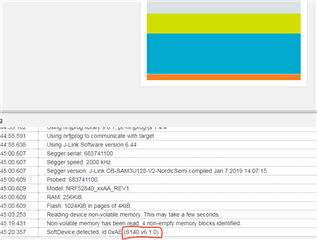
    How to check which softDevice stack is running on my DK?

    You can e.g. check it with nRF Connect programmer app:

    If you need to check it run-time, then it's defined in nrf_sdm.h as well, see this link.

    Do I need to replace header files for particular stack as I see different header files for different stack?

    No, If you are using the nRF52840-DK, then you need to use the pca10056/s140 project.It's already configured correctly.

    I am using Segger Embedded Studio but there is no toolchain associated with SES for each softdevice stack. Does SES requires no any toolchain configuration?

    There are different SES projects for the different boards and SoftDevices. If you are using nRF52840-DK, then use the project under pca10056/s140 (i.e. SDK_folder\examples\ble_peripheral\ble_app_eddystone\pca10056\s140\ses).

  • Yes, nRF connect app is helpful for me to detect the stack. Thanks.

    Further, If I wanted to change an example available for PCA10056 to work with PCA10059, what are the file and configuration changes needed? I want to test eddystone example work with nRF dongle.

  • Hi,

    Take a look at this tutorial on how to adapt the pca10056 examples to work on the dongle (in short, you need to change the preprocessor define BOARD_PCA10056 to BOARD_PCA10059).

Related