This post is older than 2 years and might not be relevant anymore
More Info: Consider searching for newer posts

nRF9160 DK - Allow program execution to continue without cellular connection

Hi,

I'm looking to use the nRF9160 DK as an IoT Bluetooth Gateway as listed on the nRF9160's product page. Basically, I am tasked with connecting two nRF52840's (both in GATT client mode) to an nRF9160 DK (in GATT server mode) using Bluetooth 5 and then have cellular connection via the nRF9160 to connect to the Cloud and push up metrics/telemetry/etc.

My Question is the following: It seems the nRF9160 does NOT allow main program execution if there is NO cellular connection. Is it possible to allow program execution on the nRF9160 to continue without cellular connection? Reasoning for needing this is that the end use application requires collecting data (telemetry, metrics, etc.) if there is no cellular connection (offline).

After reading this following documentation: https://infocenter.nordicsemi.com/index.jsp?topic=%2Fug_nrf91_dk%2FUG%2Fnrf91_DK%2Fintro.html&cp=2_0_2

"Application and modem domains are interacting through interprocessor communication (IPC) mechanism. LTE modem is accessible to user through the modem API.

The application processor is the master in the system and responsible for starting and stopping of the modem. LTE modem enables the clocks and power required for its own operation. Shared resources, such as e.g. clocks, are handled within the platform and require no user involvement. In cases where a hard fault is detected in the modem, the application domain will perform a hard reset for the modem."

Note the last sentence, which is the case and behavior currently when I power on the nRF9160 DK and it sees no cellular internet connection.


I have followed the steps outlined in the README.rst within the "lte_ble_gateway" sample project in the nRF9160 DK sample projects to setup the nRF9160 DK:

"Programming the sample
======================

When you connect the nRF9160 DK board to your computer, three virtual serial ports (USB CDC class) should appear.
The first port is connected to the main controller (nRF9160) on the board, while the second port is connected to the board controller (nRF52840).

Before you program the sample application onto the main controller, you must program the :ref:`zephyr:bluetooth-hci-uart-sample` sample onto the board controller:

1. Put the **SW5** switch (marked debug/prog) in the **NRF52** position to program the board controller.
#. Build the :ref:`zephyr:bluetooth-hci-uart-sample` sample for the nrf52840_pca10090 board and program it.
#. Verify that the sample was programmed successfully by connecting to the second serial port with a terminal emulator (for example, PuTTY) and checking the output.
See :ref:`putty` for the required settings.

After programming the board controller, you must program the :ref:`secure_boot` sample and the LTE Sensor Gateway sample to the main controller:

1. Put the **SW5** switch (marked debug/prog) in the **NRF91** position to program the main controller.
#. Build the :ref:`secure_boot` sample and program it.
#. Build the LTE Sensor Gateway sample (this sample) and program it.
#. Verify that the sample was programmed successfully by connecting to the first serial port with a terminal emulator (for example, PuTTY) and checking the output.
See :ref:`putty` for the required settings."

Debugging via Embbedded Studio reveals the nRF9160 DK is "stuck" in a library function called "interface_socket_wait".

Thank you!

Parents
  • Hi Martin,

    Thank you for the reply.

    Sorry about the link. There is no "Copy URL" at the specific page in Chrome or Edge, but here's the path: nRF91 Series -> nRF9160 -> nRF9160 Object Product Specification -> LTE Modem -> Introduction.

    I performed the Git checkout procedure for NCS. No changes/updates.

    I had already tried the latest modem firmware (mfwm1nrf9160068131alpha) and successfully updated the modem firmware, but I went ahead and perform the update against successfully.

    We have tested that we do indeed have an LTE connection in the area (if we go outside...our building is a bit of a Faraday cage so it's easy to simulate LTE connection on/off by going inside/outside).

    When I am outside with an LTE connection, I can issue modem AT commands no problem and see expected behavior.

    When I am inside, if I issue: AT+CFUN=4 or any AT command for that matter, the nRF9160 via the nRFConnect tool reports a timeout. Note that nRFConnect does report opening a port to the modem.

    Debugging via Embbedded Studio (stepping through the assembly code) reveals the nRF9160 DK is "stuck" (stuck isn't the best word but for lack of a better word) in a library function called "interface_socket_wait".

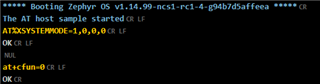
    Below is a sample terminal output from nRFConnect while inside (no LTE connection):


    Are we thinking that maybe I should try setting AT+CFUN=4 while having an LTE connection on the nRF9160 to enable Airplane mode and that subsequent reset(s) it will work?

    Thank you!

Reply
  • Hi Martin,

    Thank you for the reply.

    Sorry about the link. There is no "Copy URL" at the specific page in Chrome or Edge, but here's the path: nRF91 Series -> nRF9160 -> nRF9160 Object Product Specification -> LTE Modem -> Introduction.

    I performed the Git checkout procedure for NCS. No changes/updates.

    I had already tried the latest modem firmware (mfwm1nrf9160068131alpha) and successfully updated the modem firmware, but I went ahead and perform the update against successfully.

    We have tested that we do indeed have an LTE connection in the area (if we go outside...our building is a bit of a Faraday cage so it's easy to simulate LTE connection on/off by going inside/outside).

    When I am outside with an LTE connection, I can issue modem AT commands no problem and see expected behavior.

    When I am inside, if I issue: AT+CFUN=4 or any AT command for that matter, the nRF9160 via the nRFConnect tool reports a timeout. Note that nRFConnect does report opening a port to the modem.

    Debugging via Embbedded Studio (stepping through the assembly code) reveals the nRF9160 DK is "stuck" (stuck isn't the best word but for lack of a better word) in a library function called "interface_socket_wait".

    Below is a sample terminal output from nRFConnect while inside (no LTE connection):


    Are we thinking that maybe I should try setting AT+CFUN=4 while having an LTE connection on the nRF9160 to enable Airplane mode and that subsequent reset(s) it will work?

    Thank you!

Children
  • Hi Cory,

    From your log, it does not look like you are running the at_client sample, or at least the application has not started correctly.


    I have added a precompiled .hex file which has merged the "at_client" and the "spm" (secure partition manager) (before: secure_boot):at_client.hex

    Please flash via the command line: nrfjprog --program at_client.hex -f nrf91 --sectorerase -r --verify

    And then connect the board and run the LTE link Monitor.

    If you have any issues seeing any logs in the Terminal, please press the reset button on the nRF91 DK so you can see that the nrf91 sends out the logs from the initialization.


    IMPORTANT NOTE:

    • There is a bug in the modem firmware version -> "mfw_nrf9160_0.7.0-15.alpha" which makes it start in "nb-iot mode" as default. 
      To change to the "LTE-M" mode you need to send an  AT-Command.
      AT%XSYSTEMMODE=1,0,0,0 and then AT+CFUN=0 to save the changes into the modem flash.

    When you restart your device it will now go into the LTE-M mode. 


    Best Regards,

    Martin L.

  • As a followup, executing the nrfjprog program with flags above fixed the issues I was seeing. I'm thinking most likely the sector erase flag.

    I was able to successfully have the lte_ble_gateway sample project work as well. The program now executes without have an LTE connection.

Related