This post is older than 2 years and might not be relevant anymore
More Info: Consider searching for newer posts

nRF9160 Cannot make Kconfig options have an effect in Segger Embedded Studio

I have a nRF9160 DK and I'm adapting the asset tracker to connect to our own AWS cloud solution.

I see the code nrf_cloud uses defines coming from the Kconfig at \nrf\subsys\net\lib\nrf_cloud\Kconfig.
For example: NRF_CLOUD_HOST_NAME, NRF_CLOUD_PORT, NRF_CLOUD_PROVISION_CERTIFICATES, NRF_CLOUD_CERTIFICATES_FILE etc

How do I make changes to the Kconfig have an effect when building in Segger Embedded Studio? No matter what I do, changes to this Kconfig doesn't have an effect to the built result.

Am I missing the point, how it's supposed to work perhaps?
Anyone who can educate me, how to work "correctly" with this, would be appreciated.

I tried to build from commandline, but couldn't make it work, so I'm sticking with Segger Embedded Studio so far.
Build platform: win7

Johan

  • Hello Johan,

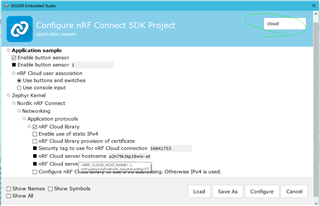
    In Segger Embedded Studio we can access these configs in the Project -> Configure nRF Connect SDK Project.

    Here you are able to change the configurations for your application. 

    You can click through the different Configs or simply use the "filter" option at the top right to find things quicker.


    So in your case you want to address the Cloud Host name etc. just use "cloud" as filter and it should show the available configurations you can change.

    After your changes you can click the "Configure" button and then re-build your application with these changes.

    If you 'hover''  the cursor over the different names you will see their respectable kconfig names (and where they are located).
    e.g.

    "nRF Cloud server host name" = NRF_CLOUD_HOST_NAME


    This will be equal setting the configs in the "prj.conf" file in the application folder.

    If you want to change the NRF_CLOUD_HOST_NAME to something else than whats default, then you can add the following

    e.g.

    CONFIG_NRF_CLOUD_HOST_NAME="<new_host_name>"


    Best regards,

    Martin L.

  • Thanks Martin! Now I can progress with ease!
    Cheers mate!

  • Martin,

    I'm having problems to build in SES and I cannot figure out what's wrong.
    I see it's looking for the compiler, but in the wrong place, and I don't know why.
    It should look in the toolchain dir, but it is instead looking in the segger bin path.. fails!


    LOG from segger embedded studio.
    (I have checked out tag v0.4.0-rc2 as Brian Kim recommended)

    Loading solution lte_ble_gateway.emProject
    Executing load commands
    cmake -GNinja -DBOARD=nrf9160_pca10090 -DBOARD_DIR=F:/nsd_src_root2/zephyr/boards/arm/nrf9160_pca10090 -DZEPHYR_TOOLCHAIN_VARIANT=gnuarmemb -DGNUARMEMB_TOOLCHAIN_PATH=F:/gnuarmemb/7 2018-q2-update/bin -BF:/nsd_src_root2/nrf/samples/nrf9160/lte_ble_gateway/build_nrf9160_pca10090 -HF:/nsd_src_root2/nrf/samples/nrf9160/lte_ble_gateway -DEXTRA_KCONFIG_TARGETS=menuconfig_ses -DEXTRA_KCONFIG_TARGET_COMMAND_FOR_menuconfig_ses=F:/segger/arm_segger_embedded_studio_v416_win_x64_nordic/html/configure_nordic_project_menuconfig.py
    CMake Error at CMakeLists.txt:20 (include):
    include could not find load file:

    F:/nsd_src_root2/ncs/zephyr/cmake/app/boilerplate.cmake


    -- The C compiler identification is GNU 8.2.1
    -- The CXX compiler identification is unknown
    -- Check for working C compiler: F:/segger/arm_segger_embedded_studio_v416_win_x64_nordic/bin/cc.exe
    -- Check for working C compiler: F:/segger/arm_segger_embedded_studio_v416_win_x64_nordic/bin/cc.exe -- works
    -- Detecting C compiler ABI info
    -- Detecting C compiler ABI info - failed
    -- Detecting C compile features
    -- Detecting C compile features - failed
    CMake Error at CMakeLists.txt:21 (project):
    No CMAKE_CXX_COMPILER could be found.

    Tell CMake where to find the compiler by setting either the environment
    variable "CXX" or the CMake cache entry CMAKE_CXX_COMPILER to the full path
    to the compiler, or to the compiler name if it is in the PATH.


    -- Configuring incomplete, errors occurred!
    See also "F:/nsd_src_root2/nrf/samples/nrf9160/lte_ble_gateway/build_nrf9160_pca10090/CMakeFiles/CMakeOutput.log".
    See also "F:/nsd_src_root2/nrf/samples/nrf9160/lte_ble_gateway/build_nrf9160_pca10090/CMakeFiles/CMakeError.log".
    Project load failed
    Reported error: solution load command failed (1)

  • When building (lte_ble_gateway) it works ok.
    Running it, gives errors I don't understand or can fix.

    ***** Booting Zephyr OS v1.13.99-ncs2 *****
    Secure Boot: configure flash
    Secure Boot: SPU: set region 0 as Secure
    Secure Boot: SPU: set region 1 as Secure
    Secure Boot: SPU: set region 2 as Secure
    Secure Boot: SPU: set region 3 as Secure
    Secure Boot: SPU: set region 4 as Secure
    Secure Boot: SPU: set region 5 as Secure
    Secure Boot: SPU: set region 6 as Secure
    Secure Boot: SPU: set region 7 as Secure
    Secure Boot: SPU: set Flash region 8 as Non-Secure
    Secure Boot: SPU: set Flash region 9 as Non-Secure
    Secure Boot: SPU: set Flash region 10 as Non-Secure
    Secure Boot: SPU: set Flash region 11 as Non-Secure
    Secure Boot: SPU: set Flash region 12 as Non-Secure
    Secure Boot: SPU: set Flash region 13 as Non-Secure
    Secure Boot: SPU: set Flash region 14 as Non-Secure
    Secure Boot: SPU: set Flash region 15 as Non-Secure
    Secure Boot: SPU: set Flash region 16 as Non-Secure
    Secure Boot: SPU: set Flash region 17 as Non-Secure
    Secure Boot: SPU: set Flash region 18 as Non-Secure
    Secure Boot: SPU: set Flash region 19 as Non-Secure
    Secure Boot: SPU: set Flash region 20 as Non-Secure
    Secure Boot: SPU: set Flash region 21 as Non-Secure
    Secure Boot: SPU: set Flash region 22 as Non-Secure
    Secure Boot: SPU: set Flash region 23 as Non-Secure
    Secure Boot: SPU: set Flash region 24 as Non-Secure
    Secure Boot: SPU: set Flash region 25 as Non-Secure
    Secure Boot: SPU: set Flash region 26 as Non-Secure
    Secure Boot: SPU: set Flash region 27 as Non-Secure
    Secure Boot: SPU: set Flash region 28 as Non-Secure
    Secure Boot: SPU: set Flash region 29 as Non-Secure
    Secure Boot: SPU: set Flash region 30 as Non-Secure
    Secure Boot: SPU: set Flash region 31 as Non-Secure
    Secure Boot: configure SRAM
    Secure Boot: SPU: set SRAM region 0 as Secure
    Secure Boot: SPU: set SRAM region 1 as Secure
    Secure Boot: SPU: set SRAM region 2 as Secure
    Secure Boot: SPU: set SRAM region 3 as Secure
    Secure Boot: SPU: set SRAM region 4 as Secure
    Secure Boot: SPU: set SRAM region 5 as Secure
    Secure Boot: SPU: set SRAM region 6 as Secure
    Secure Boot: SPU: set SRAM region 7 as Secure
    Secure Boot: SPU: set SRAM region 8 as Non-Secure
    Secure Boot: SPU: set SRAM region 9 as Non-Secure
    Secure Boot: SPU: set SRAM region 10 as Non-Secure
    Secure Boot: SPU: set SRAM region 11 as Non-Secure
    Secure Boot: SPU: set SRAM region 12 as Non-Secure
    Secure Boot: SPU: set SRAM region 13 as Non-Secure
    Secure Boot: SPU: set SRAM region 14 as Non-Secure
    Secure Boot: SPU: set SRAM region 15 as Non-Secure
    Secure Boot: SPU: set SRAM region 16 as Non-Secure
    Secure Boot: SPU: set SRAM region 17 as Non-Secure
    Secure Boot: SPU: set SRAM region 18 as Non-Secure
    Secure Boot: SPU: set SRAM region 19 as Non-Secure
    Secure Boot: SPU: set SRAM region 20 as Non-Secure
    Secure Boot: SPU: set SRAM region 21 as Non-Secure
    Secure Boot: SPU: set SRAM region 22 as Non-Secure
    Secure Boot: SPU: set SRAM region 23 as Non-Secure
    Secure Boot: SPU: set SRAM region 24 as Non-Secure
    Secure Boot: SPU: set SRAM region 25 as Non-Secure
    Secure Boot: SPU: set SRAM region 26 as Non-Secure
    Secure Boot: SPU: set SRAM region 27 as Non-Secure
    Secure Boot: SPU: set SRAM region 28 as Non-Secure
    Secure Boot: SPU: set SRAM region 29 as Non-Secure
    Secure Boot: SPU: set SRAM region 30 as Non-Secure
    Secure Boot: SPU: set SRAM region 31 as Non-Secure
    Secure Boot: configure peripherals
    Secure Boot: MSP_NS 2002c898
    Secure Boot: prepare to jump to Non-Secure image
    ***** Booting Zephyr OS v1.13.99-ncs2 *****
    Application started
    [00:00:05.615,112] <err> bt_driver.h4_get_type: Unknown H:4 type 0x3e
    [00:00:05.615,112] <err> bt_driver.h4_get_type: Unknown H:4 type 0x21
    [00:00:05.621,185] <err> bt_driver.read_payload: Not enough spac e in buffer
    ASSERTION FAIL [err == 0] @ F:/nsd_src_root/ncs/zephyr/subsys/bluetooth/host/hci_core.c:272
    k_sem_take failed with err -11

    /Johan


  • 1) 
    Ok my mistake.
    It seemed, I had not checkout the correct git-version in each repository.

    2)
    I thought "west init -m github.com/.../fw-nrfconnect-nrf --mr v0.4.0-rc2
    "west update" 
    would checkout the correct versions in each git-folder.
    It doesn't seem like it.
    Can you explain the relationship between west with version number and the state of the git-repos?

    3) 
    We verified each git-repo and took the revision which seemed to be the manifest-rev for each repo, ie:

    - mbedtls => manifest-rev 2.13.1  53546ea099f6f53d0be653a64accd250e170337f
    - mcuboot => manifest-rev v1.3.99-ncs1-rc2 aebd4b96d2abbeea5a3392c623369dd61ddf40cb
    - modules/lib/tinycbor => manifest-rev ef1f9c3d87474ec3570b1f46e91fd4b54a4fb421
    - nrf => 0.4.0-rc2 bb6ed486e0b4498bfe7e2187c63a091b5e9ab68e
    - nrfxlib => manifest-rev 0.4.0-rc2 150cf3477061d560d43b19617f6cc7e246382794
    - test => manifest-rev c243b9a7a7b3c471023193992b46cf1bd1910450
    - zephyr => manifest-rev v1.14.99-ncs-rc2 6c9637972f54e39640420c1e6ae096ac214c587c

    3a) We then build the spm.

    - select board = nrf9160_pca10090 (ie secure)
    - clean
    - build and run

    Output from putty:

    ***** Booting Zephyr OS v1.14.99-ncs1-rc2 *****
    Flash region Domain Permissions
    00 0x00000 0x08000 Secure rwxl
    01 0x08000 0x10000 Secure rwxl
    02 0x10000 0x18000 Secure rwxl
    03 0x18000 0x20000 Secure rwxl
    04 0x20000 0x28000 Secure rwxl
    05 0x28000 0x30000 Secure rwxl
    06 0x30000 0x38000 Secure rwxl
    07 0x38000 0x40000 Non-Secure rwxl
    08 0x40000 0x48000 Non-Secure rwxl
    09 0x48000 0x50000 Non-Secure rwxl
    10 0x50000 0x58000 Non-Secure rwxl
    11 0x58000 0x60000 Non-Secure rwxl
    12 0x60000 0x68000 Non-Secure rwxl
    13 0x68000 0x70000 Non-Secure rwxl
    14 0x70000 0x78000 Non-Secure rwxl
    15 0x78000 0x80000 Non-Secure rwxl
    16 0x80000 0x88000 Non-Secure rwxl
    17 0x88000 0x90000 Non-Secure rwxl
    18 0x90000 0x98000 Non-Secure rwxl
    19 0x98000 0xa0000 Non-Secure rwxl
    20 0xa0000 0xa8000 Non-Secure rwxl
    21 0xa8000 0xb0000 Non-Secure rwxl
    22 0xb0000 0xb8000 Non-Secure rwxl
    23 0xb8000 0xc0000 Non-Secure rwxl
    24 0xc0000 0xc8000 Non-Secure rwxl
    25 0xc8000 0xd0000 Non-Secure rwxl
    26 0xd0000 0xd8000 Non-Secure rwxl
    27 0xd8000 0xe0000 Non-Secure rwxl
    28 0xe0000 0xe8000 Non-Secure rwxl
    29 0xe8000 0xf0000 Non-Secure rwxl
    30 0xf0000 0xf8000 Non-Secure rwxl
    31 0xf8000 0x100000 Non-Secure rwxl

    SRAM region Domain Permissions
    00 0x00000 0x02000 Secure rwxl
    01 0x02000 0x04000 Secure rwxl
    02 0x04000 0x06000 Secure rwxl
    03 0x06000 0x08000 Secure rwxl
    04 0x08000 0x0a000 Secure rwxl
    05 0x0a000 0x0c000 Secure rwxl
    06 0x0c000 0x0e000 Secure rwxl
    07 0x0e000 0x10000 Secure rwxl
    08 0x10000 0x12000 Non-Secure rwxl
    09 0x12000 0x14000 Non-Secure rwxl
    10 0x14000 0x16000 Non-Secure rwxl
    11 0x16000 0x18000 Non-Secure rwxl
    12 0x18000 0x1a000 Non-Secure rwxl
    13 0x1a000 0x1c000 Non-Secure rwxl
    14 0x1c000 0x1e000 Non-Secure rwxl
    15 0x1e000 0x20000 Non-Secure rwxl
    16 0x20000 0x22000 Non-Secure rwxl
    17 0x22000 0x24000 Non-Secure rwxl
    18 0x24000 0x26000 Non-Secure rwxl
    19 0x26000 0x28000 Non-Secure rwxl
    20 0x28000 0x2a000 Non-Secure rwxl
    21 0x2a000 0x2c000 Non-Secure rwxl
    22 0x2c000 0x2e000 Non-Secure rwxl
    23 0x2e000 0x30000 Non-Secure rwxl
    24 0x30000 0x32000 Non-Secure rwxl
    25 0x32000 0x34000 Non-Secure rwxl
    26 0x34000 0x36000 Non-Secure rwxl
    27 0x36000 0x38000 Non-Secure rwxl
    28 0x38000 0x3a000 Non-Secure rwxl
    29 0x3a000 0x3c000 Non-Secure rwxl
    30 0x3c000 0x3e000 Non-Secure rwxl
    31 0x3e000 0x40000 Non-Secure rwxl

    Peripheral Domain Status
    00 NRF_P0 Non-Secure OK
    01 NRF_CLOCK Non-Secure OK
    02 NRF_RTC1 Non-Secure OK
    03 NRF_NVMC Non-Secure OK
    04 NRF_UARTE1 Non-Secure OK
    05 NRF_UARTE2 Secure SKIP
    06 NRF_IPC Non-Secure OK
    07 NRF_VMC Non-Secure OK
    08 NRF_FPU Non-Secure OK
    09 NRF_EGU1 Non-Secure OK
    10 NRF_EGU2 Non-Secure OK
    11 NRF_TWIM2 Non-Secure OK
    12 NRF_SPIM3 Non-Secure OK
    13 NRF_TIMER0 Non-Secure OK
    14 NRF_TIMER1 Non-Secure OK
    15 NRF_TIMER2 Non-Secure OK
    16 NRF_SAADC Non-Secure OK
    17 NRF_GPIOTE1 Non-Secure OK

    SPM: NS image at 0x40000
    SPM: NS MSP at 0xffffffff
    SPM: NS reset vector at 0xffffffff
    SPM: prepare to jump to Non-Secure image.


    -----

    Debugger stops at 
    #elif defined(CONFIG_ARMV7_M_ARMV8_M_MAINLINE)
    /* force unlock interrupts */
    ---> eors.n r0, r0

    ----

    If I force it to run, it will just reboot and repeat rebooting at high speed.
    It's natural since there is no application programmed yet (well there was before, but it doesnt seem to find it).

    3b) So we want to flash the application to non secure flash.

    - opening nrf-project te_ble_gateway
    - board = ns this time
    - cleaning solution
    - modified main.c (to print "Application 2..." instead, printk("Application2 started\n");
    - build and run
    - The debugger stops in disassembly instead of the c-code at address 0x00000f40 4040 eors r0,r0
    - The application isn't found by the bootloader it seems. It jumps to the wrong address.
    - Forcing it to run, makes it goto 0xEFFF FFFE   0000 moves r0,r0 - no code there either.

    Help, we are stuck here.

    Johan & Per-ola

Related