This post is older than 2 years and might not be relevant anymore
More Info: Consider searching for newer posts

nRF9160 Cannot make Kconfig options have an effect in Segger Embedded Studio

I have a nRF9160 DK and I'm adapting the asset tracker to connect to our own AWS cloud solution.

I see the code nrf_cloud uses defines coming from the Kconfig at \nrf\subsys\net\lib\nrf_cloud\Kconfig.
For example: NRF_CLOUD_HOST_NAME, NRF_CLOUD_PORT, NRF_CLOUD_PROVISION_CERTIFICATES, NRF_CLOUD_CERTIFICATES_FILE etc

How do I make changes to the Kconfig have an effect when building in Segger Embedded Studio? No matter what I do, changes to this Kconfig doesn't have an effect to the built result.

Am I missing the point, how it's supposed to work perhaps?
Anyone who can educate me, how to work "correctly" with this, would be appreciated.

I tried to build from commandline, but couldn't make it work, so I'm sticking with Segger Embedded Studio so far.
Build platform: win7

Johan

Parents
  • Hello Johan,

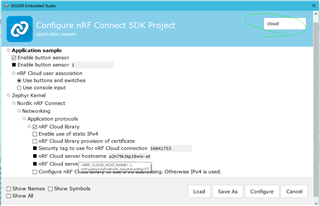
    In Segger Embedded Studio we can access these configs in the Project -> Configure nRF Connect SDK Project.

    Here you are able to change the configurations for your application. 

    You can click through the different Configs or simply use the "filter" option at the top right to find things quicker.


    So in your case you want to address the Cloud Host name etc. just use "cloud" as filter and it should show the available configurations you can change.

    After your changes you can click the "Configure" button and then re-build your application with these changes.

    If you 'hover''  the cursor over the different names you will see their respectable kconfig names (and where they are located).
    e.g.

    "nRF Cloud server host name" = NRF_CLOUD_HOST_NAME


    This will be equal setting the configs in the "prj.conf" file in the application folder.

    If you want to change the NRF_CLOUD_HOST_NAME to something else than whats default, then you can add the following

    e.g.

    CONFIG_NRF_CLOUD_HOST_NAME="<new_host_name>"


    Best regards,

    Martin L.

Reply
  • Hello Johan,

    In Segger Embedded Studio we can access these configs in the Project -> Configure nRF Connect SDK Project.

    Here you are able to change the configurations for your application. 

    You can click through the different Configs or simply use the "filter" option at the top right to find things quicker.


    So in your case you want to address the Cloud Host name etc. just use "cloud" as filter and it should show the available configurations you can change.

    After your changes you can click the "Configure" button and then re-build your application with these changes.

    If you 'hover''  the cursor over the different names you will see their respectable kconfig names (and where they are located).
    e.g.

    "nRF Cloud server host name" = NRF_CLOUD_HOST_NAME


    This will be equal setting the configs in the "prj.conf" file in the application folder.

    If you want to change the NRF_CLOUD_HOST_NAME to something else than whats default, then you can add the following

    e.g.

    CONFIG_NRF_CLOUD_HOST_NAME="<new_host_name>"


    Best regards,

    Martin L.

Children
No Data
Related