This post is older than 2 years and might not be relevant anymore
More Info: Consider searching for newer posts

nRF9160 stops on vector catch

after installing the new SDK for the nRF9160.

if I install the new spm on a board that is working and it will still run the old code that was present on the board befoe upgrading from Secure Boot.

But when I try to load run the new code created in Seger 4.16 all I get is a Vector Catch Error and SPM restarts

I am trying to compile and run Asset Tracker. I have followed the directions in the https://developer.nordicsemi.com/nRF_Connect_SDK/doc/0.4.0/nrf/gs_programming.html post.

It looks like when I do a full erase on the chip reload the modem firmware and SPM that the application does not load.

I do not see any reference in merged.hex to memory location 0x4000 where SPM is trying to run the non secure application.

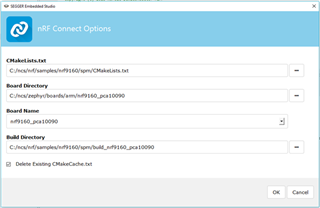
this is the load screen for the project
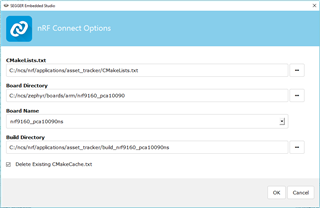
When I run the program I get the following on my terminal that keeps repeating the boot sequence.


Peripheral Domain Status
00 NRF_P0 Non-Secure OK
01 NRF_CLOCK Non-Secure OK
02 NRF_RTC1 Non-Secure OK
03 NRF_NVMC Non-Secure OK
04 NRF_UARTE1 Non-Secure OK
05 NRF_UARTE2 Secure SKIP
06 NRF_IPC Non-Secure OK
07 NRF_VMC Non-Secure OK
08 NRF_FPU Non-Secure OK
09 NRF_EGU1 Non-Secure OK
10 NRF_EGU2 Non-Secure OK
11 NRF_TWIM2 Non-Secure OK
12 NRF_SPIM3 Non-Secure OK
13 NRF_TIMER0 Non-Secure OK
14 NRF_TIMER1 Non-Secure OK
15 NRF_TIMER2 Non-Secure OK
16 NRF_SAADC Non-Secure OK
17 NRF_GPIOTE1 Non-Secure OK

SPM: NS image at 0x40000
SPM: NS MSP at 0xffffffff
SPM: NS reset vector at 0xffffffff
SPM: prepare to jump to Non-Secure image.
***** Booting Zephyr OS v1.14.99-ncs1 *****
Flash region Domain Permissions
00 0x00000 0x08000 Secure rwxl
01 0x08000 0x10000 Secure rwxl
02 0x10000 0x18000 Secure rwxl
03 0x18000 0x20000 Secure rwxl
04 0x20000 0x28000 Secure rwxl
05 0x28000 0x30000 Secure rwxl
06 0x30000 0x38000 Secure rwxl
07 0x38000 0x40000 Non-Secure rwxl

Parents Reply Children
  • Thanks for the pointer.. it worked for me.

    I was having the same problem with the asset tracker in v0.4.0 on the nrf9160 and used these instructions to get past the vector catch issue.

    My question is this - How do I modify the the asset tracker project to program the correct region? (I was running into this on the asset tracker)

    Second question is how do I get the debugger started if I can't get the project started correctly with the Build-> Debug and Run menu?

  • Working with Nordic Connect SDK 0.4.0

    It is possible to continue using Segger Studio with Nordic Connect SDK 0.4.0.

    the first thing to do is erase your current board just so we are starting with a clean slate. 

    Open the SPM project

    Then from the tool bar select Target>Connect J-Link

    Then in the target menu select Erase All to erase everything on the nRF9160.

    Now we will need to program the modem firmware.

    The current version on the web site is mfwnrf91600729.alpha.  unpack and program using the command prompt ( this is a one time operation).

    nrf9160_mdm_dfu –update

    once the modem firmware has been programed we are ready to program SPM (Secure Partition Manager).  In Segger Studio navigate to main.c in the spm project now press the green arrow in the upper right corner of the editor paint to build and debug the program.


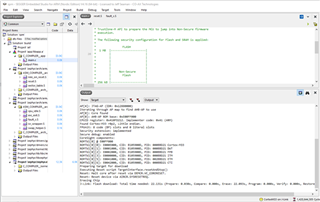
    Once you run the program you will get an error

    Preparing target for user application

    Executing Reset script TargetInterface.resetAndStop()

    Reset: Halt core after reset via DEMCR.VC_CORERESET.

    Reset: Reset device via AIRCR.SYSRESETREQ.

    Stopped by vector catch

    in the output window this is fine since there is no program in the non secure partition yet.


    Now in the file at_client/prj.conf add the line CONFIG_SPM=n.

    your project config fill should now look like this

    # General config

    CONFIG_ASSERT=y

    CONFIG_TEST_RANDOM_GENERATOR=y

    CONFIG_SPM=n


    # Network

    CONFIG_NETWORKING=y

    CONFIG_NET_SOCKETS=y

    CONFIG_NET_SOCKETS_OFFLOAD=y

Related