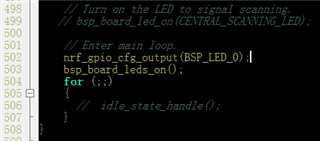
i am test mesh dfu,it work well,but i want to know how to generate the bin named blinky_nrf52840_xxAA_s140_6.1.0.hex .

please help me.thangk you
i am test mesh dfu,it work well,but i want to know how to generate the bin named blinky_nrf52840_xxAA_s140_6.1.0.hex .
please help me.thangk you
Hi CBQ,
The blinky_nrf52840_xxAA_s140_6.1.0.hex is simply some code to toggle the LED, nothing special.
You can use any application that run on S140 v6.1.0 and generate the .zip file from that hex file as instructed in the DFU documentation and you would be able to do DFU the same as the blinky image.
thanks! I use ble_app_blinky_c example and modify the code

,compile it with iar7.80.4 .and test dfu again .it work well.But the code I generated is 47KB, which is much larger than 6KB., I want to know what to do to reduce the file size so I can upgrade faster

Hi CBQ,
Please aware of the main difference between the ble_app_blinky_c and the blinky example. The ble_app_blinky_c is a BLE application, which can connect to other blinky app.
The blinky example only do LED toggling.
I strongly suggest you to get familiar with the nRF52 chip, how to write a normal program with it, how to blink LED with it, before you start playing with mesh application.
Hi CBQ,
Please aware of the main difference between the ble_app_blinky_c and the blinky example. The ble_app_blinky_c is a BLE application, which can connect to other blinky app.
The blinky example only do LED toggling.
I strongly suggest you to get familiar with the nRF52 chip, how to write a normal program with it, how to blink LED with it, before you start playing with mesh application.