This post is older than 2 years and might not be relevant anymore
More Info: Consider searching for newer posts

Application is not loading post DFU over serial

Hello,

I am able to get a successful confirmation that my application has been updated using the nordic secure bootloader over serial code example. However, my application doesn't load. Here are the steps I followed:

1) Created an app package using cmd: nrfutil pkg generate --hw-version 52 --sd-req 0x00 --application-version 1 --application app.hex --key-file private.pem app52_1.zip

2) Erased the device and downloaded the bootloader (code based on \examples\dfu\secure_bootloader\pca10040_uart projoct.

3) Generated and programmed the setting.hex file

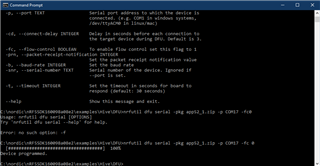
4) Recycled power and uploaded my app using cmd: nrfutil dfu serial -pkg app52_1.zip -p COM14 -fc 0. I got a confirmation message that the DFU is 100% done.

5) Recycled power but my app didn't load properly and neither did the bootloader. I know that because I cannot upload an app using step 3 anymore nor the correct DFU GPIO pattern is outputted.
Any ideas how to troubleshoot this issue? I did see other tickets referring to the boatload button being the issue so I disable that feature in the sdk_config.h file and still not working. I also tried to manually reset using nrfjprg --reset and that didn't help either. Any ideas? Thanks!
  • Hi,

    It is difficult to say what the problem is without knowing more. Can you test with the debug bootloader project and upload the log here? You can find the debug bootloader under <SDK>\examples\dfu\secure_bootloader\pca10040_uart_debug\. It would be interesting to see the log both during the DFU, and (even more importantly) afterward, when it should start the application. It should show what the bootloader does, and if there is an error.

  • Einar, can I enable the logger even though there is only one UART interface which is used for boot-loading? I have never used the logger before so if you can please send me the steps you need to follow that would be greatly appreciated. I read the info referenced in https://infocenter.nordicsemi.com/index.jsp?topic=%2Fcom.nordic.infocenter.sdk5.v15.0.0%2Flib_nrf_log.html&cp=4_0_0_3_26 and I tried to enable the logger but no luck. Also, do I have to switch to pca10040_uart_debug project or could I just stick with my project which is very similar to pca10040_uart? I see the logger as an option in the sdk_config.h file.

    Btw, I am not sure if this is related but I am experiencing the same symptom when I also try to download an example with a softdevice. 

  • Hi,

    moose said:
    Einar, can I enable the logger even though there is only one UART interface which is used for boot-loading?

    Yes, but not logging over UART. Instead, you should use RTT logging. The example bootloader projects come in pairs, one with debug logging over RTT and one without. Since you have used <SDK>\examples\dfu\secure_bootloader\pca10040_uart, I would like you to try <SDK>\examples\dfu\secure_bootloader\pca10040_uart_debug instead, and observe the logs using Segger RTT Viewer.

  • Hello Einar,

    I was able to get the RTT log after getting help from @jeff.scott and here is the log for your info

     0> <info> nrf_dfu_serial_uart: Allocated buffer 20000AF4
     0> <debug> nrf_dfu_req_handler: Handle NRF_DFU_OP_OBJECT_WRITE (data)
     0> <debug> nrf_dfu_flash: nrf_fstorage_write(addr=0x0000D280, src=0x20000B7C, len=64 bytes), queue usage: 1
     0> <debug> nrf_dfu_flash: Flash write success: addr=0x0000D280, pending 0
     0> <debug> nrf_dfu_req_handler: Request handling complete. Result: 0x1
     0> <info> nrf_dfu_serial_uart: Allocated buffer 20000B78
     0> <debug> nrf_dfu_req_handler: Handle NRF_DFU_OP_OBJECT_WRITE (data)
     0> <debug> nrf_dfu_flash: nrf_fstorage_write(addr=0x0000D2C0, src=0x20000AF8, len=64 bytes), queue usage: 1
     0> <debug> nrf_dfu_flash: Flash write success: addr=0x0000D2C0, pending 0
     0> <debug> nrf_dfu_req_handler: Request handling complete. Result: 0x1
     0> <info> nrf_dfu_serial_uart: Allocated buffer 20000AF4
     0> <debug> nrf_dfu_req_handler: Handle NRF_DFU_OP_OBJECT_WRITE (data)
     0> <debug> nrf_dfu_flash: nrf_fstorage_write(addr=0x0000D300, src=0x20000B7C, len=64 bytes), queue usage: 1
     0> <debug> nrf_dfu_flash: Flash write success: addr=0x0000D300, pending 0
     0> <debug> nrf_dfu_req_handler: Request handling complete. Result: 0x1
     0> <info> nrf_dfu_serial_uart: Allocated buffer 20000B78
     0> <debug> nrf_dfu_req_handler: Handle NRF_DFU_OP_OBJECT_WRITE (data)
     0> <debug> nrf_dfu_flash: nrf_fstorage_write(addr=0x0000D340, src=0x20000AF8, len=64 bytes), queue usage: 1
     0> <info> nrf_dfu_serial_uart: Allocated buffer 20000BFC
     0> <info> nrf_dfu_serial_uart: Allocated buffer 20000BFC
     0> <debug> nrf_dfu_flash: Flash write success: addr=0x0000D340, pending 0
     0> <debug> nrf_dfu_req_handler: Request handling complete. Result: 0x1
     0> <debug> nrf_dfu_req_handler: Handle NRF_DFU_OP_OBJECT_WRITE (data)
     0> <debug> nrf_dfu_flash: nrf_fstorage_write(addr=0x0000D380, src=0x20000B7C, len=12 bytes), queue usage: 1
     0> <debug> nrf_dfu_flash: Flash write success: addr=0x0000D380, pending 0
     0> <debug> nrf_dfu_req_handler: Request handling complete. Result: 0x1
     0> <debug> nrf_dfu_req_handler: Handle NRF_DFU_OP_CRC_GET (data)
     0> <debug> nrf_dfu_req_handler: Offset:50060, CRC:0xB8C06AE1
     0> <debug> nrf_dfu_req_handler: Request handling complete. Result: 0x1
     0> <debug> nrf_dfu_serial: Sending Response: [0x3, 0x1]
     0> <info> nrf_dfu_serial_uart: Allocated buffer 20000BFC
     0> <debug> nrf_dfu_req_handler: Handle NRF_DFU_OP_OBJECT_EXECUTE (data)
     0> <debug> nrf_dfu_req_handler: Whole firmware image received. Postvalidating.
     0> <debug> nrf_dfu_validation: Hash verification. start address: 0x1000, size: 0xC38C
     0> <debug> nrf_dfu_validation: Invalidating old application in bank 0.
     0> <debug> nrf_dfu_serial: Sending Response: [0x4, 0x1]
     0> <debug> nrf_dfu_settings: Writing settings...
     0> <debug> nrf_dfu_settings: Erasing old settings at: 0x0007F000
     0> <debug> nrf_dfu_flash: nrf_fstorage_erase(addr=0x0x0007F000, len=1 pages), queue usage: 1
     0> <debug> nrf_dfu_flash: Flash erase success: addr=0x0007F000, pending 0
     0> <debug> nrf_dfu_flash: nrf_fstorage_write(addr=0x0007F000, src=0x20000CE0, len=896 bytes), queue usage: 1
     0> <debug> nrf_dfu_flash: Flash write success: addr=0x0007F000, pending 0
     0> <info> nrf_dfu_settings: Backing up settings page to address 0x7E000.
     0> <debug> nrf_dfu_settings: Writing settings...
     0> <debug> nrf_dfu_settings: Erasing old settings at: 0x0007E000
     0> <debug> nrf_dfu_flash: nrf_fstorage_erase(addr=0x0x0007E000, len=1 pages), queue usage: 1
     0> <debug> nrf_dfu_flash: Flash erase success: addr=0x0007E000, pending 0
     0> <debug> nrf_dfu_flash: nrf_fstorage_write(addr=0x0007E000, src=0x20001060, len=896 bytes), queue usage: 1
     0> <debug> nrf_dfu_flash: Flash write success: addr=0x0007E000, pending 0
     0> <debug> nrf_dfu_req_handler: All flash operations have completed. DFU completed.
     0> <debug> app: Shutting down transports (found: 1)
     0> <debug> app: Resetting bootloader.
     0> <info> app: Inside main
     0> <info> app: Inside main
     0> <debug> app: In nrf_bootloader_init
     0> <debug> nrf_dfu_settings: Calling nrf_dfu_settings_init()...
     0> <debug> nrf_dfu_flash: Initializing nrf_fstorage_nvmc backend.
     0> <debug> nrf_dfu_settings: Using settings page.
     0> <debug> nrf_dfu_settings: Copying forbidden parts from backup page.
     0> <debug> nrf_dfu_settings: Destination settings are identical to source, write not needed. Skipping.
     0> <info> nrf_dfu_settings: Backing up settings page to address 0x7E000.
     0> <debug> nrf_dfu_settings: Destination settings are identical to source, write not needed. Skipping.
     0> <debug> app: Enter nrf_bootloader_fw_activate
     0> <debug> app: Valid App
     0> <debug> app: Enter nrf_dfu_app_continue
     0> <debug> app: No copy needed
     0> <debug> app: Setting app as valid
     0> <debug> nrf_dfu_settings: Writing settings...
     0> <debug> nrf_dfu_settings: Erasing old settings at: 0x0007F000
     0> <debug> nrf_dfu_flash: nrf_fstorage_erase(addr=0x0x0007F000, len=1 pages), queue usage: 0
     0> <debug> nrf_dfu_flash: Flash erase success: addr=0x0007F000, pending 0
     0> <debug> nrf_dfu_flash: nrf_fstorage_write(addr=0x0007F000, src=0x20000CE0, len=896 bytes), queue usage: 1
     0> <debug> nrf_dfu_flash: Flash write success: addr=0x0007F000, pending 0
     0> <info> nrf_dfu_settings: Backing up settings page to address 0x7E000.
     0> <debug> nrf_dfu_settings: Writing settings...
     0> <debug> nrf_dfu_settings: Erasing old settings at: 0x0007E000
     0> <debug> nrf_dfu_flash: nrf_fstorage_erase(addr=0x0x0007E000, len=1 pages), queue usage: 1
     0> <debug> nrf_dfu_flash: Flash erase success: addr=0x0007E000, pending 0
     0> <debug> nrf_dfu_flash: nrf_fstorage_write(addr=0x0007E000, src=0x20001060, len=896 bytes), queue usage: 1
     0> <debug> nrf_dfu_flash: Flash write success: addr=0x0007E000, pending 0
     0> <debug> app: Resetting bootloader.
     0> <info> nrf_dfu_settings: Backing up settings page to address 0x7E000.
     0> <debug> nrf_dfu_settings: D<info> app: Inside main
     0> <debug> app: In nrf_bootloader_init
     0> <debug> nrf_dfu_settings: Calling nrf_dfu_settings_init()...
     0> <debug> nrf_dfu_flash: Initializing nrf_fstorage_nvmc backend.
     0> <debug> nrf_dfu_settings: Using settings page.
     0> <debug> nrf_dfu_settings: Copying forbidden parts from backup page.
     0> <debug> nrf_dfu_settings: Destination settings are identical to source, write not needed. Skipping.
     0> <info> nrf_dfu_settings: Backing up settings page to address 0x7E000.
     0> <debug> nrf_dfu_settings: Destination settings are identical to source, write not needed. Skipping.
     0> <debug> app: Enter nrf_bootloader_fw_activate
     0> <info> app: No firmware to activate.
     0> <debug> app: App is valid
     0> <warning> nrf_dfu_settings: No additional data erased
     0> <info> nrf_dfu_settings: Backing up settings page to address 0x7E000.
     0> <debug> nrf_dfu_settings: Destination settings are identical to source, write not needed. Skipping.
     0> <debug> app: Running nrf_bootloader_app_start with address: 0x00001000
     0> <debug> app: Disabling interrupts. NVIC->ICER[0]: 0x0
    

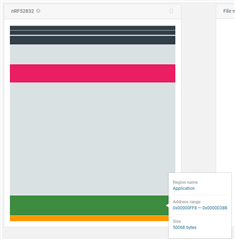
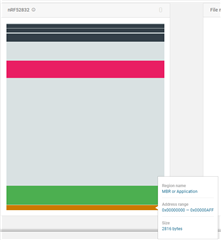
    I also attached the prompt window output and the nrf Connect read image. Hope this help. I noticed that the logger saying the bootloader is jumping to address: 0x00001000 which doesn't match my application start address as I read it from nRFConnect read image. Not sure if this the issue.

  • Hi,

    moose said:
    I also attached the prompt window output and the nrf Connect read image. Hope this help.

    Thank you, this is useful in narrowing down the issue, though I don't understand the problem yet.

    moose said:
    I noticed that the logger saying the bootloader is jumping to address: 0x00001000 which doesn't match my application start address as I read it from nRFConnect read image. Not sure if this the issue.

    This is not a problem. The start address is always 0x1000, which is immediately after the MBR (which resides on page 0). This is correct and works the same both when using SoftDevice and not. If using DFU but no SoftDevice, the application starts at 0x1000, and that is started. If using a SoftDevice, the SoftDevice starts at 0x1000, and that will in turn forward interrupts to the application and start the application (which must start immediately after the SoftDevice, with the application start address being identical to the size of the SoftDevice).

    Everything looks good in the bootloader log, and it should have started the application. Could it be an issue in the application, that somehow is only triggered when you use a bootloader? How have you verified that the application does not load? Can you try to toggle a GPIO a few times as the very first thing you do in the application, and see if you can detect that from a logic analyzer? If you do, that would show clearly that the app is started, and then we should continue looking there.

Related