This post is older than 2 years and might not be relevant anymore
More Info: Consider searching for newer posts

No connection to network after update - No LED indication

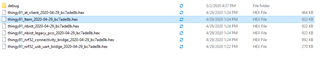
I have update my thingy91 with thingy91_ltem_dfu_2020-04-29_bc7ade8b.hex and mfwnrf9160120 as I was not longer able see anything in nrfcloud.The 

Thingy91 does not connect to the network (I am using the SIM provided in the package and there is enough allowance there). There is no LED indication when the device starts.

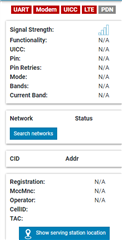
On nrfConnect i am able to see the device and also update firmware. On LTE Monitor it does not look to connect to a network ... AT commands are timing-out.

Can you please advice? How to bring the device back to life?

  • mfwnrf9160120 was successfully update using nRF Programmer;  Application firmware loaded ...\Thingy91\thingy91_fw_2020-04-29_bc7ade8b\images_full\thingy91_nrf52_usb_uart_bridge_2020-04-29_bc7ade8b.hex

  • Hello, 

    I'm a little confused. You have updated the modem FW to latest mfw v1.2. But did you update the nRF9160 with thingy91_nrf52_usb_uart_bridge_2020-04-29_bc7ade8b.hex? Or did you update the nRF52840 with this? If the latter, did you remember to set switch 2 (SW2) to nRF52?

    Kind regards,
    Øyvind

  • I did update the nRF9160 with thingy91_nrf52_usb_uart_bridge_2020-04-29_bc7ade8b.hex. SW2 was in nRF91 position.

    You can propose a update sequence so I can bring my Thingy back to life :)

  • Rossen said:
    I did update the nRF9160 with thingy91_nrf52_usb_uart_bridge_2020-04-29_bc7ade8b.hex. SW2 was in nRF91 position.

    Well, there's the problem :) When updating the Thingy:91 with precompiled images, please choose images built for nRF91 (and not DFU). E.g. images_full/thingy91_ltem_2020-04-29_bc7ade8b.hex. Make sure that SW2 is set to the NRF91 position.

    Depending on the LTE coverage in your country, i.e. LTE-m or NB-IoT. The example I gave is the Asset Tracker application built for nRF9160 using LTE-M. 

    For more information on the different images available in the precompiled FW package (thingy91_fw_2020-04-29_bc7ade8b), please read CONTENTS.txt in the folder. Also, have a look at our documentation on how to update the application FW on the Thingy:91.

    Kind regards,
    Øyvind

  • I did update now also with this image. thingy91_fw_2019-11-29_d3130d77\images_full\thingy91_ltem_2019-11-29_d3130d77.hex

    The modem does not start. Now LED indication. I am using the SIM provided with the device which was working before at the same location where I am now,

    Before I started with the updates the device will normally start blinking in light blue and I could see in LTE monitor that modem is connecting,

    Now I can see only this:

Related