This post is older than 2 years and might not be relevant anymore
More Info: Consider searching for newer posts

Zigbee TXPOWER change issue.

Hi,

I am trying to change the tx power of Zigbee using the following APIs : 

1) zb_set_tx_power(0x32);
2) nrf_radio_txpower_set(NRF_RADIO_TXPOWER_NEG12DBM);
3) nrf_802154_tx_power_set(NRF_RADIO_TXPOWER_NEG12DBM);

None of this API makes a significant change in the TXPOWER CPU register and similarly I cannot see any change in the Wireshark RSS. Can you suggest a proper API to see the changes in TXPOWER.

Thanks

  • Hello,

    I see that the zigbee stack will change the TX power back to 8dBm as long as the device is not part of a network. If you join a network, I could use the functions nrf_802154_tx_power_set() and nrf_802154_tx_power_get() to change the TX power (and confirm it). Was the node part of a network when you tried to use nrf_802154_tx_power_set()?

    BR,

    Edvin

  • Thanks for the reply.

    I tried changing the TX power of the ZC so It was network creator. So basically does the nrf_802154_tx_power_set()  should be used before the stack is initialized?. Additionally I can see the value getting set to value I set using the above API but cannot see the change in the Wireshark.

    Thanks

  • Do you see the RSSI of packets in wireshark (because I can't see it when I use the sniffer).

    I use a couple of methods to check the TX power. I use nrf_802154_tx_power_get() to read the TX power from the radio driver, and then I read the TX power register using:

    uint32_t my_tx_power_register = NRF_RADIO->TX_POWER;
    NRF_LOG_INFO("my_tx_power_register: 0x%08x", my_tx_power_register);

    To print the actual value from the register. 

    Then I use the button handler (with some unused buttons) to trigger nrf_802154_tx_power_set() and print the values from the register. I see that sometimes it may take some time before the register updates, but I am fairly sure that this is only because the changes doesn't take effect before the radio is actually going to transmit something.

    So can you describe to me how you change, and what you see in wireshark? You may not see the difference between 0 and -12, but perhaps you can try some more extreme values and see if you see any change in the RSSI. E.g. +8dBm vs -40dBm. Can you show a screenshot of what the RSSI looks like on wireshark?

    Best regards,

    Edvin

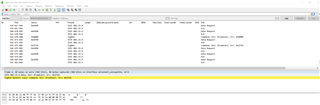
  • When you configure the nRF Sniffer in the setting right besides it you can change the channel and there is one more drop down for IEEE 802.15.4 TAP please select that it will show the RSS information. I have attached the wireshark caputre files before and after changing the power. Please have look.Capture_With_Power_Change.pcapngCapture_WO_Power_Change.pcapng

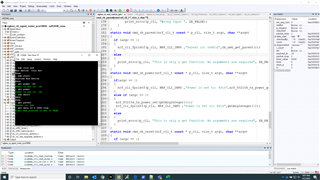
    In the Image file you can see that I am setting the power and checking it with the same command the code is just besides the terminal window. But still I cannot see change in power.

    The using a custom get data cmd I am sending 10 bytes of packet  2 times and sending at interval of 5 seconds.

    get data [payload_size] [#to send] [Timer Interval] [True].

    You can see the commands being Transmitted in the wireshark with and without power change.

  • I suspect we are not using the same sniffer:

    So what are the TX powers you are trying to use? Did you try +8 and -40 dBm?

Related