This post is older than 2 years and might not be relevant anymore
More Info: Consider searching for newer posts

SAADC Configuration

Hi All,

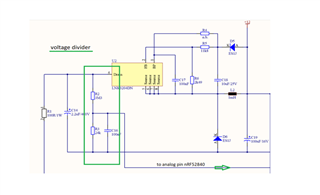
I am developing one project and there we are using ADC (i.e., SAADC in nRF). I have designed the hardware where I am using Capacitor ( C14, 2.2µF) which is connected to Analog pin and my requirement is I have to read the voltage level.

Here I am attaching details and image,

The voltage level of the input capacitor C14, 2.2µF / 400V to the Step-Down controller must be monitored. A voltage divider is used across the capacitor from R2, 3M3, and R3, 24k. The tapped voltage is measured at pin port P0.04 / AIN2 of the nRF52840. The expected voltage at the input of the controller is between 2.35V and 0V. The voltage at the capacitor must not fall below the value of 100V.

This is my requirement can anyone help how to configure SAADC with respect to my requirement.
Thanks in advance

Rohit R

  • Hi Istvan,

    Thank you for the quick response

    I have referred those documents and even SDK examples.

    The 0.6 V internal reference is used by default, which you can tweak by changing the GAIN factor.

    - I did not understand it clearly. Can you please explain more regarding the Gain factor.

    For the tested purpose, I have configured as below,

    1) saadc_config.resolution = NRF_SAADC_RESOLUTION_12BIT;   //12 bit resolution

    2) NRF_DRV_SAADC_DEFAULT_CHANNEL_CONFIG_SE(NRF_SAADC_INPUT_AIN2);

    3) channel_config.gain = NRF_SAADC_GAIN1;

    4) err_code = nrf_drv_saadc_sample(); // Check error

    5)     err_code = nrf_drv_saadc_buffer_convert(m_buffer_pool[0], SAMPLES_IN_BUFFER);
        APP_ERROR_CHECK(err_code);

    6) void saadc_callback(nrf_drv_saadc_evt_t const * p_event)
    {
        if (p_event->type == NRF_DRV_SAADC_EVT_DONE)
        {
            ret_code_t err_code;

            err_code = nrf_drv_saadc_buffer_convert(p_event->data.done.p_buffer, SAMPLES_IN_BUFFER);
            APP_ERROR_CHECK(err_code);

            
            int i;
            NRF_LOG_INFO("ADC event number: %d", (int)m_adc_evt_counter);

            for (i = 0; i < SAMPLES_IN_BUFFER; i++)
            {
                NRF_LOG_INFO("%d", p_event->data.done.p_buffer[i]);
            }
            m_adc_evt_counter++;
        }
    }

    7) Buffer size is 1

    And I have shorted P0_4 to VCC and GND Dev-kit on putty it shows me,

    a) when short to VCC - 1023

    b) when short to GND - -6, -4, -3

    I am not understanding with these values whether it is correct or wrong. Basically not understood SAADC config and it's result.

    Thanks and Regards

    Rohit R

  • Hello Rohit R,

    Have you seen the formulas for calculating SAADC input range in the SAADC documentation?

    The expected voltage at the input of the controller is between 2.35V and 0V.
    This is my requirement can anyone help how to configure SAADC with respect to my requirement.

    How is your nRF52840 supplies with power, are you using the coin cell battery, USB or external power?
    In the case of USB / 3 V power:
    If you would like your SAADC to have a the input range 0 - 2.35 V, you could either use reference VDD/4 and gain 1/3, which yields the input range 0 - 2.27 V, or you could use VDD/4 and gain 1/4 and get 0 - 3 V.
    Have you seen the SAADC Example from the SDK? It demonstrates how to setup and use the SAADC - then you could just input your own configuration, and you should start seeing your measurements.

    Please let me know if anything should be unclear with the forumlas, or how to go about doing the configuration.

    Best regards,
    Karl

  • Hi Karl,

    Yes, I have seen the document and SDK examples too.

    I am modifying SDK example as per my requirement, I have shared the changes in the previous post.

    How is your nRF52840 supplies with power, are you using the coin cell battery, USB or external power?
    In the case of USB / 3 V power:

    - It is basically a light Dimming control circuit we are using 230V and then using the voltage regulator and divider we are powering up MCU with 3.3V. If you make this ticket private then I can share the schematic file here as it confidential.

    If you would like your SAADC to have a the input range 0 - 2.35 V, you could either use reference VDD/4 and gain 1/3, which yields the input range 0 - 2.27 V, or you could use VDD/4 and gain 1/4 and get 0 - 3 V.

    - Okay, let me try this configuration related Gain and check the result.

    - One more question, I am using P0.04 / AIN2, with respect to SDK example as per my understanding AIN2 means the channel 2 and to configure this we need to call,

    nrf_saadc_channel_config_t channel_config =
            NRF_DRV_SAADC_DEFAULT_CHANNEL_CONFIG_SE(NRF_SAADC_INPUT_AIN2);  //single shot and channel config

    I am correct in configuring pin or did I miss something.

    Correct me If i am doing anything wrong.

    Thanks and Regards

    Rohit R

  • Hello again Rohit,

    Rohit Rajapure said:
    Yes, I have seen the document and SDK examples too.

    Great, then we are off to a good start!

    Rohit Rajapure said:
    I am modifying SDK example as per my requirement, I have shared the changes in the previous post.

    Regarding what you have shared in your other comment, I have some questions:
    - 1), 2), and 3) is just setting up a configuration structure, but they are not actually initializing any channel with that configuration. You will need to use nrfx_saadc_channel_init for this. Please also note that the NRF_DRV_SAADC_DEFAULT_CHANNEL_CONFIG_SE only generates a "default configuration struct for single ended input on the specified channel" struct, so any modifications to the default single ended input configuration will have to be done after this line.

    - 4) triggers a sampling, but no error check is performed. You will need to pass the error code to APP_ERROR_CHECK for this.

    - 5) this function is used to provide a new buffer to the SAADC. You should call this function as part of the DONE event callback and the SAADC init.

    - 7) a & b:

    You seem to get the SAADC outputs ~1024 and ~0 when connected to VDD and GND respectively. Given the 1), 2), and 3) I suspect that these values were acquired on pin AIN0, with the default single ended configuration. The SAADC output 1024 with 10 bit resolution, 1 / 6 gain and 600 mV reference equals 3.6 V using the formula provided in the documentation:

    RESULT = (V(P) – V(N)) * (GAIN/REFERENCE) * 2(RESOLUTION - m)


    You should also perform a calibration of the SAADC after initialization and following significant temperature changes. 

    For future reference, please use the "Insert -> Code" option here on DevZone when submitting code, this drastically increases readability.

    Rohit Rajapure said:
    - Okay, let me try this configuration related Gain and check the result.

    Yes, please try the other configuration and let me know what samples you receive.

    Rohit Rajapure said:

    - One more question, I am using P0.04 / AIN2, with respect to SDK example as per my understanding AIN2 means the channel 2 and to configure this we need to call,

    nrf_saadc_channel_config_t channel_config =
            NRF_DRV_SAADC_DEFAULT_CHANNEL_CONFIG_SE(NRF_SAADC_INPUT_AIN2);  //single shot and channel config

    I am correct in configuring pin or did I miss something.

    Yes, at least partly - see my above comments. This is just generating the configuration struct - you are not actually initializing the channel.

    Rohit Rajapure said:
    If you make this ticket private then I can share the schematic file here as it confidential.

    For the current SAADC issues I do not think I will need to see the schematics, but I may convert the ticket to private at any time if you would like - just let me know and it will be done.

    As a side note I will also have to mention that I highly recommend making use of the NRFX SAADC driver, instead of the nrf_drv_* legacy driver.
    As you will see if you dive into the nrf_drv_* legacy drivers source code, it is now just forwarding macros to the NRFX driver, so functionally the change from switching to the NRFX driver is nothing, but it will decrease future work if the legacy driver is discontinues in future releases. 

    Looking forward to resolving this issue together!

    Best regards,
    Karl

Related