This post is older than 2 years and might not be relevant anymore
More Info: Consider searching for newer posts

SAADC Configuration

Hi All,

I am developing one project and there we are using ADC (i.e., SAADC in nRF). I have designed the hardware where I am using Capacitor ( C14, 2.2µF) which is connected to Analog pin and my requirement is I have to read the voltage level.

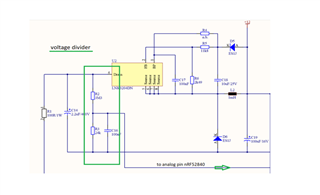
Here I am attaching details and image,

The voltage level of the input capacitor C14, 2.2µF / 400V to the Step-Down controller must be monitored. A voltage divider is used across the capacitor from R2, 3M3, and R3, 24k. The tapped voltage is measured at pin port P0.04 / AIN2 of the nRF52840. The expected voltage at the input of the controller is between 2.35V and 0V. The voltage at the capacitor must not fall below the value of 100V.

This is my requirement can anyone help how to configure SAADC with respect to my requirement.
Thanks in advance

Rohit R

Parents
  • Hello Rohit R,

    Have you seen the formulas for calculating SAADC input range in the SAADC documentation?

    The expected voltage at the input of the controller is between 2.35V and 0V.
    This is my requirement can anyone help how to configure SAADC with respect to my requirement.

    How is your nRF52840 supplies with power, are you using the coin cell battery, USB or external power?
    In the case of USB / 3 V power:
    If you would like your SAADC to have a the input range 0 - 2.35 V, you could either use reference VDD/4 and gain 1/3, which yields the input range 0 - 2.27 V, or you could use VDD/4 and gain 1/4 and get 0 - 3 V.
    Have you seen the SAADC Example from the SDK? It demonstrates how to setup and use the SAADC - then you could just input your own configuration, and you should start seeing your measurements.

    Please let me know if anything should be unclear with the forumlas, or how to go about doing the configuration.

    Best regards,
    Karl

  • Hi Karl,

    Yes, I have seen the document and SDK examples too.

    I am modifying SDK example as per my requirement, I have shared the changes in the previous post.

    How is your nRF52840 supplies with power, are you using the coin cell battery, USB or external power?
    In the case of USB / 3 V power:

    - It is basically a light Dimming control circuit we are using 230V and then using the voltage regulator and divider we are powering up MCU with 3.3V. If you make this ticket private then I can share the schematic file here as it confidential.

    If you would like your SAADC to have a the input range 0 - 2.35 V, you could either use reference VDD/4 and gain 1/3, which yields the input range 0 - 2.27 V, or you could use VDD/4 and gain 1/4 and get 0 - 3 V.

    - Okay, let me try this configuration related Gain and check the result.

    - One more question, I am using P0.04 / AIN2, with respect to SDK example as per my understanding AIN2 means the channel 2 and to configure this we need to call,

    nrf_saadc_channel_config_t channel_config =
            NRF_DRV_SAADC_DEFAULT_CHANNEL_CONFIG_SE(NRF_SAADC_INPUT_AIN2);  //single shot and channel config

    I am correct in configuring pin or did I miss something.

    Correct me If i am doing anything wrong.

    Thanks and Regards

    Rohit R

  • Hello Rohit R,

    Rohit Rajapure said:

    I am using saadc_sampling_trigger(); trigger the ADC samples. But I am getting 1 sample.

    I have tried by changing the buffer size than my code not working.

    The nrfx_saadc_sample() function triggers the START task or SAMPLE task register, depending on weather the driver is configured in low power mode or not. If you want to use a timer to trigger ADC sampling yo could trigger the task directly via PPI instead. This way you get precise timing, as it happens in HW and won't be delayed by a potential high priority interrupt.
    If I have misunderstood you, and you would just like to get a single sample by calling a single function, you should instead use the nrfx_saadc_sample_convert function for this.

    Rohit Rajapure said:
    What I need is, I want to read multiple samples when I trigger ADC?

    Have you seen the SAADC example from the SDK? It demonstrates how to set up the SAADC's sampling to trigger by a timer through PPI.
    What are your requirements for the SAADC - do you intend to perform a sampling ( or multiple samples ? ) each second, have I understood this correct?
    If you are doing a periodic sampling, I would highly recommend setting it to trigger by a timer through PPI, as demonstrated in the SDK example.

    On a general note, I would also recommend that you do some power management in your main while loop, so as to reduce power consumption.
    In most examples - including the SAADC peripheral example - you can see this implemented as the idle_state_handler function.
    Currently, it seems that you are using a 1000 ms delay in the main loop to time your measurements - this is not recommended, as the delay NOP CPU instructions are wasted, and the delay function will not give you an exact delay, if you intend to add BLE communication to your project later on. 

    Best regards,
    Karl

  • Hi Karl,

    Thanks for the feedback,

    What are your requirements for the SAADC - do you intend to perform a sampling ( or multiple samples ? ) each second, have I understood this correct?

    - yes, I want multiple sample in around 6msec.

    - I do not want to use timer or PPI channels, I need just a normal operation of SAADC operation.

    - I had gone through the SDK example so with reference to that example I have modified my program without using timer or PPI.

    - My requirement for SAADC previously was read single sample so I have configured and in attached code I am able to get that. But in my final project, requirement case is increased, means in 1 case I need single sample and in 2 case I need multiple samples (as in my first statement). So I want keeping same configuration how I can achieve my both requirement (case 1 and case 2).

    Thanks and Regards

    Rohit R

  • Hello Rohit R,

    Rohit Rajapure said:
    - I do not want to use timer or PPI channels, I need just a normal operation of SAADC operation.

    Understood. All I can do here is to emphasize my recommendation of the timer + PPI combination, due to all the aforementioned advantages of this approach - but at the same time I do not know all the requirements and constraints of your project, so you may very well ignore this unsolicited recommendation, of course.

    Rohit Rajapure said:
    My requirement for SAADC previously was read single sample so I have configured and in attached code I am able to get that. But in my final project, requirement case is increased, means in 1 case I need single sample and in 2 case I need multiple samples (as in my first statement). So I want keeping same configuration how I can achieve my both requirement (case 1 and case 2).

    To avoid any confusion for future forum-goers readings this thread; I can not recommend the following approach for periodic sampling, but the following is how you may go about using inserted delay in combination with nrfx_saadc_sample_convert to achieve the functionality described above:

    Change the contents of your main while-loop to be a for-loop that calls nrfx_saadc_sample_convert for the required number of samples ( either 1 or multiple ), then delay the next execution of the for-loop by around 6 ms.

    Please keep in mind that delay is not an accurate timing mechanism - the delay function will just calculate the rough number of NOP cycles it will take to delay the given time, and queue them for execution. If the execution of these NOP cycles are in any way interrupted - such as by the SoftDevice - then the delay will be extended by the total time of the interruption.
    The approach above could also quickly be made less power consuming by the addition of a timer and nrf_pwr_mngmt_run.

    Please try the above, and let me know if it achieves the functionality you seek to implement.

    Best regards,
    Karl

  • Hi Karl,

    Thanks for the response,

    I will check and get back to you.

    Thanks and Regards

    Rohit R

  • Rohit Rajapure said:
    Thanks for the response,

    No problem at all, Rohit!

    Rohit Rajapure said:
    I will check and get back to you.

    Great, I look forward to hearing if this fulfills your applications requirements!

    Best regards,
    Karl 

Reply Children
No Data
Related