This post is older than 2 years and might not be relevant anymore
More Info: Consider searching for newer posts

nRF52840 Hard fault issue

Hi All,

I am working on the nRF52840 Zigbee protocol and I am using nRF5_SDK_for_Thread_and_Zigbee_v3.0.0_d310e71 SDK.

With the help of engineers and other stuff, I am able to design my end product using Zigbee and Alexa communication.

My product is about, It is a Zigbee based light controlling device which uses Alexa as a command sending device for controlling brightness and On/Off.

It is the last stage of production but while testing we have an encounter with the Hardfault issue. And enable to trace and yet no solution found also I had been touch with nordic engineers from the start of my project to till today but we are not able to fix this issue yet.

Here is my ticket - https://devzone.nordicsemi.com/support/234827

My project, I am using 1 as Input pin ZCD (Zero Cross Detection pin), 1 as Output pin Trigger pin (Trigger for turning On/Off ), and 2 timers (Timer 4 and Timer 0).

Workflow - The device is powered with AC voltage, When there is ZCD detection using Timer as duty cycle (i.e., brightness level), we pass timer values for 0msec to 10msec (i.e., 0 % to 100%). This we pass for both the Positive cycle and the Negative cycle of the MOSFET trigger.

The result - While testing this device after 6 to 8 hours it enters into the hard fault handler we tried to figure out the issue but still no success. And as per one of your engineer suggestions, may be cause for hard fault issue is Timer 0 which is configured as continuous as we are using disable an interrupt routine. And as per his suggestion, we have configured timer 0 as a one-shot timer. You can check the ticket for more details.

After his suggestion, configured Timer 0 (which I am using in my project as a one-shot) but its interrupt routine means timer 0's interrupt routine not executing. Then we tried with other timers like 1 but the device starts flickering. And If configure the timer as a continuous timer using "nrf_drv_timer_extended_compare()" instead of one-shot as done before then it works smoothly.

I am not able to figure out this Hardfault issue and Timer one-shot issue.

Attached are my code and schematic file. Kindly help me to solve this issue as early as possible. It is very urgent for me as we are in the last stage of production only due to this hard fault issue we are stuck here.

nRF_Dimmer XXX-00-CIR.PDF

I am attaching 2 code, wherein one(Zigbee_Dimmer-0.9.4) we have used continuous timer and we stuck in hard fault issue. And another one(Zigbee_Dimmer-0.9.6.1) is where we have configured timer as a one-shot timer as a solution for hard fault issues.

a)Zigbee_Dimmer-0.9.4

Zigbee_Dimmer-0.9.4.zip

b)Zigbee_Dimmer-0.9.6.1

Zigbee_Dimmer-0.9.6.1.zip

Please help me to solve this issue.

Thanks in advance.

Rohit R

Parents
  • Hi Rohit,

    The result - While testing this device after 6 to 8 hours it enters into the hard fault handler we tried to figure out the issue but still no success.

    I remember your old case which my colleague Simon was looking into. We were not allowed to plug in your device into our sockets for security reasons.  

    First thing is that hardfaults are traceable (if the stack is not corrupt). Since we cannot reproduce or run your hardware in our premises, we cannot debug that for you. Can you please refresh me what was your hardfault debugging results? Timers from SDK are well tested and mature libraries.


    After his suggestion, configured Timer 0 (which I am using in my project as a one-shot) but its interrupt routine means timer 0's interrupt routine not executing

    The above sentence is not clear what it means. What do you mean the interrupt routine is not executing? how are you verifying this?

  • Hi Susheel,

    The above sentence is not clear what it means. What do you mean the interrupt routine is not executing? how are you verifying this?

    - I think you only had suggested "configure timer 0 as one-shot timer using nrf_drv_timer_compare() instead of nrf_drv_timer_extended_compare() as your disabling it in interrupt handler" . So per your suggestion only I made respective changes but unfortunately when I kept "Breakpoint" inside this function "void timer0_event_handler(nrf_timer_event_t event_type, void* p_context)", the statement inside this functions not executing in fact code never stopped at a breakpoint.

    I hope this clears my points. In my last post also I was explaining Simon the thing.

    looking for a positive response from your side.

    Thanks and Regards

    Rohit R

  • Rohit, 

    I have run some tests and it seems that the timer runs well in the one shot mode. I tested this in Zigbee/BLE and stand alone mode.

    There are many changes in your code from 0.9.4 compared to 0.9.6.1  and are not just the change related to to timer.

    I would suggest that you take the version 0.9.4 and change the nrf_drv_timer_extended_compare to nrf_drv_timer_compare keeping everything else same.

    I am sure that if the extended work in 0.9.4, then the one shot will also work just fine. We cannot compare two difference code versions and narrow down the problem to just the timer.

  • Hi Susheel,

    Thanks for the feedback.

    I would suggest that you take the version 0.9.4 and change the nrf_drv_timer_extended_compare to nrf_drv_timer_compare keeping everything else same.

    - Okay, I will compare and make the suggested changes keeping the rest things the same.

    One more doubt clears me If doing something wrong.

    1) If I configure timer using  nrf_drv_timer_compare instead of nrf_drv_timer_extended_compare this then I need not call nrf_drv_timer_disable in the timer handler. As per my understanding if we configured one shot then there is no need to call disable the function. Am I correct?

    - If my above statement is correct, then I am working on another project where I have used a timer 2 as a one-shot timer there I observed that my bulb is flickering after configuring one shot. (Basically, my other project is the next version of Zigbee base Dimming control which also has similar logic as the current one)

    Please correct me If I am wrong.

    Thanks and Regards

    Rohit R

  • Rohit Rajapure said:
    1) If I configure timer using  nrf_drv_timer_compare instead of nrf_drv_timer_extended_compare this then I need not call nrf_drv_timer_disable in the timer handler. As per my understanding if we configured one shot then there is no need to call disable the function. Am I correct?

     The timer is still running keeping the HFCLK active. If you do not need the timer it is best practice to disable it. the callback is still only called once even if you DO NOT disable it, but i recommend you to disable the timer if you do not need to use it again for considerable amount of time.


    Rohit Rajapure said:
    - If my above statement is correct, then I am working on another project where I have used a timer 2 as a one-shot timer there I observed that my bulb is flickering after configuring one shot. (Basically, my other project is the next version of Zigbee base Dimming control which also has similar logic as the current one)

     The normal practice is that you disable it and when you need to activate it again you call

    nrfx_timer_compare
    nrfx_timer_clear(&m_timer);
    nrfx_timer_enable(&m_timer)
  • Hi Susheel,

    The timer is still running keeping the HFCLK active. If you do not need the timer it is best practice to disable it. the callback is still only called once even if you DO NOT disable it, but i recommend you to disable the timer if you do not need to use it again for considerable amount of time.

    - Okay, I will disable it and check the result.

    - I will get back to you once I test all the suggested points.

    Thanks for the update

    Regards

    Rohit R

Reply Children
  • Hi Susheel,

    Sorry for the late reply,

    As per your suggestion, what i did is in 0.9.6.1 version firmware I have used nrf_drv_timer_disable(&Timer0) and kept timer 0 as one shot timer using nrf_drv_timer_compare().

    And I am able to execute the timer0's event handler, means statements inside handler function as explained in previous post.

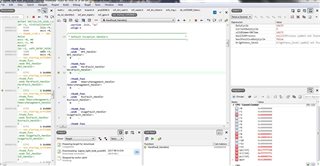
    So I kept the dev-kit running with above configuration but after 4 hour it enters into hard fault handler. Below are the attached screen shot of the same.

    1st is when code enters into hard fault handler and 2nd is when I again run the code using step over command.

    Please check the CPU window and it's SP, LR, and register values and let me know based on this what could be the issue. Or how to figure out the problem.

     hard fault 2.zip

    Thanks and Regards

    Rohit R

  • Hi Susheel,

    There is one more bad news or facing the same problem.

    As I told in a previous post or my last ticket, I am developing another project and which also similar to the current device based on ZCD (Zero cross detection) and Timer using Zigbee to control bulb brightness.

    My first phase is developed using ZCD and Timer for controlling brightness it has been observed that in the new version of the device also I am facing a hard fault issue after 4/5 hours. After 4/5 hours fixed device stops responding.

    Attached in the hard fault screenshot.

    And I think for both my project ( both versions of devices) causing the same issue which results in hard fault after a few hours. But I am unable to trace back and slove it.

    It will be very helpful for me if you guide me to trace my issue. please let me know the steps or guide to trace the same.

    And, I have some question please help me with it.

    1) in sdk_config.h file,  #define TIMER0_ENABLED 1 like this I have done for timer 2 and timer 4 which I am using in my project.  And in same file I can see that #define NRFX_TIMER0_ENABLED 0 also present for all timers so do I need to enable this also?

    2) Instead of timer 0, I tried to configure timer 1 for 10msec but I am not able to configure it for 10msec.

    below is snippet which I followed to configure timer0, timer2 and timer4 as 10msec timer,

    nrf_drv_timer_config_t timer_cfg = NRF_DRV_TIMER_DEFAULT_CONFIG;
        timer_cfg.frequency = 4; //set frequency 1MHz  
        err_code = nrf_drv_timer_init(&TIMER_1, &timer_cfg, timer1_event_handler);
        if (err_code != NRF_SUCCESS)
        {
            // handle error condition
        }

    If I follow same configuration for timer 1 then I am unable to configure it for 10msec. Can you please let me know what is the problem for timer 1 configuration or how to configure it for 10msec?

    Let me know your feedback.

    Thanks and Regards

    Rohit R

Related