This post is older than 2 years and might not be relevant anymore
More Info: Consider searching for newer posts

Problems using nRFConnect with nRF52840 Dongle - No connection

My nRF52840 arrived yesterday and I started playing around with it. It is immediately recognized y nRFConnect v3.5 BLE App v2.4.0. The firmware on the device is 4.1.2 Jul 14th 2020.

I am reproducing exactly this example How to use nRF52840 USB Dongle and nRF Connect for emulating a BLE peripheral

The advertised device can be found on iOS's nRF Connect App as well as with Android. The advertised name of the nRF52 is correctly received. However neither can I connect nor read the advertised services. Both apps show "No service" in the pre-connection phase. When I try to connect with iOS I immediately get the following error:
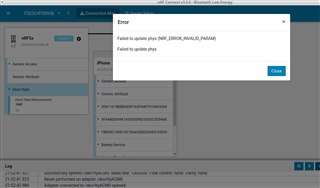
As you can see the smart phone seems to be "somewhat" connected (background of picture). The app on the phone still says "Connecting...". Some seconds later the connection terminates.

On Android I get "Error 133 (0x85): GATT Error" but nothing more.

The behavior is consistent whether running the nRF Connect tool on Linux or on Windows. The error is the same.

I also tried adding a HRS in the tool and use the nRF Toolbox on the phone to see whether this works. Here, the nRF52840 isn't even found but the app just said "Scanning".

What am I missing?

  • Did your friend use an iPhone as well? I saw the same error when testing on an nRF52840 DK, but I'll test on an nRF52 DK for good measure as soon as I can get my hands on an iPhone again. We're using an iPhone 11 with iOS v13.6.

    You can follow our Dongle Programming tutorial if you're uncertain on the procedure of how you should program it. In the tutorial you can also find a chapter on how to recover it if you're unintentionally erase the bootloader.

    Best regards,

    Simon

    UPDATE: I think your friend must be using something else than an iPhone or an older version of the Bluetooth Low Energy app when testing, as the nRF52(832) DK shows exactly the same error as well on my side.

  • He was using a Google Pixel 3 device (Android)! I'll ask for the details!

  • Friend here.

    Tested with NRF52832 DK, latest nRF Connetct/BLE App on Windows 10, Pixel 3a w/ Android 11.

    Fully working

  • Thank you for the update. This issue seem to be restricted to iOS then.

  • Simon, now back at the PC, testing:

    Windows 10 v2004, nRFConnect 3.5.0 with nRF52832 DK vs. the iPhone 11 Pro Plus with nRF Connect v2.3.2and LightBlue app. Can confirm that the problem is happening here as well (same as nRF 52480 Dongle).

    Windows 10 v2004, nRFConnect 3.5.0with nRF52832 DK vs. Android 5.1.1 on Medion Livetab S10346, same problem as initially reported (Error 133 (0x85): GATT Error)

    So the problem occurs with the nRF52832 DK as well as the nRF52840 Dongle both on Windows 10 and Linux (tested before) with iOS and Android 5 clients.

    I then tried to flash ble_peripheral_hrs using SES to the nRF52840 Dongle but failed, apparently because there is no on-board programmer.

    I built the binary with SES and it is called ble_app_hrs_pca10059_s140.hex and built using SDK v17.0.0. Using the nRF Programmer app I read out the memory of the nRF52840 then clicked "write" in the Device section. Judging by the colored bars the hex is only the app w/o the soft device. I am then asked for the ID of the Softdevice. The latest version number available in here is "0xAE (s140_nrf52_6.1.0)" which is rejected. From what I see in the readmes of the SDK the S140 should be version v7.0.1 and thus ID 0xca. I then added the file 'components\s140\hex\s140_nrf52_7.0.1_softdevice.hex' manually from the SDK directory and wrote both files to the device which apparently finished without error. nRF52840 is blinking during advertisement.

    I can now see the advertised HRM device and can connect w/o errors - but it is not showing any services. The same holds for the nRF Toolbox app.

    Did I miss something during flashing?

    Thank you!

Related