Hello,
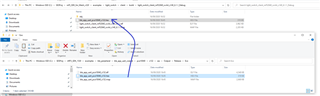
I am trying to follow the tutorial SDK UART coexistence example, but it seems like the last step cannot be completed. As you can see, that .hex file does not exist in the folder. Do you have any suggestion?
Thanks.
Hello,
I am trying to follow the tutorial SDK UART coexistence example, but it seems like the last step cannot be completed. As you can see, that .hex file does not exist in the folder. Do you have any suggestion?
Thanks.
Hi,
The Output folder in .../pca10040/s132/ses/ and all the files in it are generated when you build your project. Try building the ble_app_uart_coexist example in SES. The folder, and then also the .hex file, should be then generated, and you should be able to find the file.
Best regards,
Marte
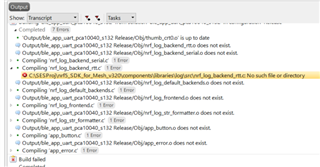
Hi. Trying to build the example (did not do any modification), these errors occur:
The problem is that the components folder does not even exist in the Mesh folder, but rather in the other one (SDK folder). And the global macros in SES are defined as:
SDK_ROOT=C:\SESProj\nRF5_SDK_1530
MESH_ROOT=C:\SESProj\nrf5_SDK_for_Mesh_v320
Do you have any clue why this happens? Thanks.
Hi,
Great to hear that you managed to solve the problem yourself!
Yes, with the coexistence examples you have to copy the example folders to the nRF5 SDK folder and build it from there, as you did.
There's also a guide about integrating mesh into nRF5 SDK examples here, which can be useful if you experience any new problems. However, with the coexistence examples, I don't think you should have to do everything under "Including nRF5 SDK for Mesh functionality in an nRF5 SDK example", as the files and folders should already be included. At least they were when I tested the example earlier.
Hope you're able to run the example without any problems now.
Best regards,
Marte
Hi Ms. Marte Myrvold,
I sucessfully built the SDK UART coexistence example and now I am trying to test it - but I am not successful.
What I'd like to do is to :
1. First connect to the nRF board with the nRF Mesh App (then assign it with some address). And afterwards,
2. Check the UART functionality by sending some data from the phone to the board. And visualise that with putty.
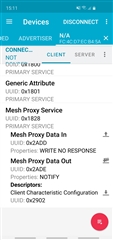
Unfortunately, none of the steps works. I cannot connect with nRF mesh from the phone. And also in the nRF connect, I cannot find the option for writing into a characteristic, which should send the message to the board and then see it with putty.

Maybe the Mesh Proxy Data In should be the answer for step number 2. However, nothing pops up in putty, so I would say that the board does not receive this message.
Do you have any idea how to debug this problem?
Thanks in advance!
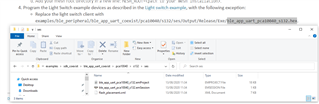
Ms. Marte Myrvold, is it possible that I did not do the last step from the coexistence example correctly?
I just replaced the .hex file:
Is there some other trick? Thanks!
I see in this post that "SDK UART coexistence example does not work with nRF Mesh APP. You need find some other provisioning ways..." - So, I wonder: is this true
Could you test this project successfully
Hi,
I'm sorry for the late reply. I had to test this example myself and it took some time.
The guide can be a bit confusing when it comes to the last part with the light switch example, but I will try to explain the process here.
I just tested that this works. However, I used the provisioner example in the nRF Mesh SDK instead of the Mesh app as it fixes everything with provisioning so you don't have to do it manually, which you have to do with the nRF Mesh app. In order to test it with the provisioner example like I did, you should do the following:
I hope this helps you understand how to test this out.
As for the question about the uart coexistence example not working with the nRF Mesh App. This is because the nRF Mesh app does provisioning over GATT, since smart phones don't support provisioning or Mesh activity over ADV. However, the uart coexistence example does not use GATT (both GATT proxy and GATT provisioner bearer are disabled). This is likely because the example is a combination of mesh and BLE examples, so you already have BLE+mesh there, and the the GATT proxy functionality will make it so you kind of get an additional instance of BLE. You could try to implement GATT provisioning and functionality in the example yourself, but I don't know if it will work, and I wouldn't recommend it.
Best regards,
Marte
Hi,
I'm sorry for the late reply. I had to test this example myself and it took some time.
The guide can be a bit confusing when it comes to the last part with the light switch example, but I will try to explain the process here.
I just tested that this works. However, I used the provisioner example in the nRF Mesh SDK instead of the Mesh app as it fixes everything with provisioning so you don't have to do it manually, which you have to do with the nRF Mesh app. In order to test it with the provisioner example like I did, you should do the following:
I hope this helps you understand how to test this out.
As for the question about the uart coexistence example not working with the nRF Mesh App. This is because the nRF Mesh app does provisioning over GATT, since smart phones don't support provisioning or Mesh activity over ADV. However, the uart coexistence example does not use GATT (both GATT proxy and GATT provisioner bearer are disabled). This is likely because the example is a combination of mesh and BLE examples, so you already have BLE+mesh there, and the the GATT proxy functionality will make it so you kind of get an additional instance of BLE. You could try to implement GATT provisioning and functionality in the example yourself, but I don't know if it will work, and I wouldn't recommend it.
Best regards,
Marte