This post is older than 2 years and might not be relevant anymore
More Info: Consider searching for newer posts

SES CMAKE ERROR

I have installed the latest SDK 1.3.0 using the Toolchain Manager.

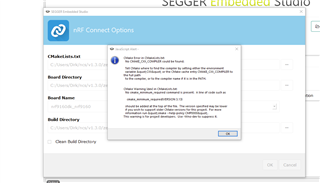
I would now like to open nRF Connect SDK Projekt and get the follwoing error:
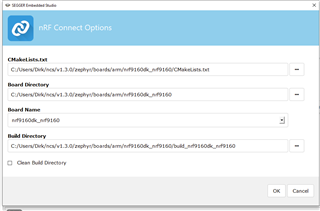
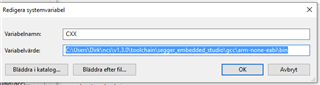
I have added the CXX environment variable, but it did not help Disappointed

Parents
  • Hi,

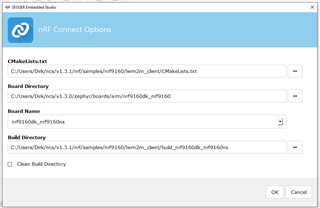
    The "CMakeLists.txt" field should point to the CMakeLists.txt of your project, not the board.

    E.g. if you want to build the asset_tracker project, the path should be <your NCS folder>/nrf/applications/asset_tracker/CMakeLists.txt.

    In addition, if you want to use the modem in the nRF9160, you must build your application as non-secure. To do that, you must select the non-secure version of the board.

    I.e. nrf9160dk_nrf9160ns (notice the "ns" at the end).

    Finally, in case you are not already doing it, when you install NCS using the Toolchain Manager, you must open SES (or bash/cmd) from the Toolchain Manager for the environment to be configured correctly.

    Best regards,

    Didrik

  • Hi Didrik,

    thank you for your swift reply and help. now I can build the asset tracker and even the lwm2m_client which will be the base for our application.

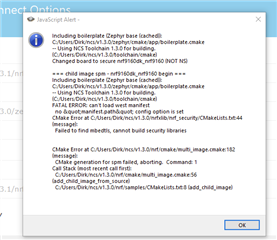
    Later yesterday the toolchain manager downloaded SDK 1.3.1, but it seems incomplete. When I select the lwm2m_client in the 1.3.1 folder the build process fails again:

    For the time being I will continue with lwm2m_client from the 1.3.0 folder which works. Just to let you know there is a problem with 1.3.1.

    Best regards

    Dirk

  • I notice that you are still using the board folder from NCS v1.3.0.

    Could you try to change that to 1.3.1 as well, and see if that helps?

Reply Children
No Data
Related