This post is older than 2 years and might not be relevant anymore
More Info: Consider searching for newer posts

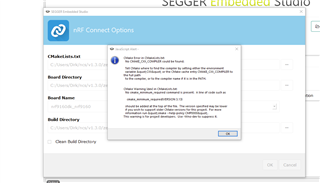
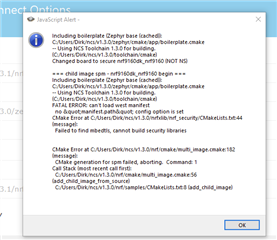
SES CMAKE ERROR

I have installed the latest SDK 1.3.0 using the Toolchain Manager.

I would now like to open nRF Connect SDK Projekt and get the follwoing error:
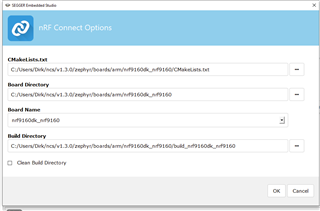
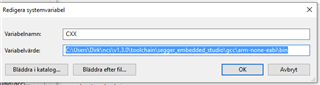
I have added the CXX environment variable, but it did not help Disappointed

Parents
  • Hi,

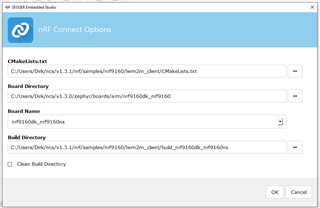
    The "CMakeLists.txt" field should point to the CMakeLists.txt of your project, not the board.

    E.g. if you want to build the asset_tracker project, the path should be <your NCS folder>/nrf/applications/asset_tracker/CMakeLists.txt.

    In addition, if you want to use the modem in the nRF9160, you must build your application as non-secure. To do that, you must select the non-secure version of the board.

    I.e. nrf9160dk_nrf9160ns (notice the "ns" at the end).

    Finally, in case you are not already doing it, when you install NCS using the Toolchain Manager, you must open SES (or bash/cmd) from the Toolchain Manager for the environment to be configured correctly.

    Best regards,

    Didrik

Reply
  • Hi,

    The "CMakeLists.txt" field should point to the CMakeLists.txt of your project, not the board.

    E.g. if you want to build the asset_tracker project, the path should be <your NCS folder>/nrf/applications/asset_tracker/CMakeLists.txt.

    In addition, if you want to use the modem in the nRF9160, you must build your application as non-secure. To do that, you must select the non-secure version of the board.

    I.e. nrf9160dk_nrf9160ns (notice the "ns" at the end).

    Finally, in case you are not already doing it, when you install NCS using the Toolchain Manager, you must open SES (or bash/cmd) from the Toolchain Manager for the environment to be configured correctly.

    Best regards,

    Didrik

Children
Related