

I have installed the latest SDK 1.3.0 using the Toolchain Manager.
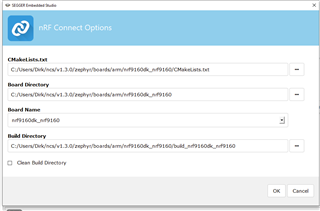
I would now like to open nRF Connect SDK Projekt and get the follwoing error:
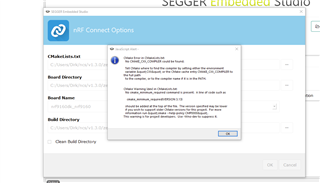
I have added the CXX environment variable, but it did not help 
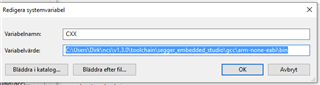
I have installed the latest SDK 1.3.0 using the Toolchain Manager.
I would now like to open nRF Connect SDK Projekt and get the follwoing error:
I have added the CXX environment variable, but it did not help
Hi,
The "CMakeLists.txt" field should point to the CMakeLists.txt of your project, not the board.
E.g. if you want to build the asset_tracker project, the path should be <your NCS folder>/nrf/applications/asset_tracker/CMakeLists.txt.
In addition, if you want to use the modem in the nRF9160, you must build your application as non-secure. To do that, you must select the non-secure version of the board.
I.e. nrf9160dk_nrf9160ns (notice the "ns" at the end).
Finally, in case you are not already doing it, when you install NCS using the Toolchain Manager, you must open SES (or bash/cmd) from the Toolchain Manager for the environment to be configured correctly.
Best regards,
Didrik

Hi Didrik,
thank you for your swift reply and help. now I can build the asset tracker and even the lwm2m_client which will be the base for our application.
Later yesterday the toolchain manager downloaded SDK 1.3.1, but it seems incomplete. When I select the lwm2m_client in the 1.3.1 folder the build process fails again:
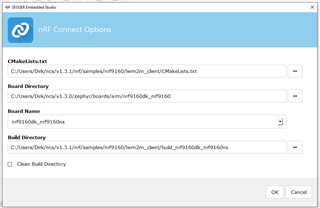
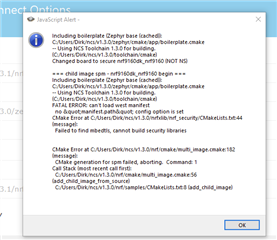
For the time being I will continue with lwm2m_client from the 1.3.0 folder which works. Just to let you know there is a problem with 1.3.1.
Best regards
Dirk

That does not seem right.
The v1.3.1 folder should look like this:
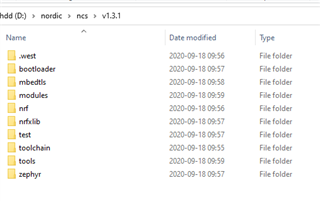
Can you try to "Update SDK"?
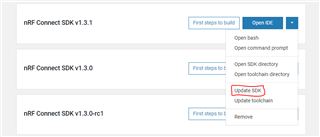
If that does not work, you can try to "Open bash", and run "west update"?
If you get any errors, please send them to me.
Looking at the partition scheme creted by the partition manager, the app partition is 0x6ae00 bytes, or 437,760.
When I build from the comman line, I get the following report:
Memory region         Used Size  Region Size  %age Used
           FLASH:      210832 B     437760 B     48.16%
            SRAM:       79160 B       128 KB     60.39%
        IDT_LIST:         136 B         2 KB      6.64%
(it should also be available in the "output" window in SES.
EMPTY_0:
  address: 0xc000
  placement:
    before:
    - mcuboot_pad
  region: flash_primary
  size: 0x4000
app:
  address: 0x1c200
  region: flash_primary
  size: 0x6ae00
mcuboot:
  address: 0x0
  placement:
    before:
    - mcuboot_primary
  region: flash_primary
  size: 0xc000
mcuboot_pad:
  address: 0x10000
  placement:
    align:
      start: 0x8000
    before:
    - mcuboot_primary_app
  region: flash_primary
  size: 0x200
mcuboot_primary:
  address: 0x10000
  orig_span: &id001
  - spm
  - app
  - mcuboot_pad
  region: flash_primary
  sharers: 0x1
  size: 0x77000
  span: *id001
mcuboot_primary_app:
  address: 0x10200
  orig_span: &id002
  - app
  - spm
  region: flash_primary
  size: 0x76e00
  span: *id002
mcuboot_secondary:
  address: 0x87000
  placement:
    after:
    - mcuboot_primary
    align:
      start: 0x1000
  region: flash_primary
  share_size:
  - mcuboot_primary
  size: 0x77000
otp:
  address: 0xff8108
  region: otp
  size: 0x2f4
settings_storage:
  address: 0xfe000
  placement:
    before:
    - end
  region: flash_primary
  size: 0x2000
spm:
  address: 0x10200
  inside:
  - mcuboot_primary_app
  placement:
    before:
    - app
  region: flash_primary
  size: 0xc000
Hi Didrik,
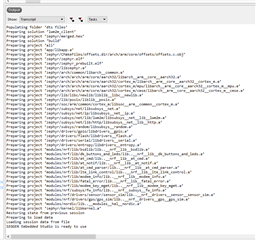
I have tried Update SDK for 1.3.1 from Toolchain Manager without success. I have tried from BASH west update and also ncsmgr init-ncs but I get errors:
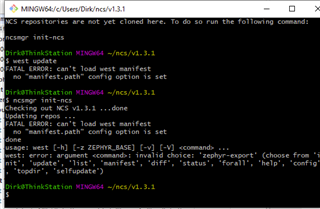
The Output pane in SES does not show memeory usage information after building either.
Hi Didrik,
today I received my nRF9160 DK board and I have the asset tracker running using nrf9160dk_asset_tracker_ltem_2020-04-29_bc7ade8b.hex. Works fine except GPS position even with external antenna and SW12 in CON position and patch antenna near window I dont get GPS readings. Is this part of the LTE-M implementation?
dhandzic said:The Output pane in SES does not show memeory usage information after building either.
If you change the right drop-down menu from "Tasks" to "Output", you should get the same output as from a terminal.
dhandzic said:today I received my nRF9160 DK board and I have the asset tracker running using nrf9160dk_asset_tracker_ltem_2020-04-29_bc7ade8b.hex. Works fine except GPS position even with external antenna and SW12 in CON position and patch antenna near window I dont get GPS readings. Is this part of the LTE-M implementation?
Are you using the iBasis SIM card that came with the DK? Those usually don't get PSM granted by the network. The nRF9160 is not able to use the GPS while also using the LTE radio, and there is usually not enough time for the GPS to get a fix in the intervals where the LTE radio is off unless eDRX or PSM is used.
dhandzic said:I have tried Update SDK for 1.3.1 from Toolchain Manager without success. I have tried from BASH west update and also ncsmgr init-ncs but I get errors:
Are you using VPN? If so, that might be the problem.
Also, have you tried to change the folder used by the Toolchain Manager?
Hi Didrik,
I have been out of office a couple of days. We use NordVPN and I had do uninstall the 1.3.1, turn off the VPN and reinstall 1.3.1 and now all sub directories are there and I can build the lwm2m_client from 1.3.1.
I am using the iBasis SIM while waiting for my Telia SIM to arrive. I will now look at the hardware design of our board. Is there any document containing reference design and layout guidelines?
Running the DK board today I get the LED1 and LED4 blinking and it does not show data in the NRFCLOUD:
Hi Didrik,
I have been out of office a couple of days. We use NordVPN and I had do uninstall the 1.3.1, turn off the VPN and reinstall 1.3.1 and now all sub directories are there and I can build the lwm2m_client from 1.3.1.
I am using the iBasis SIM while waiting for my Telia SIM to arrive. I will now look at the hardware design of our board. Is there any document containing reference design and layout guidelines?
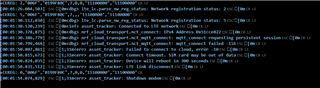
Running the DK board today I get the LED1 and LED4 blinking and it does not show data in the NRFCLOUD:
The LTE Link Monitor shows the following today:
dhandzic said:I will now look at the hardware design of our board. Is there any document containing reference design and layout guidelines?
I am not a hardware expert, so if you have any hardware related questions, you should open a new ticket. But I was directed to this document by one of our hardware experts: https://infocenter.nordicsemi.com/topic/nwp_037/WP/nwp_037/nwp_037_intro.html
dhandzic said:I have been out of office a couple of days. We use NordVPN and I had do uninstall the 1.3.1, turn off the VPN and reinstall 1.3.1 and now all sub directories are there and I can build the lwm2m_client from 1.3.1.
Glad to hear that it now works.
dhandzic said:I am using the iBasis SIM while waiting for my Telia SIM to arrive
That probably explains why you could not get a GPS fix. If you want to test the GPS, you should also try the gps sample. As it does not use LTE (unless you have configured it to also use A-GPS), it should be able to get a fix. Note that you might not be able to get a fix indoors.
dhandzic said:Running the DK board today I get the LED1 and LED4 blinking and it does not show data in the NRFCLOUD:
Did only LED1 and 4 blink?
I can't find that combination in the documentation: https://developer.nordicsemi.com/nRF_Connect_SDK/doc/1.3.0/nrf/applications/asset_tracker/README.html
If you open a serial terminal on your computer, you should see a log from the application on one of the COM ports. What does the log say?
Hi Didrik,
I posted the log above. It is the output from the LTE Link Monitor and it reports a SIM card problem. It is the iBasis SIM I have used last week without a problem.
If you log in to nRF Cloud, and select "SIM cards" in the menu on the left, you should be able to see how much data is left on your iBasis SIM card, along with an option to buy more (note that this will replace any data you have left, not add to it). A TLS handshake can take quite a lot of data, so if the device has been running in a reset-loop doing a TLS handshake each time, the data can be used quite quickly.
Yes, indeed it seems the 10 MB on the iBasis SIM have already been used up when I check the SIM status on nRF Cloud. That is a surprise. We plan to use LwM2M for our application (remote door control) which normally uses very little data, but if TLS handshaking can use a lot of data that might have a big impact on the dataplan we are planning to use. Is there any way to avoid this? Can the use of DTLS and CID reduce that? Is this implemented in Nordics LwM2M client?