This post is older than 2 years and might not be relevant anymore
More Info: Consider searching for newer posts

Why having "nRF Connect - Bluetooth Low Energy" open makes my connection faster

This topic follows devzone.nordicsemi.com/.../why-having-nrf-connect---bluetooth-low-energy-open-makes-my-connection-faster-and-more-stable which was partially fixed (with fix in SoftDevice, connection is more stable and does not freeze anymore, however, it remains slow).

I could reproduce the issue only with code delivered by Nordic:

* Board PCA10028 programmed with "Nordic_HRM" sample program

* pc-ble-driver's heart_rate_collector sample program with very few changes:

  • Added "#include <time.h>" and "clock_t start;" on top of the file
  • Added "start = clock();" after "printf("Discovering primary services\n");fflush(stdout);" in service_discovery_start()
  • Added "clock_t stop = clock();double diffticks=stop-start;double diffms=(diffticks)/(CLOCKS_PER_SEC/1000);printf("time taken %fms\n",diffms);" before "m_hrm_cccd_handle = p_ble_gattc_evt->params.desc_disc_rsp.descs[i].handle;" in on_descriptor_discovery_response

So now the program reports how long service discovery took

Now I ran the sample program:

  • Twice in a raw, without "nRF Connect - Bluetooth Low Energy" being opened, service discovery took around 200ms
  • Then, I open "nRF Connect - Bluetooth Low Energy"
  • Twice in a raw, service discovery took less than 50ms
  • Then, I close "nRF Connect - Bluetooth Low Energy"
  • Once again, service discovery took around 200ms
  • Then, I reopen "nRF Connect - Bluetooth Low Energy"
  • Once again, service discovery took less than 50ms

See the video:
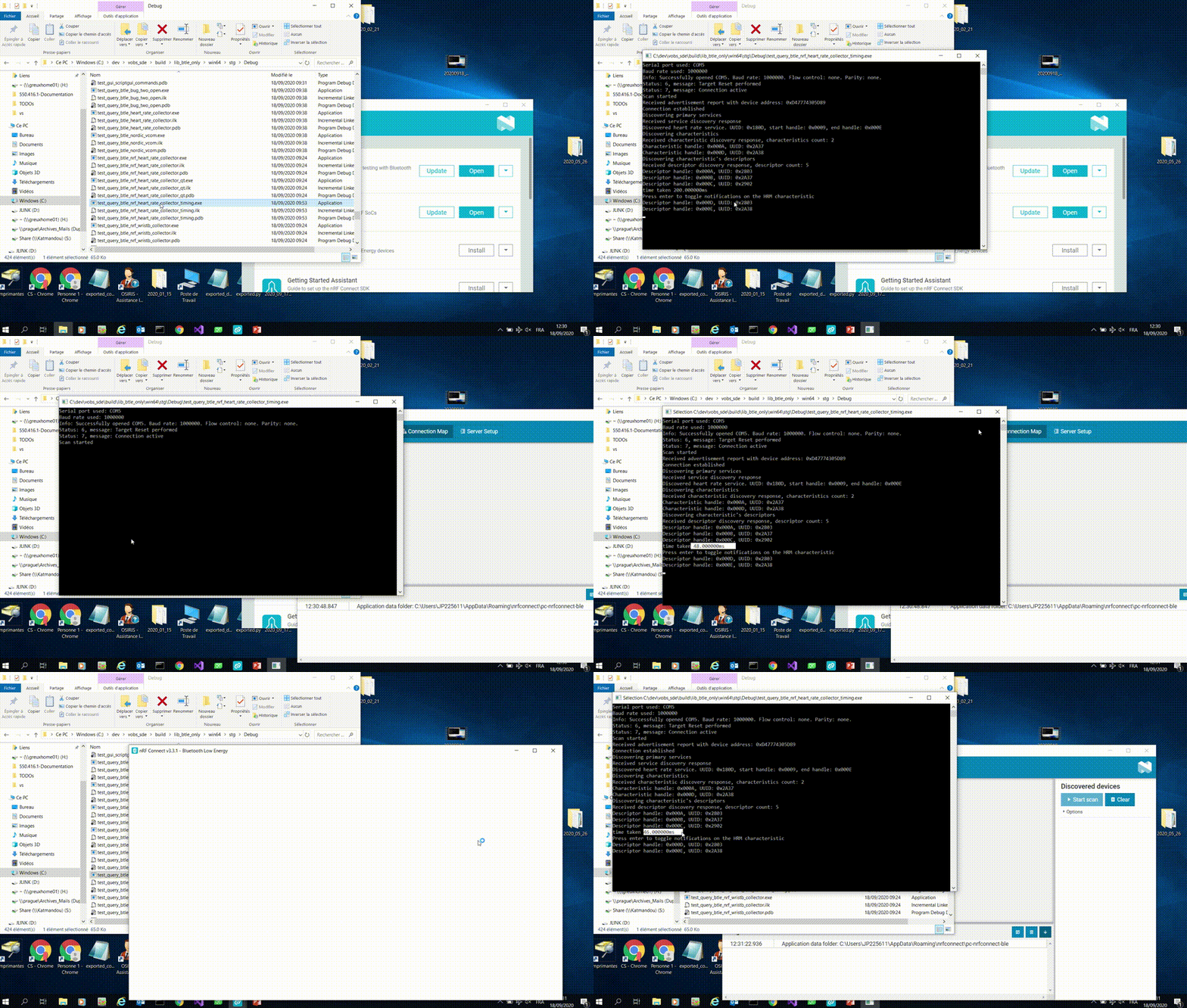
So the fact that "nRF Connect - Bluetooth Low Energy" is opened apparently really makes device discovery faster. Later, for our devices, it also makes data acquisition faster, meaning that witout "nRF Connect - Bluetooth Low Energy" being installed and running on the computer, we cannot reach the throughpout we need for our applications.

Could you please help us understanding what is "nRF Connect - Bluetooth Low Energy" doing at Windows level (or elsewhere) that make the device communication be faster?

Parents Reply Children
  • If needed, I believe we could even consider hosting a Nordic engineer at our place (Grenoble/France) for some days to work together on the problem.

    Jean

  • If that could help, it looks like having JLInk.exe running also makes softdevice run in a faster way. Could there by any link between JLink and "USB CDC ACM" that could explain that?

  • Did some more investigations.

    If I rename "C:\Program Files (x86)\SEGGER\JLink" (as "Jlink_").

    When I run "heart_rate_collector" sample program or my programs using pc-ble-driver 4.1.2, they still work the same.

    But when I run "nRF Connect"/"Bluetooth Low Energy" app, it reports:

    2021-02-05T15:37:00.123Z ERROR Error while probing devices: Error occured when get serial numbers. Errorcode: CouldNotCallFunction (0x9)
    Lowlevel error: INVALID_OPERATION (fffffffe)

    So there is dfinitely something done in the background by "nRF Connect"/"Bluetooth Low Energy" through JLink. And I bet that's what makes the dongle behave right (high speed) when "nRF Connect"/"Bluetooth Low Energy" is opened on the machine.

    Any idea what this could be?

    Kind regards,

    Jean

  • Hi Jean, 

    If you rename the path of the Jlink driver, the error might be expected because of the setting. Do you mean that the service discovery will not run faster in that case?

    Could you also help to test if you open J-Link Commander? Does it also affect the time?

    -Amanda H. 

  • Hello,

    I could do some more testing, here is what we observe here:

    - When nor JLink, nor nRF Connect are opened, service discovery and data transmission is slow

    - When JLink.exe is opened, service discovery and data transmission is faster

    - When "nRF Connect - Bleototh Low Energy" is opened, service discovery and data transmission is faster

    So we could conclude that "nRF Connect - Bleototh Low Energy" may start JLink in the background making everything work fine. But:

    - If I rename "C:\Program Files (x86)\SEGGER", and open "nRF Connect - Bleototh Low Energy", I get an error and, surprisingly, service discovery and data transmission remain faster....while I would expect it to be slow again as "nRF Connect - Bleototh Low Energy" could not run JLink....

    Jean

Related