This post is older than 2 years and might not be relevant anymore
More Info: Consider searching for newer posts
This discussion has been locked.
You can no longer post new replies to this discussion. If you have a question you can start a new discussion

Sending SAADC data via ble_nus_data_send

Hello,

I am trying to send data obtained from a SAADC port via BLE using the ble_nus_data_send function. This must happen periodically at frequencies within the Gigahertz range, ideally.

I started with the ble_app_uart example, from SDK16. Then, I initialized a timer using PPI to trigger an SAADC sampling event, such as in the saadc example.

Inside the saadc_callback function, I process the data and call the ble_nus_data_send function, as seen bellow:

void saadc_callback(nrf_drv_saadc_evt_t const * p_event)
{
    if (p_event->type == NRF_DRV_SAADC_EVT_DONE)
    {
        ret_code_t err_code;

        err_code = nrf_drv_saadc_buffer_convert(p_event->data.done.p_buffer, SAMPLES_IN_BUFFER);
        APP_ERROR_CHECK(err_code);

        saadc2ble_convert();   
        uint16_t length = (uint16_t)UART_TX_BUF_SIZE;
        err_code = ble_nus_data_send(&m_nus, adc_output, &length, m_conn_handle);                  
        APP_ERROR_CHECK(err_code);         
    }
}

the saadc2ble_convert function simply converts the data from uint16_t to uint8_t and the length of the data transmitted via ble_nus_data_send function has not been modified from the initial example:

#define UART_TX_BUF_SIZE                256                                         /**< UART TX buffer size. */
#define SAMPLES_IN_BUFFER  UART_TX_BUF_SIZE/2
static nrf_saadc_value_t adc_buf[SAMPLES_IN_BUFFER];                   //!< Buffer used for storing ADC value.
static uint8_t          adc_output[UART_TX_BUF_SIZE]; //!< Current battery level.


void saadc2ble_convert(){

   int i;

   for(i=0; i<SAMPLES_IN_BUFFER; i++){
       adc_output[i*2] = adc_buf[i] & 0xff;
       adc_output[i*2 + 1] = (adc_buf[i] >> 8) & 0xff;
   }

}

I initialize all in the main function as seen in the next code block:

int main(void)
{
    bool erase_bonds;
    ret_code_t err_code;

    // Initialize.
    uart_init();
    log_init();
    timers_init();    
    buttons_leds_init(&erase_bonds);
    power_management_init();
    ble_stack_init();
    gap_params_init();
    gatt_init();
    services_init();

    saadc_init();
    saadc_sampling_event_init();
    

    advertising_init();
    conn_params_init();

    // Start execution.
    printf("\r\nUART started.\r\n");
    NRF_LOG_INFO("Debug logging for UART over RTT started.");


    advertising_start();

    saadc_sampling_event_enable();


    // Enter main loop.
    for (;;)
    {
        idle_state_handle();
    }
}

Debugging, I see that the SAADC is reading data well, however, I couldn't get any data at the smartphone.

I am getting the error shown on the image:
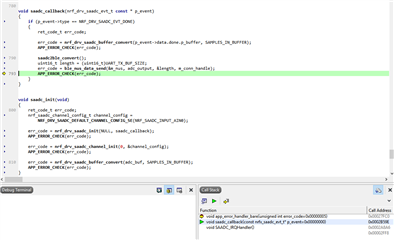
Could anyone help me to find a way to solve this problem?

  • Hello, Karl


    I tested the ADC behavior using a voltage divider with a few resistors such as the image below:

    3.3V and ground are connected to the Vcc and GND from the dev. board. I measured all the voltage values with a multimeter.

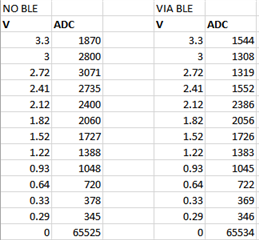
    I read the ADC data using the debugging mode and after BLE transmission, using the nrf_connect app. The ADC values are shown in the following table:

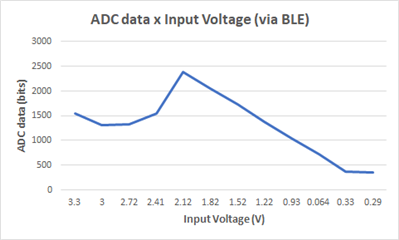
    You can see the result graphically here:

    Not shown in the graph, but as can be seen in the table, when Vin is 0V, the ADC outputs 0xFFF.

    Could you also confirm for me that you did in fact mean Hundreds of Hertz, and not Hundreds of Kilo Hertz?

    I really meant Hundreds of Hertz. We made a few tests with the ADC and found that oversampling helped to improve the graphs but it drastically reduced the transfer speed. Finally, we found that the causes of this problem were actually two:

    1. Reading the ADC data with the j-link connected to the board
    2. Using the USB from the computer to power the system. When we switched to a more stable power source this problem was fixed.

    Now that I think about that, I didn't try changing the input voltage after I used a stable power source. I will try it again and come back here to tell if it worked.

  • Hello Thiago,

    I hope you had a great weekend!

    Thiago said:
    I tested the ADC behavior using a voltage divider with a few resistors such as the image below:

    Since we are now diverging from the original ticket's issue, I would ask you to open a new ticket for the SAADC investigation - to keep the forum tidy and easy to navigate for other users.
    I will reply to your previous comment here, but I ask that you create a new ticket for any followups you might have on this new issue.

    Thiago said:
    I read the ADC data using the debugging mode and after BLE transmission

    By this, do you mean that you specifically sample when the radio is and is not active? When the radio is active, it will draw a lot of current, possibly skewing your samples ( especially if you are using VDD/4 as your SAADC reference).

    Thiago said:
    I really meant Hundreds of Hertz.

    Thank you for confirming! I just needed to make sure, since it seemed your description was leading up to hundreds of kHz-
    It sounds very strange to me that your lower-frequency signal is not recreated properly, when sampled with a frequency which succeeds at sampling a 20 kHz signal. 

    Thiago said:
    We made a few tests with the ADC and found that oversampling helped to improve the graphs but it drastically reduced the transfer speed.

    Yes, oversampling will increase accuracy - since it averages out white-noise, but it will take longer, since you need to trigger x amounts of sampling per sample outputted.
    You could alleviate this by enabling BURST with oversampling, so that the SAADC will take these samples as fast as possible.

    Thiago said:
    Finally, we found that the causes of this problem were actually two:

    I am not sure I understand you here - are you saying that the source of the behavior seen in the graph and table you posted was verified to be the stability of your power source?
    If so, I would say this is a reasonable finding.

    Thiago said:
    Reading the ADC data with the j-link connected to the board

    I do not understand what you mean by this part, please elaborate.

    Thiago said:
    Now that I think about that, I didn't try changing the input voltage after I used a stable power source. I will try it again and come back here to tell if it worked.

    It will be interesting to see if you still see this behavior with a stable power source, but as I said initially, let us continue this in a separate ticket - since it diverges from the original issue of sending SAADC data over BLE.

    Best regards,
    Karl

  • Ok, Karl.

    Thank you very much for your support. I wouldn't have advanced this much if it was not for your help.

    If I was your boss at Nordic Semi, I would give you an extra month of paid vacations!

    Thank you very much!

    Thiago.

  • Hi again,

    Thiago said:

    Thank you very much for your support. I wouldn't have advanced this much if it was not for your help.

    If I was your boss at Nordic Semi, I would give you an extra month of paid vacations!

    Thank you very much!

    I am happy to hear you say that Thiago, thank you very much! :) 

    Please do not hesitate to open a new ticket for your possible issue of power-stability's effect on the SAADC samples, or any other issue or question you might encounter.

    Good luck with your development!

    Best regards,
    Karl

Related