This post is older than 2 years and might not be relevant anymore
More Info: Consider searching for newer posts

How to enable proxy feature in nRF Mesh app?

I have a similar issue with https://devzone.nordicsemi.com/f/nordic-q-a/58524/nrf-mesh-can-t-see-node-feature

I am using nrf5_SDK_for_Mesh_v4.2.0_src for the light switch client example

I have defined the following in nrf_mesh_config_app.h :  

#define MESH_FEATURE_GATT_PROXY_ENABLED  (1)

#define MESH_FEATURE_PB_GATT_ENABLED    (1)  

#define MESH_FEATURE_PROXY_ENABLED (1)

but I still see
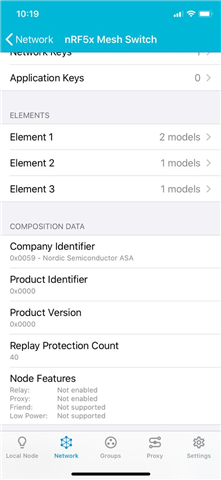
Or could u suggest an alternative method for me to check if the light switch is working as a proxy?

Parents Reply Children
  • Hello Terje,

    Would like to ask if the error mentioned in https://devzone.nordicsemi.com/f/nordic-q-a/58524/nrf-mesh-can-t-see-node-feature have been rectified??

    I am currently using nRF Mesh Application version 2.2.3 on iPhone.

    I connected to the node via the following steps:

    1. Connect the nRF52832 board to my laptop via a USB cable

    2. Open solution for the nrf5_SDK_for_Mesh_v4.2.0_src light switch client example via SEGGER and made the change to include the #define MESH_FEATURE_PROXY_ENABLED (1)

    3. Target -> Connect J-Link -> Erase All

    4. Build -> Build and Run

    5. Open nRF Mesh app on phone 

    6. Provision my nRF5x Light Switch, chose Static OOB and entered the 16-character hexadecimal string.

    7. After successful provisioning, I wait for the app to request composition data and that's all

    But under Node Features, it will still state that Proxy: Not enabled.

  • Hi,

    From what I understand the error you mention in that other thread should be part of what was fixed in version 2.2.3 of the nRF Mesh app, released May 1, 2020, yes, although I am not 100 % certain. Are you still able to reproduce that issue?

    Regarding this issue, thank you for the detailed steps. We have reproduced. It looks like the information from the app that proxy is not enabled is wrong.

    I also reproduced with nRF Mesh for Android. There, after connecting, the state is shown as "ON" initially, but by using the "read state" functionality (available in the Android version of nRF Mesh), the state is then displayed as "OFF". However, after manually toggling the setting to "ON" again through the app, it now consistently shows as "ON", also when re-read. I suspect an error in nRF5 SDK for Mesh, and will report internally.

    (To clarify, it looks like the node claims to have proxy feature "off", until the state has been changed or updated through configuration. So when the app reads the status from the node, it gets told that the feature is off, even if in reality the feature is on.)

    Regards,
    Terje

Related