This post is older than 2 years and might not be relevant anymore
More Info: Consider searching for newer posts

AT+CFUN=0/AT+CFUN=4 is not confirned with "OK".(NCS1.3.0)

I add lte_lc_init_and_connect() to the application "Serial LTE Modem" (SLM) v1.3.0. And then there's no reaction to AT+CFUN=0 or AT+CFUN=4.

static int modem_configure(void){
#if defined(CONFIG_BSD_LIBRARY)
	if (IS_ENABLED(CONFIG_LTE_AUTO_INIT_AND_CONNECT)) {
		/* Do nothing, modem is already turned on */
		/* and connected */
		goto connected;
	}

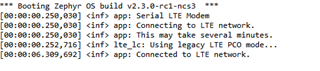
	LOG_INF("Connecting to LTE network.");
	LOG_INF("This may take several minutes.");

#if defined(CONFIG_LWM2M_CARRIER)
	/* Wait for the LWM2M carrier library to configure the */
	/* modem and set up the LTE connection. */
	k_sem_take(&lte_connected, K_FOREVER);
#else /* defined(CONFIG_LWM2M_CARRIER) */
	int err = lte_lc_init_and_connect();
	if (err) {
		LOG_ERR("LTE link could not be established.");
		return err;
	}
#endif /* defined(CONFIG_LWM2M_CARRIER) */

connected:
	LOG_INF("Connected to LTE network.");

#endif /* defined(CONFIG_BSD_LIBRARY) */
	return 0;
}

void start_execute(void)
{
	int err;

	LOG_INF("Serial LTE Modem");

+	while (modem_configure() != 0) {
+		LOG_WRN("Failed to establish LTE connection.");
+		LOG_WRN("Will retry in %d seconds.", 10);
+		k_sleep(K_SECONDS(10));
+	}

	err = modem_info_init();
	if (err) {
		LOG_ERR("Modem info could not be established: %d", err);
		return;
	}

	modem_info_params_init(&modem_param);

	/* Initialize AT Parser */
	err = at_params_list_init(&at_param_list, CONFIG_SLM_AT_MAX_PARAM);
	if (err) {
		LOG_ERR("Failed to init AT Parser: %d", err);
		return;
	}

	err = slm_at_host_init();
	if (err) {
		LOG_ERR("Failed to init at_host: %d", err);
		return;
	}

	k_work_q_start(&slm_work_q, slm_wq_stack_area,
		K_THREAD_STACK_SIZEOF(slm_wq_stack_area), SLM_WQ_PRIORITY);
	k_work_init(&exit_idle_work, exit_idle);
}

I find that the socket_thread_fn() in at_cmd.c does not respond "OK\r\n".

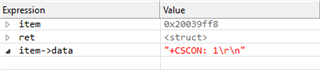
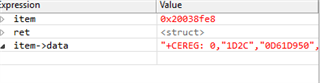
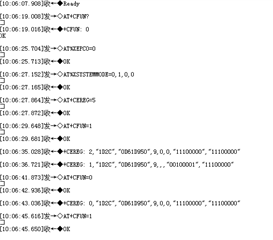
It returns "+CSCON: 1\r\n" and  "+CEREG: 0,"1D2C","0D61D950",9,0,0,"11100000","11100000"\r\n"
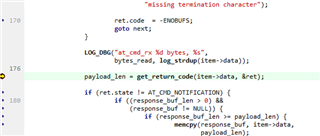
        

So no messages are put on the queue. The program is blocked at_write().

static inline int at_write(const char *const cmd, enum at_cmd_state *state)
{
	int bytes_sent;
	int bytes_to_send = strlen(cmd);
	struct return_state_object ret;

	LOG_DBG("Sending command %s", log_strdup(cmd));

	bytes_sent = send(common_socket_fd, cmd, bytes_to_send, 0);

	if (bytes_sent == -1) {
		LOG_ERR("Failed to send AT command (err:%d)", errno);
		ret.code  = -errno;
		ret.state = AT_CMD_ERROR;
	} else {
		LOG_DBG("Awaiting response for %s", log_strdup(cmd));
		k_msgq_get(&return_code_msq, &ret, K_FOREVER);   //It's blocked here
		LOG_DBG("Bytes sent: %d", bytes_sent);

		if (bytes_sent != bytes_to_send) {
			LOG_ERR("Bytes sent (%d) was not the "
				"same as expected (%d)",
				bytes_sent, bytes_to_send);
		}
	}

	if (state) {
		*state = ret.state;
	}

	return ret.code;
}

Parents
  • Hi,
    Please try the SLM version in NCS v1.3.1 I think this was fixed in that version.

  • I ported the program to version in NCS v1.3.1 and v1.3.2 . The issue was not resolved.

  • Hi,
    The program I sent you is the default SLM version from NCS tag 1.3.2.

    If you are using the default settings and code from the tag 1.3.2 you should have the same code as here.

    Which mfw version are you running?

    Make sure you have a newer modem firmware on the device.


    Please try to just run the application without debugging enabled and using another serial terminal, e.g. using the LTE Link monitor or Termite.


    Default behavior when resetting the board and getting the "ready" signal from SLM and then sending AT+CFUN? is that it is in offline mode (AT+CFUN=4).

    However in your case it is ON for some reason, and you also get a notification +CSCON:0, which let me to belive you are doing some additional stuff you are not mentioning in this case. (e.g. do you have several serial terminals open?)
    Anyway, please follow my suggestions mentioned at the beginning of this post)

  • Hi:

    Which mfw version are you running?

    V1.2.1

    You didn't understand the problem I described. I just added  lte_lc_init_and_connect()  before "ready" to let it network automatically.

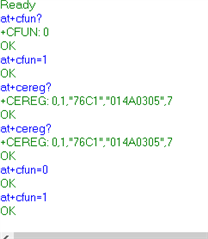
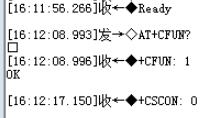
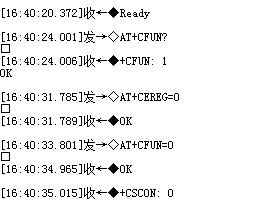
    The default SLM program requires manual network injection and this bug does not occur.Here is mt log:

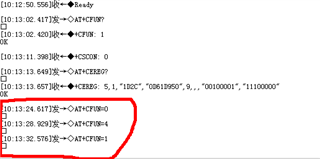
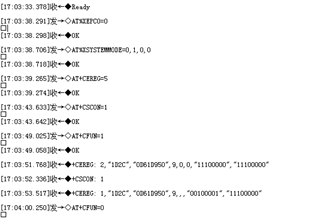
    When I add lte_lc_init_and_connect(), the network is done before "ready". You can see the 128 lines of main.c code above, only added lte_lc_init_and_connect(). Here is my log:

    before "ready":

    after "ready":

    The program in red is blocked.

  • Hi,
    I apologize that I did not notice your modification of the code.

    I am able to reproduce the issue at my side now as well, I have tried to find a workaround that would work with using the LTE Link Control library, and it seems to be affected by the +CEREG notification response.

    A workaround for this issue is to disable the CEREG notification, by sending the command AT+CEREG=0. 
    Then you should be able to Turn OFF and ON the modem without any issues.


    A tip for you is that instead of adding the modem configure in your main.c you can just enable the configuration:

    CONFIG_LTE_AUTO_INIT_AND_CONNECT=y

    in prj.conf to automatically connect at the boot-up.


    Thank you for your observation, I will file a bug report about this.

    Best regards,
    Martin L.

  • Hi:

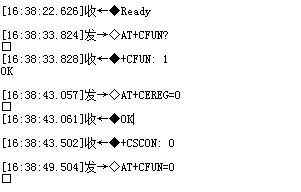
    I tried it your way and found that the problem should be affected by the +CSCON notification response.

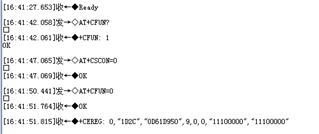
    You can look at the following four scenarios.

    When LTE goes into idle state, the bug reappears.

    Normal when LTE dose not idle and sends the command AT+CEREG=0.

    The default SLM program with CSCON enabled also replicates this problem.

    No other problems occurred when the CSCON notification was disabled.

    Thank you for your answer. I only find this problem exists in SLM. Please let me know if you have a good solution.

  • Hi,
    Thank you for the additional observations and feedback.
    I can replicate what you are seeing as well so we are working on this internally to see what we can to solve this.
    Hopefully this workaround is sufficient for you as of now.

    If not then I would recommend setting up the modem "manually" with the AT commands to avoid the issue entirely. 

Reply Children
Related