This post is older than 2 years and might not be relevant anymore
More Info: Consider searching for newer posts

Please let me know how to use the ble_nus_data_send.

Hello

I am testing sending the value to the app through the ble_app_uart of SDK v17.

I know roughly that I need to use 'ble_nus_data_send', but it is not printed from the nRF Connect app.

int main(void)
{
    bool erase_bonds;

    // Initialize.
    uart_init();
    log_init();
    timers_init();
    buttons_leds_init(&erase_bonds);
    power_management_init();
    ble_stack_init();
    gap_params_init();
    gatt_init();
    services_init();
    advertising_init();
    conn_params_init();

    // Start execution.
    printf("\r\nUART started.\r\n");
    NRF_LOG_INFO("Debug logging for UART over RTT started.");
    advertising_start();

    // Enter main loop.
    for (;;)
    {
        idle_state_handle();

        char data_string1[] = {"TEST"}; //string data1
        uint16_t length1 = sizeof(data_string1); //data length

         
        //send data to app (OK)
        ble_nus_data_send(&m_nus, data_string1, &length1, m_conn_handle); 
    }
}

I've only added the part about text transfer in the example ble_app_uart.

Is there anything I should do wrong or add?

And if I run this example and connect with the app, the connection will be lost in about 30 seconds, so can you tell me why?

Thank you.

Parents
  • Hi,

    Check the return code of `ble_nus_data_send` and see if you get any error.

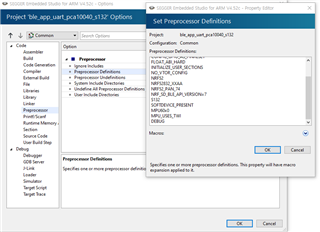
    Define DEBUG in preprocessor symbols debug your application as showed here and here.

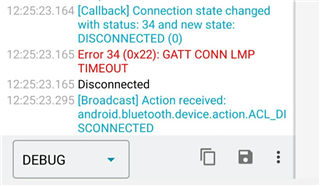
    What reason is showed in nRFConnect app while disconnect happens?

  • Hello. Ali!

    I defined DEBUG and proceeded debugging.
    However, the message is not printed on Debug Terminal.

    sdk_config.h

    // <o> NRF_LOG_DEFAULT_LEVEL  - Default Severity level
     
    // <0=> Off 
    // <1=> Error 
    // <2=> Warning 
    // <3=> Info 
    // <4=> Debug 
    
    #ifndef NRF_LOG_DEFAULT_LEVEL
    #define NRF_LOG_DEFAULT_LEVEL 3
    #endif

    And I checked the messages that were printed when the Bluetooth connection was lost.


    Can you tell anything in this error message?
    And how do I print the message from NRF_LOG_INFO?

    Thank you.

  • Hello,

    I defined DEBUG and proceeded debugging.
    However, the message is not printed on Debug Terminal.
    Check the return code of `ble_nus_data_send` and see if you get any error.

    You will need to add an APP_ERROR_CHECK for the return value of ble_nus_data_send.
    It should look something like this:

    uint32_t err_code;
    err_code = ble_nus_data_send(...)
    APP_ERROR_CHECK(err_code);

    And how do I print the message from NRF_LOG_INFO?

    Are you seeing anything at all in your RTT / debug terminal?

    Can you tell anything in this error message?

    Connection timeout could very well be caused by your application encountering an error, and having to reset, for example.

    Looking forward to resolving this issue together!

    Best regards,
    Karl

  • Hello, Karl!
    Thank you for helping me.

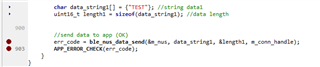
    After adding the err_code to 'ble_nus_data_send', I set up and debugged the brake points.

    int main(void)
    {
        bool erase_bonds;
        uint32_t err_code;
    
        // Initialize.
        uart_init();
        log_init();
        timers_init();
        buttons_leds_init(&erase_bonds);
        power_management_init();
        ble_stack_init();
        gap_params_init();
        gatt_init();
        services_init();
        advertising_init();
        conn_params_init();
    
        mpu_init();
        gpio_init(); 
    
        // Start execution.
        printf("\r\nUART started.\r\n");
        NRF_LOG_INFO("Debug logging for UART over RTT started.");
        advertising_start();
    
        accel_values_t accel_values; //mpu6050
        gyro_values_t gyro_values;
    
        uint16_t app_value[256];
    
        // Enter main loop.
        for (;;)
        {
            idle_state_handle(); //sleep mode, advertising start
    
    
            //MPU6050 CODE
            if (NRF_LOG_PROCESS() == false)
            {
                //app_mpu_read_accel(&accel_values);
                //app_mpu_read_gyro(&gyro_values);
                
                err_code = app_mpu_read_accel(&accel_values);
                APP_ERROR_CHECK(err_code);
                //err_code = app_mpu_read_gyro(&gyro_values);
                //APP_ERROR_CHECK(err_code);
    
                //printf("Aceel_X : %.2f \n", accel_x); 
                //printf("Aceel_Y : %.2f \n", accel_y);
                //printf("Aceel_Z : %.2f \n", accel_z);
    
    
                //BLE send data to app test
                //uint8_t app_accel[index]; //ble data1
                //app_accel[index] = accel_x;
                //index = index + 1;
            }
    
                char data_string1[] = {"TEST"}; //string data1
                uint16_t length1 = sizeof(data_string1); //data length
    
                //send data to app
                err_code = ble_nus_data_send(&m_nus, data_string1, &length1, m_conn_handle); 
                APP_ERROR_CHECK(err_code);
         }
    }
      

    The following error is output when debugging 'APP_ERROR_CHECK'.

    <info> app_timer: RTC: initialized.
    <info> app: Debug logging for UART over RTT started.
    <error> app: ERROR 5 [NRF_ERROR_NOT_FOUND] at C:\Users\Administrator\Desktop\CODE\nRF5_SDK\SDK_17\nRF5_SDK_17.0.0_9d13099\examples\ble_peripheral\ble_app_uart\main.c:891
    PC at: 0x0002AA65
    <error> app: End of error report

    Can you tell me about this error? Do you think I did it right?

    Thank you.

  • Hello,

    schosdas said:
    The following error is output when debugging 'APP_ERROR_CHECK'.
    schosdas said:
    Can you tell me about this error? Do you think I did it right?

    This is very helpful, thank you!
    The ble_nus_data_send function returns NRF_ERROR_NOT_FOUND when either the connection handle is invalid, or if there is no client for the notification.

    The exact code can be seen in the ble_nus.c source code, where the exempt reads:

    if ((conn_handle == BLE_CONN_HANDLE_INVALID) || (p_client == NULL))
    {
        return NRF_ERROR_NOT_FOUND;
    }


    Looking back at your code this is to be expected, since you never check whether you are in a connection or not - there is no point in trying to send / queueing a notification when you are not in a connection. To resolve this, you could add a conditional check in you are in a connection before sending. In essence; you should only call ble_nus_send_data when in a connection.

    For future reference, I would recommend doing this in an event handler rather than in the main loop, since you are probably only queueing a notification for sending following a certain event anyways. This will make your code easier to read and debug, and keep the main minimal with only the idle_state_handler.

    Best regards,
    Karl

  • Hello!

    Successfully printed text on app.

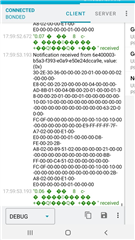
    And now I'm trying to send the sensor values to the app. The sensor values are printed on the app, but the letters are broken as shown in the picture below.

    Is "array[]" wrong?

    (I am using the mpu6050 by connecting it with TWI.)


    static void send_data()
    {
        uint32_t err_code;
    
        accel_values_t accel_values; //mpu6050
        app_mpu_read_accel(&accel_values);          
        err_code = app_mpu_read_accel(&accel_values);
        APP_ERROR_CHECK(err_code);
    
        float accel_x = accel_values.x * 4.0 / 32768.0; //Conversion to decimal places for easy viewing
    
        printf("Aceel_X : %.2f \n", accel_x); //Success!
    
        //char array[10] = "HELLOW"; //Success
        //char array[100]; //Broken character output_1
        //uint8_t array[100]; //Broken character output_2
        uint16_t array[100]; //Broken character output_3
        uint16_t length = sizeof(array);
    
        sprintf(array, "%.2f", accel_x);
    
    
        err_code = ble_nus_data_send(&m_nus, &array, &length, m_conn_handle);
    
        if ((err_code != NRF_ERROR_INVALID_STATE) &&// 
                                (err_code != NRF_ERROR_RESOURCES) &&
                                (err_code != NRF_ERROR_NOT_FOUND))
                            {
                                APP_ERROR_CHECK(err_code);
                            }
    }


       for (;;)
        {
            idle_state_handle(); //sleep mode
            send_data(); //send data to app
            nrf_delay_ms(500);
        }

    Thank you in advance!
Reply
  • Hello!

    Successfully printed text on app.

    And now I'm trying to send the sensor values to the app. The sensor values are printed on the app, but the letters are broken as shown in the picture below.

    Is "array[]" wrong?

    (I am using the mpu6050 by connecting it with TWI.)


    static void send_data()
    {
        uint32_t err_code;
    
        accel_values_t accel_values; //mpu6050
        app_mpu_read_accel(&accel_values);          
        err_code = app_mpu_read_accel(&accel_values);
        APP_ERROR_CHECK(err_code);
    
        float accel_x = accel_values.x * 4.0 / 32768.0; //Conversion to decimal places for easy viewing
    
        printf("Aceel_X : %.2f \n", accel_x); //Success!
    
        //char array[10] = "HELLOW"; //Success
        //char array[100]; //Broken character output_1
        //uint8_t array[100]; //Broken character output_2
        uint16_t array[100]; //Broken character output_3
        uint16_t length = sizeof(array);
    
        sprintf(array, "%.2f", accel_x);
    
    
        err_code = ble_nus_data_send(&m_nus, &array, &length, m_conn_handle);
    
        if ((err_code != NRF_ERROR_INVALID_STATE) &&// 
                                (err_code != NRF_ERROR_RESOURCES) &&
                                (err_code != NRF_ERROR_NOT_FOUND))
                            {
                                APP_ERROR_CHECK(err_code);
                            }
    }


       for (;;)
        {
            idle_state_handle(); //sleep mode
            send_data(); //send data to app
            nrf_delay_ms(500);
        }

    Thank you in advance!
Children
Related