This post is older than 2 years and might not be relevant anymore
More Info: Consider searching for newer posts

Please let me know how to use the ble_nus_data_send.

Hello

I am testing sending the value to the app through the ble_app_uart of SDK v17.

I know roughly that I need to use 'ble_nus_data_send', but it is not printed from the nRF Connect app.

int main(void)
{
    bool erase_bonds;

    // Initialize.
    uart_init();
    log_init();
    timers_init();
    buttons_leds_init(&erase_bonds);
    power_management_init();
    ble_stack_init();
    gap_params_init();
    gatt_init();
    services_init();
    advertising_init();
    conn_params_init();

    // Start execution.
    printf("\r\nUART started.\r\n");
    NRF_LOG_INFO("Debug logging for UART over RTT started.");
    advertising_start();

    // Enter main loop.
    for (;;)
    {
        idle_state_handle();

        char data_string1[] = {"TEST"}; //string data1
        uint16_t length1 = sizeof(data_string1); //data length

         
        //send data to app (OK)
        ble_nus_data_send(&m_nus, data_string1, &length1, m_conn_handle); 
    }
}

I've only added the part about text transfer in the example ble_app_uart.

Is there anything I should do wrong or add?

And if I run this example and connect with the app, the connection will be lost in about 30 seconds, so can you tell me why?

Thank you.

  • Hello!

    Successfully printed text on app.

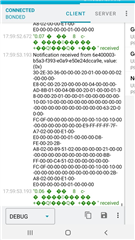
    And now I'm trying to send the sensor values to the app. The sensor values are printed on the app, but the letters are broken as shown in the picture below.

    Is "array[]" wrong?

    (I am using the mpu6050 by connecting it with TWI.)


    static void send_data()
    {
        uint32_t err_code;
    
        accel_values_t accel_values; //mpu6050
        app_mpu_read_accel(&accel_values);          
        err_code = app_mpu_read_accel(&accel_values);
        APP_ERROR_CHECK(err_code);
    
        float accel_x = accel_values.x * 4.0 / 32768.0; //Conversion to decimal places for easy viewing
    
        printf("Aceel_X : %.2f \n", accel_x); //Success!
    
        //char array[10] = "HELLOW"; //Success
        //char array[100]; //Broken character output_1
        //uint8_t array[100]; //Broken character output_2
        uint16_t array[100]; //Broken character output_3
        uint16_t length = sizeof(array);
    
        sprintf(array, "%.2f", accel_x);
    
    
        err_code = ble_nus_data_send(&m_nus, &array, &length, m_conn_handle);
    
        if ((err_code != NRF_ERROR_INVALID_STATE) &&// 
                                (err_code != NRF_ERROR_RESOURCES) &&
                                (err_code != NRF_ERROR_NOT_FOUND))
                            {
                                APP_ERROR_CHECK(err_code);
                            }
    }


       for (;;)
        {
            idle_state_handle(); //sleep mode
            send_data(); //send data to app
            nrf_delay_ms(500);
        }

    Thank you in advance!
  • Hello,

    schosdas said:
    Successfully printed text on app.

    I am happy to hear that this resolved your previous issue! 

    schosdas said:

    And now I'm trying to send the sensor values to the app. The sensor values are printed on the app, but the letters are broken as shown in the picture below.

    Is "array[]" wrong?

    (I am using the mpu6050 by connecting it with TWI.)

    I see that you are receiving help with this issue by my colleague in your other ticket.
    Please refrain from posting duplicate questions in the forum, since this will make it harder to navigate for other users.

    I would also say as he said, and ask if you if any error codes are being generated.
    Perhaps you are attempting to send more than you have configured it for, or perhap your central is expecting to receive an uint8_t array ( as specified by NUS ), while you are actually sending a uint16_t array.

    Best regards,
    Karl

  • schosdas said:
    Thank you!

    No problem at all, I am happy to hear that you got the help you needed and that your issue is resolved!

    Please do not hesitate to open a new ticket if you should encounter any issues or questions in the future.

    Good luck with your development!

    Best regards,
    Karl

Related