This post is older than 2 years and might not be relevant anymore
More Info: Consider searching for newer posts

nrf5340-pdk locked

Hi. I think I did a huge error by uploading the soft device S140 after erasing all.

Which lead to the device being locked. I tried to use J-link GDB Server still the issue persist.

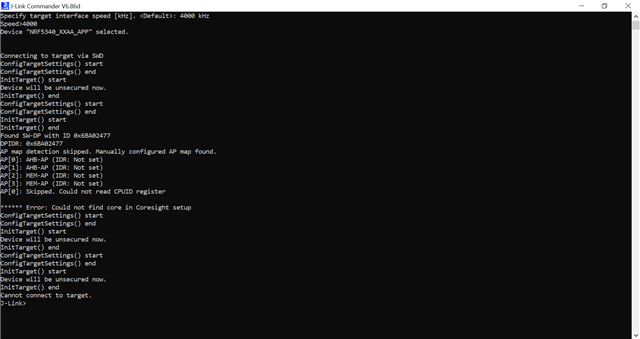
Please assist on this matter. Attached is j-link commander log. It shows that it could not find core in Coresight setup.
Thank you.

  • Hi.

    This is the log file from nRF Connect Programmer:

    2020-10-19T01:27:27.934Z INFO Application data folder: C:\Users\Mathangopal\AppData\Roaming\nrfconnect\pc-nrfconnect-programmer
    2020-10-19T01:27:28.241Z DEBUG App pc-nrfconnect-programmer v1.4.6 official
    2020-10-19T01:27:28.241Z DEBUG App path: C:\Users\Mathangopal\.nrfconnect-apps\node_modules\pc-nrfconnect-programmer
    2020-10-19T01:27:28.241Z DEBUG nRFConnect 3.6.0 is supported by the app (^3.6.0)
    2020-10-19T01:27:28.241Z DEBUG nRFConnect path: C:\Users\Mathangopal\AppData\Local\Programs\nrfconnect\resources\app.asar
    2020-10-19T01:27:28.242Z DEBUG HomeDir: C:\Users\Mathangopal
    2020-10-19T01:27:28.242Z DEBUG TmpDir: C:\Users\MATHAN~1\AppData\Local\Temp
    2020-10-19T01:27:28.272Z INFO Using nrfjprog library 10.9.0, pc-nrfjprog-js 1.7.3
    2020-10-19T01:27:33.057Z INFO Using nrfjprog to communicate with target
    2020-10-19T01:27:34.220Z INFO Using J-Link Software version 6.86
    2020-10-19T01:27:35.842Z INFO Segger serial: 960161431
    2020-10-19T01:27:35.843Z INFO Segger speed: 2000 kHz
    2020-10-19T01:27:35.843Z INFO Segger version: J-Link OB-K22-NordicSemi compiled Jan 21 2020 17:33:01
    2020-10-19T01:27:35.845Z INFO Core probed: 960161431.
    2020-10-19T01:27:35.846Z INFO Core RAM: 512KiB.
    2020-10-19T01:27:35.846Z INFO Core ROM: 1024KiB in pages of 4KiB.
    2020-10-19T01:27:36.832Z ERROR Error when closing nrfjprog: Error: Error occured when close opened device. Errorcode: CouldNotResetDevice (0x5)
    Lowlevel error: CANNOT_CONNECT (fffffff5)

    2020-10-19T01:27:36.832Z INFO Model: NRF5340_xxAA_ENGA.
    2020-10-19T01:27:36.837Z ERROR Error when getting device info: Error: Error: Error occured when open device long term. Errorcode: CouldNotOpenDevice (0x4)
    Lowlevel error: INVALID_OPERATION (fffffffe)

    2020-10-19T01:27:36.843Z ERROR Error when closing nrfjprog: Error: Error occured when close opened device. Errorcode: CouldNotOpenDevice (0x4)
    Lowlevel error: INVALID_OPERATION (fffffffe)

    Thank you.

  • Hi. I found the solution to this problem.

    The nrfjprog is not updated to the latest version when SDK connect is downloaded.

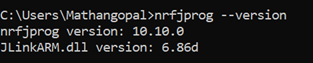
    So I have downloaded the latest nRF Command Line Tools. Then, I checked the version of nrfjprog.


    It should be 10.10.0. Previously, it was 6.xx.xx.

    Then I tried the recover command.

    Then, I went to nRF Connect Programmer.

    Then I connect to device and read.

    The device is recover successfully.

Related