This post is older than 2 years and might not be relevant anymore
More Info: Consider searching for newer posts

Failed to manually build blinky example

Had tried to build it from the IDE before.  Couldn't do it.
Tried to build manually, got exactly the same error I was getting in the IDE.

Parsing C:/Users/mario.raposo/zephyrproject/zephyr/Kconfig
Loaded configuration 'C:/Users/mario.raposo/zephyrproject/zephyr/build/zephyr/.config'
No change to configuration in 'C:/Users/mario.raposo/zephyrproject/zephyr/build/zephyr/.config'
No change to Kconfig header in 'C:/Users/mario.raposo/zephyrproject/zephyr/build/zephyr/include/generated/autoconf.h'
CMake Error at ../../../cmake/extensions.cmake:1557 (message):
Assertion failed: The toolchain is unable to build a dummy C file. See
CMakeError.log.
Call Stack (most recent call first):
../../../CMakeLists.txt:42 (assert)


-- Configuring incomplete, errors occurred!
See also "C:/Users/mario.raposo/zephyrproject/zephyr/build/CMakeFiles/CMakeOutput.log".
See also "C:/Users/mario.raposo/zephyrproject/zephyr/build/CMakeFiles/CMakeError.log".

  • There is a previous Devzone ticket where the solution is to delete the CMake cache.
    "Can you try to delete ~/Library/Caches/zephyr before building and see if that helps?"


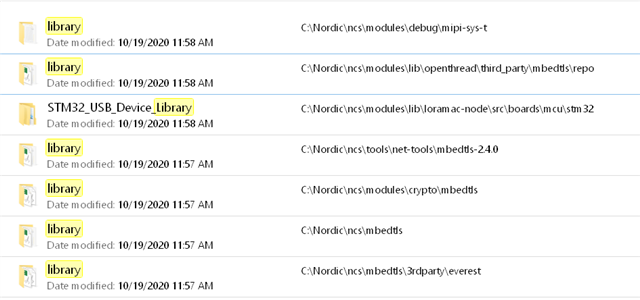
       A: I've tried that before, but first, there are only these Library folders on my installation:


       None of them have a .cache folder on it.
       There is a cache folder at C:\Nordic\ncs\zephyr\.cache, which I deleted but it did not help me

    Have you followed the instructions here, https://developer.nordicsemi.com/nRF_Connect_SDK/doc/latest/nrf/gs_installing.html#gs-installing 

        Yes I did.

    Do you have the nrf Command line tools?
    See this section for instructions on how to set up command line build environment.

        I'll look at it, but my goal is to be able to build and debug at real time (breakpoints, etc...)

    If none of the above helps can you provide the CMakeError.log file ?

        I can't. At this point I am stuck.
        The Open IDE option on the Toolchain manager is not there anymore.
        I tried to remove and re-install, delete the installation folder and re-install, but now the option is gone.

  • I was able to compile again after deleting some extra files.
    I attached my log files (asset tracker build) for your review:


    Compiling the C compiler identification source file "CMakeCCompilerId.c" failed.
    Compiler: C:/Users/mario.raposo/ncs/v1.3.1/toolchain/opt/bin/arm-none-eabi-gcc.exe 
    Build flags: 
    Id flags:  
    
    The output was:
    1
    c:/users/mario.raposo/ncs/v1.3.1/toolchain/opt/bin/../lib/gcc/arm-none-eabi/9.2.1/../../../../arm-none-eabi/bin/ld.exe: c:/users/mario.raposo/ncs/v1.3.1/toolchain/opt/bin/../lib/gcc/arm-none-eabi/9.2.1/../../../../arm-none-eabi/lib\libc.a(lib_a-exit.o): in function `exit':
    exit.c:(.text.exit+0x2c): undefined reference to `_exit'
    collect2.exe: error: ld returned 1 exit status
    
    
    Compiling the CXX compiler identification source file "CMakeCXXCompilerId.cpp" failed.
    Compiler: C:/Users/mario.raposo/ncs/v1.3.1/toolchain/opt/bin/arm-none-eabi-gcc.exe 
    Build flags: 
    Id flags:  
    
    The output was:
    1
    c:/users/mario.raposo/ncs/v1.3.1/toolchain/opt/bin/../lib/gcc/arm-none-eabi/9.2.1/../../../../arm-none-eabi/bin/ld.exe: c:/users/mario.raposo/ncs/v1.3.1/toolchain/opt/bin/../lib/gcc/arm-none-eabi/9.2.1/../../../../arm-none-eabi/lib\libc.a(lib_a-exit.o): in function `exit':
    exit.c:(.text.exit+0x2c): undefined reference to `_exit'
    collect2.exe: error: ld returned 1 exit status
    
    
    Performing C SOURCE FILE Test check_C__nostartfiles__nostdlib__isystem__c__users_mario_raposo_ncs_v1_3_1_toolchain_opt_bin____lib_gcc_arm_none_eabi_9_2_1_include___isystem__c__users_mario_raposo_ncs_v1_3_1_toolchain_opt_bin____lib_gcc_arm_none_eabi_9_2_1_include_fixed___Wl___unresolved_symbols_ignore_in_object_files__Wl___entry_0 failed with the following output:
    Change Dir: C:/Users/mario.raposo/ncs/v1.3.1/nrf/applications/asset_tracker/build_thingy91_nrf9160ns/CMakeFiles/CMakeTmp
    
    Run Build Command:"C:/Users/mario.raposo/ncs/v1.3.1/toolchain/opt/bin/ninja.exe" "cmTC_3e03c"
    [1/2] Building C object CMakeFiles/cmTC_3e03c.dir/src.c.obj
    
    [2/2] Linking C executable cmTC_3e03c
    
    FAILED: cmTC_3e03c 
    
    cmd.exe /C "cd . && C:\Users\mario.raposo\ncs\v1.3.1\toolchain\opt\bin\arm-none-eabi-gcc.exe -Dcheck_C__nostartfiles__nostdlib__isystem__c__users_mario_raposo_ncs_v1_3_1_toolchain_opt_bin____lib_gcc_arm_none_eabi_9_2_1_include___isystem__c__users_mario_raposo_ncs_v1_3_1_toolchain_opt_bin____lib_gcc_arm_none_eabi_9_2_1_include_fixed___Wl___unresolved_symbols_ignore_in_object_files__Wl___entry_0 -nostartfiles -nostdlib -isystem "c:/users/mario.raposo/ncs/v1.3.1/toolchain/opt/bin/../lib/gcc/arm-none-eabi/9.2.1/include" -isystem "c:/users/mario.raposo/ncs/v1.3.1/toolchain/opt/bin/../lib/gcc/arm-none-eabi/9.2.1/include-fixed" -Wl,--unresolved-symbols=ignore-in-object-files -Wl,--entry=0   CMakeFiles/cmTC_3e03c.dir/src.c.obj  -o cmTC_3e03c   && cd ."
    
    The system cannot find the path specified.
    
    ninja: build stopped: subcommand failed.
    
    
    Source file was:
    int main(void) { return 0; }
    
    The target system is: Generic - 2.3.0 - arm
    The host system is: Windows - 10.0.17134 - AMD64
    Compiling the C compiler identification source file "CMakeCCompilerId.c" succeeded.
    Compiler: C:/Users/mario.raposo/ncs/v1.3.1/toolchain/opt/bin/arm-none-eabi-gcc.exe 
    Build flags: 
    Id flags: -c 
    
    The output was:
    0
    
    
    Compilation of the C compiler identification source "CMakeCCompilerId.c" produced "CMakeCCompilerId.o"
    
    The C compiler identification is GNU, found in "C:/Users/mario.raposo/ncs/v1.3.1/nrf/applications/asset_tracker/build_thingy91_nrf9160ns/CMakeFiles/3.13.4/CompilerIdC/CMakeCCompilerId.o"
    
    Compiling the CXX compiler identification source file "CMakeCXXCompilerId.cpp" succeeded.
    Compiler: C:/Users/mario.raposo/ncs/v1.3.1/toolchain/opt/bin/arm-none-eabi-gcc.exe 
    Build flags: 
    Id flags: -c 
    
    The output was:
    0
    
    
    Compilation of the CXX compiler identification source "CMakeCXXCompilerId.cpp" produced "CMakeCXXCompilerId.o"
    
    The CXX compiler identification is GNU, found in "C:/Users/mario.raposo/ncs/v1.3.1/nrf/applications/asset_tracker/build_thingy91_nrf9160ns/CMakeFiles/3.13.4/CompilerIdCXX/CMakeCXXCompilerId.o"
    
    Checking whether the ASM compiler is GNU using "--version" matched "(GNU assembler)|(GCC)|(Free Software Foundation)":
    arm-none-eabi-gcc.exe (GNU Tools for Arm Embedded Processors 9-2019-q4-major) 9.2.1 20191025 (release) [ARM/arm-9-branch revision 277599]
    Copyright (C) 2019 Free Software Foundation, Inc.
    This is free software; see the source for copying conditions.  There is NO
    warranty; not even for MERCHANTABILITY or FITNESS FOR A PARTICULAR PURPOSE.


  • I was able to get a little bit forward.
    Now getting a "undefined reference to _exit" error.
    I opened a new case:

    devzone.nordicsemi.com/.../undefined-reference-to-_exit-when-building-blinky

  • You can get the latest release of the GNU Arm Embedded Toolchain here and older release here
    check out this video for a visualization of the IDE use and more: https://youtu.be/1jgImp7FBy8?t=877 
    What is the command you use in terminal when trying to build?

    Do you use  west build -b thingy91_nrf9160ns

    And do you still get the same terminal output:

    -- Cache files will be written to: C:/Nordic/ncs/zephyr/.cache
    -- Found dtc: C:/ProgramData/chocolatey/bin/dtc.exe (found suitable version "1.4.7", minimum required is "1.4.6")
    -- Found toolchain: gnuarmemb (C:\gnuarmemb)
    -- Found BOARD.dts: C:/Nordic/ncs/nrf/boards/arm/thingy91_nrf9160/thingy91_nrf9160ns.dts
    -- Generated zephyr.dts: C:/Nordic/ncs/zephyr/build/zephyr/zephyr.dts
    -- Generated devicetree_unfixed.h: C:/Nordic/ncs/zephyr/build/zephyr/include/generated/devicetree_unfixed.h
    Parsing C:/Nordic/ncs/zephyr/Kconfig
    Loaded configuration 'C:/Nordic/ncs/nrf/boards/arm/thingy91_nrf9160/thingy91_nrf9160ns_defconfig'
    Merged configuration 'C:/Nordic/ncs/zephyr/samples/basic/blinky/prj.conf'
    Configuration saved to 'C:/Nordic/ncs/zephyr/build/zephyr/.config'
    Kconfig header saved to 'C:/Nordic/ncs/zephyr/build/zephyr/include/generated/autoconf.h'
    -- The C compiler identification is GNU 8.3.1
    -- The CXX compiler identification is GNU 8.3.1
    -- The ASM compiler identification is GNU
    -- Found assembler: C:/gnuarmemb/bin/arm-none-eabi-gcc.exe
    CMake Error at ../../../cmake/extensions.cmake:1557 (message):
    Assertion failed: The toolchain is unable to build a dummy C file. See
    CMakeError.log.
    Call Stack (most recent call first):
    ../../../CMakeLists.txt:42 (assert)
    
    
    -- Configuring incomplete, errors occurred!
    See also "C:/Nordic/ncs/zephyr/build/CMakeFiles/CMakeOutput.log".
    See also "C:/Nordic/ncs/zephyr/build/CMakeFiles/CMakeError.log".
    FATAL ERROR: command exited with status 1: 'C:\Program Files\CMake\bin\cmake.EXE' '-DWEST_PYTHON=c:\users\mario.raposo\appdata\local\programs\python\python37\python.exe' '-BC:\Nordic\ncs\zephyr\build' '-SC:\Nordic\ncs\zephyr\samples\basic\blinky' -GNinja


    Your CMakeOutput file look good the CMakeError has a build command fail that C executable Linking. 
    resulting in a can not fin path. 

    Linking C executable cmTC_3e03c
    FAILED: cmTC_3e03c
    :
    :
    The system cannot find the path specified.


    We can continue the discussion on either case if the problem is related, i will get back to you on the topic of each case if there the problems are not related.
    Regards,
    Jonathan

  • "You can get the latest release of the GNU Arm Embedded Toolchain here"

          I did and it did not help me.  The issue persists.

    "Check out this video for a visualization of the IDE use and more: 
    https://youtu.be/1jgImp7FBy8?t=877 "

          I did.  Thank you for the link, but it did not help me, since I tried both methods (Toolchain manager and manual) and the issue is the same.

    "What is the command you use in terminal when trying to build? Do you use  west build -b thingy91_nrf9160ns ?"

         Yes.

Related