Hello Nordic people,
Is anyone knows how to set the Nrf52840 buttons high automatically without human interface while button press?
Any examples or Related API are available?
Hello Nordic people,
Is anyone knows how to set the Nrf52840 buttons high automatically without human interface while button press?
Any examples or Related API are available?
I don't understand the question - please explain.
Do you mean you're trying to simulate a person pressing a button? For testing, perhaps?
simple @awneil
Example Initially I have initialized OLED, I have programmed in a way that for screen change, I have to press the button on DK board one - one time.
Instead of impressing each time, is there any possibility to high the button automatically through an API?
Still not clear why you'd want to do that.
Surely, if you want the screen to change programmatically, you just call whatever code would get activated by the button press ?
Still not clear why you'd want to do that.
Surely, if you want the screen to change programmatically, you just call whatever code would get activated by the button press ?
Yeah I can change the screen programmatically, But I'm curious to know whether we can enable the button high via programming if yes how?
What would be the point in that?
Rather than doing that to indirectly get the action you want, why not just do it directly?
Anyhow, have you studied the relevant section in the Product Specification:
https://infocenter.nordicsemi.com/topic/ps_nrf52840/gpio.html?cp=4_0_0_5_8
Also the DK deocumentation:
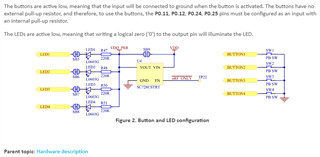
Note that it tells you the buttons are active-low; ie, pressing a button takes it low - not high.

To explain further.
For manual operation, you presumably have something like this:
if( button_is_pressed )
{
change_screen();
}
So, rather than trying to mess about with simulating the button press, why not simply call change_screen() ?
That makes for far clearer & cleaner programming.