Hi,


Hi,


Hello, CARL!!
Could you first state what Thingy:91 version you have and whether or not you are using the Toolchain manager?
Ans: tried to debug thingy 91 using j link Edu using SWD pins.
Secondly, you are flashing the Zephyr hello_world sample, correct? There are not supposed to be any blinking LEDs when using that sample, and for MCU boot to function with the sample it must be added in prj.conf like this
CONFIG_MCUBOOT=y
Hi again, Rahul.
Thank you for the response. What version of the Thingy:91 are you using?
Rkidechaa said:I have done the research for the error and that could be one possibility that space between my user name. which are not allowing segger to connect path.
This is most likely correct! Changing the username and updating the path correctly can be a bit of a hassle, but Microsoft have described the approach here. Anyway, what kind of hang/error did you get on the other PC? Could you provide some screenshots/logs?
We do not have any video tutorial, but we provide a quite extensive guide on getting started with the Thingy:91. It also describes how you can setup projects in SES.
Most samples are configured for output over UART, which will require a micro-usb to be able to display it in the terminal. Alternatively the sample can be configured to use RTT. The output from the debugger will then be available with the Segger RTT Viewer.
Best regards,
Carl Richard
Hello, carl!!
Thank you for your reply.
What version of the Thingy:91 are you using?
Version :PCA20035
Regarding the error will sport a screenshot shortly. Do you have any features where I can upload the whole procedure?
Thanks,
Rahul Kidecha
Hello Carl,
Now to avoid all the problems what I have done is created a new account with just a name and tried to build and flash the hello program using j link Edu.
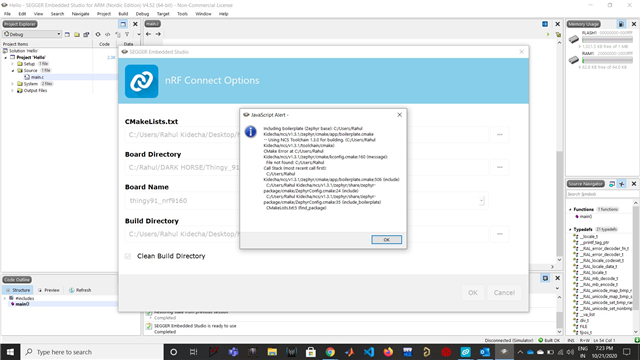
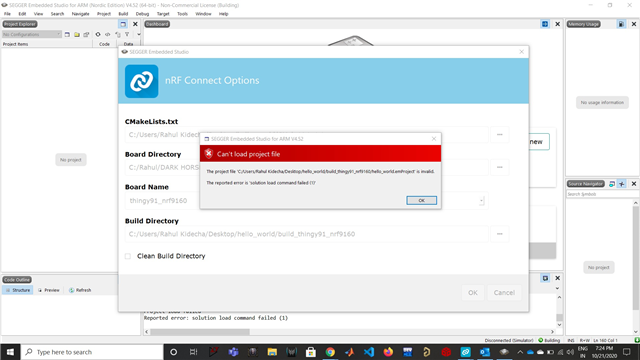
we tried 1st time everything worked well but we were not able to see the output on the terminal. So we tried to flash it again but now, what is happening that when I open segger with toolchain manager software was getting hang not allowing to anything?
Also showing below error everytime when I click on open IDE.

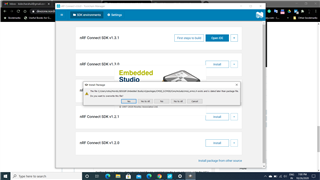
Now when clicking on Yes to all or No to all. software is getting the hang (while j link Edu is connected)

Another thing is that now when I tried to load the pre-compiled Hex file it was not going under the MCU mode. (I know how to set in MCU mode)

Questions:
might be earlier we have done some mistake while flashing the hello program which led to any failure of the thingy:91?
can we reset thingy 91 OR clear the flash memory?
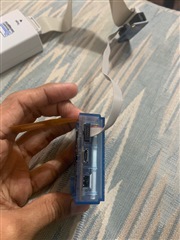
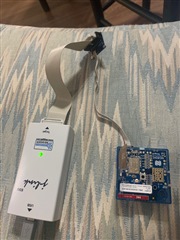
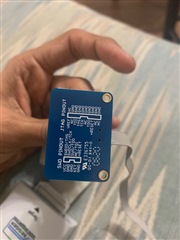
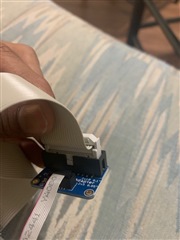
I am enclosing the photos of physical connection pf thingy 91 with PC using j link Edu.( Let me know if you find any problem in connection)


With regards,
Rahul Kidecha
Hello Carl,
Now to avoid all the problems what I have done is created a new account with just a name and tried to build and flash the hello program using j link Edu.
we tried 1st time everything worked well but we were not able to see the output on the terminal. So we tried to flash it again but now, what is happening that when I open segger with toolchain manager software was getting hang not allowing to anything?
Also showing below error everytime when I click on open IDE.

Now when clicking on Yes to all or No to all. software is getting the hang (while j link Edu is connected)

Another thing is that now when I tried to load the pre-compiled Hex file it was not going under the MCU mode. (I know how to set in MCU mode)

Questions:
might be earlier we have done some mistake while flashing the hello program which led to any failure of the thingy:91?
can we reset thingy 91 OR clear the flash memory?
I am enclosing the photos of physical connection pf thingy 91 with PC using j link Edu.( Let me know if you find any problem in connection)


With regards,
Rahul Kidecha
Hello, Rahul.
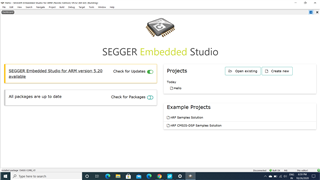
I see. I believe that the "install package" prompt you are getting when opening Segger is because you already have a standalone Segger installation on your computer. Correct? You can try one of the fixes described in this thread. However, the error should be harmless.
When it comes to SES hanging. Is it totally unresponsive, or are you able to do some things (like opening a new project for example)? It can be a bit slow and stutter at times, mind you.
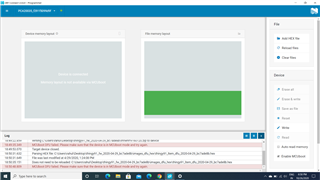
When it comes to the Thingy:91 programming, it may be that the bootloader was overwritten (which is required for MCU Boot). Are you able to read the memory of the Thingy:91 in the nRF Connect programmer app when it's connected using the JLINK? If so, post a screenshot of it here.
To reenable MCU Boot I recommend flashing one of the full images from the Thingy:91 firmware package, located on the product page.
Best regards,
Carl Richard
Hi Carl,
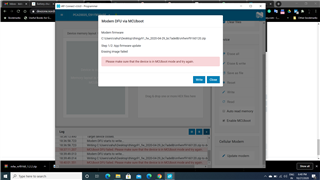
I got your point regarding MCU boot mode. I did it earlier successfully but now when I tried to reload the modem firmware but every time showing the below error.

But when I tried to set nRF52840 into MCU boot mode it goes under boot mode but nRF9160 did not.
So the question is we tried to load the hello_world program using J link Edu (which was not done successfully) due to this IC got damaged or blocked? otherwise, it should go under MCU boot mode.
Might be we had done some mistake while flashing the code but there should be the other way to reset the nRF9160 or bring it back to life.
Can we upload the modem file using J link Edu?
Thanks and Regards,
Rahul Kidecha
I see.
What kind of errors did you experience when trying to flash hello_world with the JLink EDU? Did you try to do it using the nRF Connect Programmer app? The IC is probably not damaged, but as mentioned the bootloader may have been erased (which is why MCUBoot won't work).
If the bootloader is erased the only way to restore the device is using a debugger, like the JLink Edu. The debugger can also be used to flash the modem file.
What are you seeing in the nRF Connect programmer app when connected through the JLink Edu? Please provide a screenshot.
Best regards,
Carl Richard