Hi,


Hi,


Hi Carl,
What kind of errors did you experience when trying to flash hello_world with the JLink EDU?
Yes I tried to flash hello_world with JLink EDU
Did you try to do it using the nRF Connect Programmer app?
I was following this link to debug thingy 91 using segger.
developer.nordicsemi.com/.../ug_thingy91.html
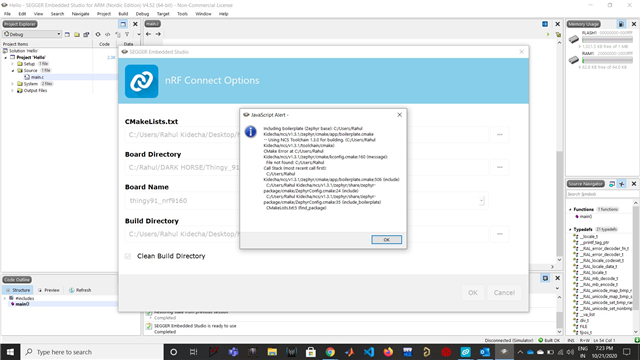
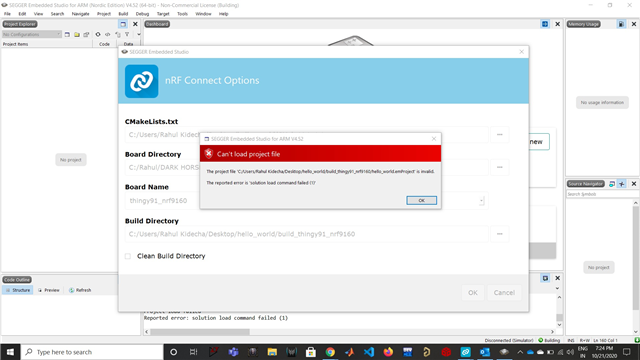
When I am debugging using Segger software was getting hang and not allowing me to do anything. after step 3 ( doing setting nrf connect setting )
Do I need to make changes in the directory?
Regards,
Rahul Kidecha
Hi Carl,
What kind of errors did you experience when trying to flash hello_world with the JLink EDU?
Yes I tried to flash hello_world with JLink EDU
Did you try to do it using the nRF Connect Programmer app?
I was following this link to debug thingy 91 using segger.
developer.nordicsemi.com/.../ug_thingy91.html
When I am debugging using Segger software was getting hang and not allowing me to do anything. after step 3 ( doing setting nrf connect setting )
Do I need to make changes in the directory?
Regards,
Rahul Kidecha
Hi again, Rahul!
It seems like the bootloader may have been deleted. Could you try to follow the steps below closely:
You should now have the asset_tracker including MCUBoot flashed to your Thingy:91. When programming applications in the future with the JLINK Edu make sure that they have MCUBoot enabled by having "CONFIG_BOOTLOADER_MCUBOOT=y" in prj.conf, or else the bootloader will be overwritten.
When it comes to your issues with opening a project in Segger Embedded Studio do the following:
1. Make sure that there are no "space" characters in the path of the SDK. I see that you have "DARK HORSE" as a part of your path, which will result in errors because of the space character.
2. Program the application for the correct board name: thingy91_nrf9160ns
Hope this works!
Best regards,
Carl Richard