This post is older than 2 years and might not be relevant anymore
More Info: Consider searching for newer posts

Issues Getting Started in nRF Connect SDK

Hi,

I followed all the steps to get NCS up and running with SEGGER Embedded Studio. However, when I try to open an example, I get this error: 

Including boilerplate (Zephyr base): /Users/kylemassa/Documents/proximity/covid-proximity-tracing/ncs/zephyr/cmake/app/boilerplate.cmake

CMake Warning at /Users/kylemassa/Documents/proximity/covid-proximity-tracing/ncs/zephyr/cmake/host-tools.cmake:36 (message):

Could NOT find working dtc: Found dtc (/usr/local/bin/dtc), but failed to

load with:

Call Stack (most recent call first):

/Users/kylemassa/Documents/proximity/covid-proximity-tracing/ncs/zephyr/cmake/app/boilerplate.cmake:509 (include)

/Users/kylemassa/Documents/proximity/covid-proximity-tracing/ncs/zephyr/share/zephyr-package/cmake/ZephyrConfig.cmake:24 (include)

/Users/kylemassa/Documents/proximity/covid-proximity-tracing/ncs/zephyr/share/zephyr-package/cmake/ZephyrConfig.cmake:35 (include_boilerplate)

CMakeLists.txt:4 (find_package)
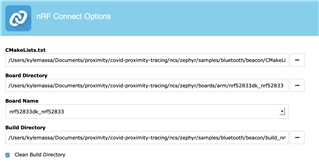
CMake Error at /Users/kylemassa/Documents/proximity/covid-proximity-tracing/ncs/zephyr/cmake/compiler/gcc/generic.cmake:8 (message):

Zephyr was unable to find the toolchain. Is the environment misconfigured?

User-configuration:

ZEPHYR_TOOLCHAIN_VARIANT: gnuarmemb

Internal variables:

CROSS_COMPILE: /Users/kylemassa/gnuarmemb/bin/arm-none-eabi-

TOOLCHAIN_HOME: /Users/kylemassa/gnuarmemb

Call Stack (most recent call first):

/Users/kylemassa/Documents/proximity/covid-proximity-tracing/ncs/zephyr/cmake/generic_toolchain.cmake:70 (include)

/Users/kylemassa/Documents/proximity/covid-proximity-tracing/ncs/zephyr/cmake/app/boilerplate.cmake:527 (include)

/Users/kylemassa/Documents/proximity/covid-proximity-tracing/ncs/zephyr/share/zephyr-package/cmake/ZephyrConfig.cmake:24 (include)

/Users/kylemassa/Documents/proximity/covid-proximity-tracing/ncs/zephyr/share/zephyr-package/cmake/ZephyrConfig.cmake:35 (include_boilerplate)

CMakeLists.txt:4 (find_package)

It looks like there may be an issue with where my toolchain is located? I'm not sure how to correct this though, and I haven't been able to find any posts about my exact problem. Does anyone know how I might be able to fix this?

Thanks!

Parents
  • Hi,

    What version of NCS are you using? Have you been able to build other projects successfully? Are you on windows/mac/linux

    I tried NCS v1.3.0 and was able to build the Zephyr>samples>bluetooth example successfully.


    Zephyr was unable to find the toolchain. Is the environment misconfigured?

    Make sure you have sett you environment variables correctly.

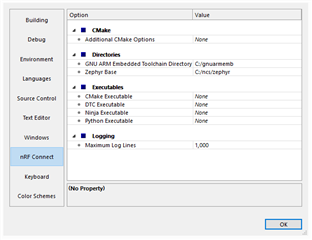
    In SES go to Tools>Optrions>nRF Connect and add the correct path to where you have your path's. 


    Regards,
    Jonathan


Reply
  • Hi,

    What version of NCS are you using? Have you been able to build other projects successfully? Are you on windows/mac/linux

    I tried NCS v1.3.0 and was able to build the Zephyr>samples>bluetooth example successfully.


    Zephyr was unable to find the toolchain. Is the environment misconfigured?

    Make sure you have sett you environment variables correctly.

    In SES go to Tools>Optrions>nRF Connect and add the correct path to where you have your path's. 


    Regards,
    Jonathan


Children
  • Hi Jonathan,

    I am using the latest version of NCS, running on macOS.

    I fixed the path and made sure to download the correct toolchain (2019 q4).

    However, I am now receiving this error message: 

    Including boilerplate (Zephyr base): /Users/kylemassa/Documents/proximity/covid-proximity-tracing/ncs/zephyr/cmake/app/boilerplate.cmake

    CMake Warning at /Users/kylemassa/Documents/proximity/covid-proximity-tracing/ncs/zephyr/cmake/host-tools.cmake:36 (message):

    Could NOT find working dtc: Found dtc (/usr/local/bin/dtc), but failed to

    load with:

    Call Stack (most recent call first):

    /Users/kylemassa/Documents/proximity/covid-proximity-tracing/ncs/zephyr/cmake/app/boilerplate.cmake:509 (include)

    /Users/kylemassa/Documents/proximity/covid-proximity-tracing/ncs/zephyr/share/zephyr-package/cmake/ZephyrConfig.cmake:24 (include)

    /Users/kylemassa/Documents/proximity/covid-proximity-tracing/ncs/zephyr/share/zephyr-package/cmake/ZephyrConfig.cmake:35 (include_boilerplate)

    CMakeLists.txt:4 (find_package)

    Traceback (most recent call last):

    File "/Users/kylemassa/Documents/proximity/covid-proximity-tracing/ncs/zephyr/scripts/dts/gen_defines.py", line 29, in <module>

    import edtlib

    File "/Users/kylemassa/Documents/proximity/covid-proximity-tracing/ncs/zephyr/scripts/dts/edtlib.py", line 78, in <module>

    import yaml

    ModuleNotFoundError: No module named 'yaml'

    CMake Error at /Users/kylemassa/Documents/proximity/covid-proximity-tracing/ncs/zephyr/cmake/dts.cmake:235 (message):

    gen_defines.py failed with return code: 1

    Call Stack (most recent call first):

    /Users/kylemassa/Documents/proximity/covid-proximity-tracing/ncs/zephyr/cmake/app/boilerplate.cmake:528 (include)

    /Users/kylemassa/Documents/proximity/covid-proximity-tracing/ncs/zephyr/share/zephyr-package/cmake/ZephyrConfig.cmake:24 (include)

    /Users/kylemassa/Documents/proximity/covid-proximity-tracing/ncs/zephyr/share/zephyr-package/cmake/ZephyrConfig.cmake:35 (include_boilerplate)

    CMakeLists.txt:4 (find_package)

    I have found posts on DevZone that talk about installing the requirements using pip3, but this has not solved my problem. Here is the specific line from those logs pertaining to 'yaml':

    Requirement already satisfied: PyYAML>=5.1 in /usr/local/lib/python3.8/site-packages (from west>=0.7.2->-r scripts/requirements.txt (line 6)) (5.3.1)

  • Hi,

    Are you using SES(Segger embedded studio Nordic edition) or are you using terminal?

    Are you able to run a west update from NCS folder?

    Regards,
    Jonathan

  • Hi Jonathan,

    I'm using SES Nordic Edition to open a nRF Connect SDK Project. Would you suggest using the terminal instead?

    I was able to run a west update in the NCS folder, but I received the same error about missing YAML when I tried opening a project in SES.

    Thanks!

  • Hi,

    No I don't recommend using terminal instead unless you want to tinker quite a bitt more to get it working. 
    Here is a link to the documentation, Click on the master link to see the latest NCS updates. Here is a link to the getting started with nRF connect for desktop where you can find the steps to follow the setup for mac. Was it this you did? 
    Note that for Mac and Linux the Getting started assistant is the guide to follow.


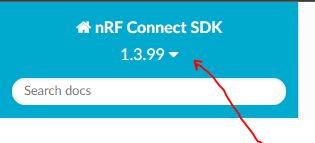
    To change the version to the one you are using click the triangle next to version number.
     

    Did you use the nRF connect for desktop Toolchain manager to download NCS or did you do a git downlead from repo? an if so witch tag? or did you pull form master branch?

    Sorry for all the questions but need to pinpoint where what the cause could be, there is usually more than on thing that can go wrong.

    Regards,
    Jonathan

  • Hi,

    I followed the "Installing the nRF Connect SDK manually" guide. So I did a git download from the repo: 

    west init -m https://github.com/nrfconnect/sdk-nrf --mr master

    Should I go back and install through nRF Connect for Desktop?
Related