This post is older than 2 years and might not be relevant anymore
More Info: Consider searching for newer posts

How to implement the LESC for ble peripheral?

SDK version: SDK17.0.2

Product: nRF52840-DK

IDE: Segger

Role: ble peripheral

OS: non-os

Example: examples\ble_central_and_peripheral\experimental\ble_app_multirole_lesc\pca10056\s140

Softdevice: s140

Sniffer equipment: Ellisys

Hi,

  Recently, I would like to use the example ble_app_multirole_lesc as a template for ble peripheral, which runs on nrf52840. I expect it could perform the LESC to do pairing, bonding, and connect to the APP (Android or iPhone). Now I use the Android APP, nRF Connect or nRF Toolbox to connect nrf52840. Actually, I don't want to press button 1 to confirm the passkey, so I make a little change in this example as following:

(in main.c)

#define LESC_MITM_NC                    0

as for LESC_DEBUG_MODE, I've tested to set to 1 or 0.

When I tab the connect button in nRF Connect app, nrf52840 starts to bond, it prints the following message:

<info> app_timer: RTC: initialized.
<info> app: LE Secure Connections example started.
<info> app: Scanning
<info> app: Advertising
<info> app: PERIPHERAL: Connected, handle 1.
<info> app: PERIPHERAL: BLE_GAP_EVT_SEC_PARAMS_REQUEST
<info> app: PERIPHERAL: BLE_GAP_EVT_LESC_DHKEY_REQUEST
<info> nrf_ble_lesc: Calling sd_ble_gap_lesc_dhkey_reply on conn_handle: 1
<info> peer_manager_handler: Connection secured: role: Peripheral, conn_handle: 1, procedure: Bonding
<info> app: PERIPHERAL: BLE_GAP_EVT_AUTH_STATUS: status=0x0 bond=0x1 lv4: 0 kdist_own:0x3 kdist_peer:0x2
<info> peer_manager_handler: Peer data updated in flash: peer_id: 0, data_id: Bonding data, action: Update
<info> peer_manager_handler: Peer data updated in flash: peer_id: 0, data_id: Peer rank, action: Update
<info> peer_manager_handler: Peer data updated in flash: peer_id: 0, data_id: Local database, action: Update
<info> peer_manager_handler: Peer data updated in flash: peer_id: 0, data_id: Central address resolution, action: Update

Then I tab the "Read Characteristic" or "Enable CCCDs", nrf52840 starts to encrypt, it prints the following message:

B.T.W., I add some message to print the LTK (from p_enc_info->ltk[]) after calls sd_ble_gap_sec_info_reply() in sec_info_request_process()  in security_dispatcher.c.

<info> peer_manager_smd: [sec_info_request_process:372] GOT LTK p_enc_info->ltk[]
<info> peer_manager_smd: 5D BC 17 DD
<info> peer_manager_smd: D3 ED 67 45
<info> peer_manager_smd: 84 3D 3C DE
<info> peer_manager_smd: 40 95 CD A6
<info> peer_manager_handler: Connection secured: role: Peripheral, conn_handle: 1, procedure: Encryption
<info> peer_manager_handler: Peer data updated in flash: peer_id: 0, data_id: Peer rank, action: Update, no change
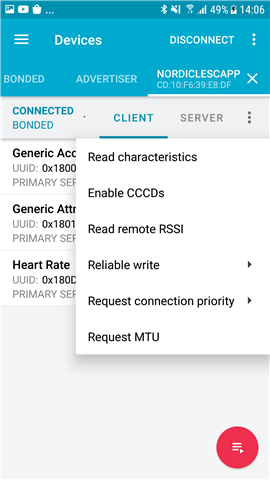
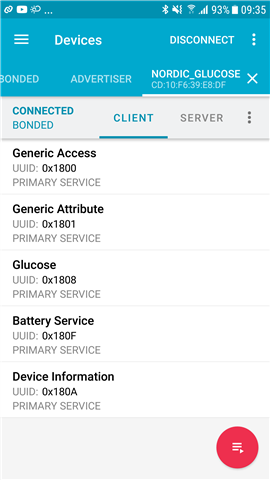
nRF connect app

Everything seemed to go well, but the LTK only successfully decrypt my sniffer packets at the 1st time. And I track the LLCP packets, it show the complete 5 packets as following:

(Actually, this picture is not the 1st time's sniffer packets, because I forgot to save its file... but I'm quite sure these packets are like that)

LLCP complete 5 packets

Their opcode are LL_ENC_REQ,  LL_ENC_RSPLL_START_ENC_REQ, LL_START_ENC_RSP, and  LL_START_ENC_RSP. And I use the LTK which I get from sec_info_request_process() , it can decrypt the packets.

But when I try to test again and again (refresh the code, unpair and delete bond), the LLCP packets didn't get the LL_START_ENC_RSP from central (nRF Connect), which means it only has 3 incomplete sequence as following:

LLCP_incomplete_3_packets

now I cannot decrypt the packets with the LTK. I guess the LTK may be wrong, so the central won't send the LL_START_ENC_RSP to nrf52840.  

Could you please tell me what can I do now?


Thanks,

Fox Tai

  • Hi

    I'm sorry, but what exactly is the problem? It seems like your BLE sniffer is the part that's struggling to keep up in the different connections (please correct me if I'm wrong). Do you see problems in the encryption in the log on your nRFConnect app and/or the debug log of the DK?

    Please also note that the LESC Multirole Example is defined as an experimental example, which means it has not been thoroughly tested and may have some undiscovered bugs. For a more streamlined peripheral application with LESC pairing/bonding, please check out the Glucose application instead.

    Best regards,

    Simon

  • Hi Simon,

    You're right, I knew ble_app_multirole_lesc is for experimental, so I hesitate to ask this question here. And I didn't get any error message, but it did nothing after encryption. Actually, I've modified this ble_app_multirole_lesc to connect to our Android APP, but it was disconnected by Android APP. I guess the supervision timeout happened because LL_START_ENC_RSP didn't send by Android APP(central).

    Thanks for giving me another LESC example the Glucose application. And I have some questions about how to run the test and the result for this example the Glucose application .

    I attach the test_example_Glucose.btt sniffer packet for reference . Oh, this time also no any error log happened. 

    Question 1:

    Step 6. in title Testing  the Glucose applicationit said to select "Security Settings" in settings, but I cannot find "Security Settings" in Android, iOS or nRF Connect desktop version, so I think this article may be old, the nRF Connect may already get this settings done, and I skip this step. 

    Using nRF Connect, bond to the device with LESC enabled. Enter the settings, select "Security Settings", check "Enable LE Secure Connection pairing" and "Perform bonding", and click "Apply"

    B.T.W., I don't use nRF Connect Desktop version, because it should reprogram the image in flash right? So I think my nrf52840 won't run the Glucose example, right?

    Question 2:

    After I enter the passkey, it prints the following log, it seemed to perform Bonding:

    <info> app_timer: RTC: initialized.
    <info> app: Glucose example started.
    <info> app: Fast advertising
    <info> app: Connected
    <info> app: Passkey: 146511
    <info> app: BLE_GAP_EVT_LESC_DHKEY_REQUEST
    <info> nrf_ble_lesc: Calling sd_ble_gap_lesc_dhkey_reply on conn_handle: 0
    <info> peer_manager_handler: Connection secured: role: Peripheral, conn_handle: 0, procedure: Bonding
    <info> app: Link secured. Role: 1. conn_handle: 0, Procedure: 1
    <info> app: BLE_GAP_EVT_AUTH_STATUS: status=0x0 bond=0x1 lv4: 1 kdist_own:0x3 kdist_peer:0x2
    <info> peer_manager_handler: Peer data updated in flash: peer_id: 0, data_id: Bonding data, action: Update
    <info> peer_manager_handler: Peer data updated in flash: peer_id: 0, data_id: Peer rank, action: Update
    <info> peer_manager_handler: Peer data updated in flash: peer_id: 0, data_id: Local database, action: Update
    <info> peer_manager_handler: Peer data updated in flash: peer_id: 0, data_id: Central address resolution, action: Updat

    Then I tab the "Read Characteristic" or "Enable CCCDs", nrf52840 didn't started to encrypt. So I tab the DISCONNECT, then tab CONNECT on nRF Connect, it started to run the encryption and prints the following log:

    nRF connect Disconnect

    From the log, it seemed to generate 2 times LTK?

    <info> app: Connected
    <info> peer_manager_smd: [sec_info_request_process:370] after call sd_ble_gap_sec_info_reply(p_gap_evt->conn_handle, p_enc_info, NULL, NULL),     err_code=0x0
    <info> peer_manager_smd: [sec_info_request_process:372] GOT LTK p_enc_info->ltk[]
    <info> peer_manager_smd: AE A4 A9 BD
    <info> peer_manager_smd: C5 29 6F A9
    <info> peer_manager_smd: 19 2F 63 C5
    <info> peer_manager_smd: 29 20 1 4E
    <info> peer_manager_handler: Connection secured: role: Peripheral, conn_handle: 0, procedure: Encryption
    <info> peer_manager_handler: Peer data updated in flash: peer_id: 0, data_id: Peer rank, action: Update, no change
    <info> app: Link secured. Role: 1. conn_handle: 0, Procedure: 0
    <info> peer_manager_smd: [sec_info_request_process:370] after call sd_ble_gap_sec_info_reply(p_gap_evt->conn_handle, p_enc_info, NULL, NULL),     err_code=0x0
    <info> peer_manager_smd: [sec_info_request_process:372] GOT LTK p_enc_info->ltk[]
    <info> peer_manager_smd: AE A4 A9 BD
    <info> peer_manager_smd: C5 29 6F A9
    <info> peer_manager_smd: 19 2F 63 C5
    <info> peer_manager_smd: 29 20 1 4E
    <info> peer_manager_handler: Connection secured: role: Peripheral, conn_handle: 0, procedure: Encryption
    <info> peer_manager_handler: Peer data updated in flash: peer_id: 0, data_id: Peer rank, action: Update, no change


    So example the Glucose application should connect, disconnect, then connect, it would run the 2 times encryption? 

    Question 3:

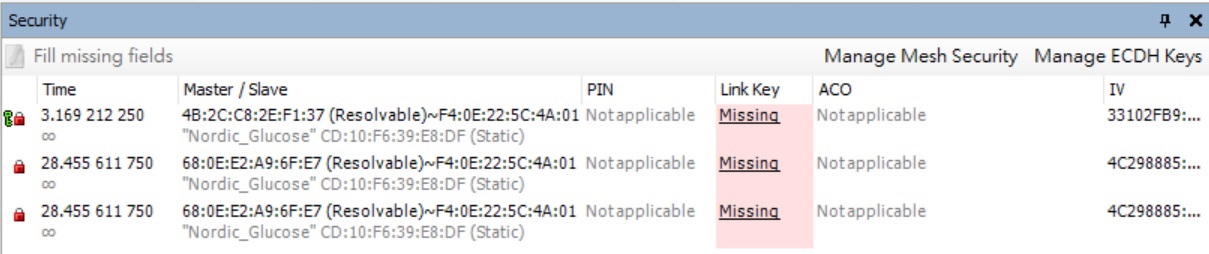
    And I track the sniffer packets by Ellisys, it really needs 3 keys, 1st is generate right after bonding, 2nd and 3rd are generated right after encryption. The following picture is what I mention 3 keys:

    3 keys

    I wonder bonding need any key to decrypt? Is that DHKey or something? 

    After encryption, I only got 1 LTK in  p_enc_info->ltk[] in sec_info_request_process(), but this LTK is not applicable on 2nd and 3rd. So is this LTK correct?

    Question 4:

    LLCP packets still not get the LL_START_ENC_RSP from central (nRF Connect), so is it normal behavior?

    Thanks,

    Fox Tai

  • Hi Simon,

    I just survey related the Glucose application article, should it prepare 2 nordic dk, one for connecting to nRF Connect for Desktop as central, another one use this the Glucose application as peripheral? 

    Thanks,

    Fox Tai

  • 1. Step 6 seems to be somewhat outdated indeed. Step 6 should be the following in nRFConnect for Desktop for example. After you have successfully connected to the Nordic Glucose example, press the settings icon and Pair... in the dropdown menu. A pop-up should appear where you can enable LESC pairing, etc. Please check the Enable LE Secure Connection pairing  as well as Perform bonding and press "Pair". A new window prompting you to enter the passkey should appear once more. Enter it in order to pair using LESC.

    In order to use nRFConnect for Desktop, you will need 2 DKs, one to act as a central, and one to act as the Glucose peripheral.

    Step 6 for nRFConnect on Android/iOS can be skipped, as the initial pairing process trigs the LESC pairing automatically.

    2. I had no problems making the nRF52840 DK write I.E. its battery status to the nRFConnect app (tested with Android and Desktop apps). When disconnecting, and reconnecting to the device, the peer manager handles the bonding information, and connects again with the same encryption used when initially paired. I suggest you check out the peer manager documentation for more information on this.

    3. This question is not entirely clear to me, can you please try to explain in detail what you mean here? Yes, the encryption uses DH keys for encryption if that's what you're asking. 

    Best regards,

    Simon

  • Hi Simon,

    I've tried to use 2 nrf52840-DK, one to connect to nRF Connect Desktop, another to run the Glucose application. When I tab the "connect" on nRF Connect Desktop show the log "Security updated, mode:1, level:4".  And I find the uart print the following log, it seemed to run bonding:

    <info> peer_manager_handler: Connection secured: role: Peripheral, conn_handle: 1, procedure: Bonding

    If I tab "disconnect", then "connect", uart would print the following log, it seemed to run encryption:

    <info> peer_manager_handler: Connection secured: role: Peripheral, conn_handle: 1, procedure: Encryption


    So, I have some questions:

    Question 1. 

    After advertising, I tab "connect", it only perform bonding. Then I tab "disconnect" and "connect", it would perform "encryption".

    These behavior is right?

    Question 2.

    If the program is running bonding, that also runs the security connection and encryption?


    Question 3.

    Could you tell me where can I find the LTK to decrypt my sniffer packets. Almost of time, my LTK cannot decrypt packets...

    Thanks,

    Fox Tai

Related