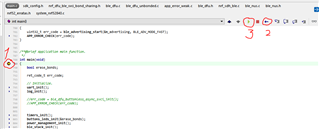
I am attempting to create a custom Buttonless DFU application by building on top of the default example from the SDK. Specifically, I am merging the Buttonless DFU app with the BLE UART app and the TWI sensor reading app. Among those 2 other apps, I have made various changes for my custom device (not using the DK).
I have successfully been able to follow this tutorial and I can get the Nordic_Buttonless DFU app to work as expected. However, when I program my custom Buttonless DFU app to my device via nRF Connect (iOS), the new application code is never able to start and so it never advertises. On the nRF Connect app, everything works as it should: the .zip package is written and it even prints a "Successful DFU!" notification when its done. But the code on the device never starts.
In order to debug this I have tried the following 2 things, without many results:
- Standard SEGGER Embedded Studio debugger
- Connect to Target and "Erase All"
- Open the DFU secure_bootloader example code (pca10040_s132_ble_debug), build and download to device
- Then open the ble_app_buttonless_dfu example that I modified, build, then use the output .hex file to generate the .zip package to be sent using nRF Connect DFU on my iPhone
- With this buttonless_dfu project open in SES, and the device in DFU mode, I click "Attach Debugger"
- Then in the nRF Connect app, select the .zip package from before and perform the DFU
- This is when the Debugger halts at the function 'errata_136(void)' in the file 'system_nrf52.c'. There is nothing printed in the Debug Terminal.
- The code does not advertise itself after this, but I can reset the power and hold the button to re-enter DFU mode
- Embedded Studio debugger + bootloader settings with nrfutil/nrfjprog
- Device is now back in DFU mode
- I generate bootloader settings: nrfutil settings generate --family NRF52 --application myButtonless.hex --application-version 1 --bootloader-version 1 --bl-settings-version 2 settings.hex
- With my custom Buttonless DFU project open in SES, I select "Attach Debugger"
- Then I try to run the following commands:
nrfjprog -e
nrfjprog --program "softdevice.hex" --verify
nrfjprog --program "bootloader.hex" --verify
nrfjprog --program myButtonless.hex --verify
nrfjprog --program settings.hex --verify
nrfjprog --reset
- This is when the Debugger halts at the function 'errata_136(void)' in the file 'system_nrf52.c'. There is nothing printed in the Debug Terminal.
- I notice that it halts on the first command 'nrfjprog -e'
- The code does not advertise itself after this, but I can reset the power and hold the button to re-enter DFU mode
I have added DEBUG to my preprocessor definitions and I have disabled optimizations. I have enabled NRF_LOG and NRF_LOG_BACKEND_RTT. Is this way of debugging correct? What should I do instead to produce a more informative debugging session? In the file 'system_nrf52.c', I found the following code:
/* Workaround for Errata 136 "System: Bits in RESETREAS are set when they should not be" found at the Errata document
       for your device located at https://infocenter.nordicsemi.com/index.jsp  */
    if (errata_136()){
        if (NRF_POWER->RESETREAS & POWER_RESETREAS_RESETPIN_Msk){
            NRF_POWER->RESETREAS =  ~POWER_RESETREAS_RESETPIN_Msk;
        }
    }
This led me to this link, which says:
// Apply the following code after any reset:

if (NRF_POWER->RESETREAS & POWER_RESETREAS_RESETPIN_Msk){
    NRF_POWER->RESETREAS =  ~POWER_RESETREAS_RESETPIN_Msk;
}
Any advice on where I should specifically put this IF STATEMENT in my Buttonless DFU app code? Thanks for the help :)