This post is older than 2 years and might not be relevant anymore
More Info: Consider searching for newer posts

Sending Data from nrf9160 to external device

Hello,

I am really new to nrf9160 product and its SDK. I want to send data from nrf9160 to an external flash memory. Could you please tell me how can I do this with SPI or is it possible to do this with SPI? Which example code should I use for that and which part of the code do I need to modify. I would be appreciated if you can provide me some links that can guide me. Since I am a beginner in this field it is hard to understand the example codes at this stage, I am a bit confused. 

Thank you so much for the help.

  • Hi,


    is it possible to do this with SPI?

     Yes.


    Which example code should I use for that

     Take a look at Zephyr's AT45 DataFlash driver sample: https://developer.nordicsemi.com/nRF_Connect_SDK/doc/1.4.0/zephyr/samples/drivers/spi_flash_at45/README.html

    Zephyr also has other flash and SPI samples, but those have not been made for the nRF9160, and therefore might require some minor modifications to get them to work on the nRF9160 (I believe adding an overlay file should be enough in most cases).


    which part of the code do I need to modify

     First, Zephyr already have drivers for some flash devices. If they have a driver for the device you plan to use, all you need is to add the flash device to your device tree (either in an overlay file or in your board's .dts directly), and you should be able to use the flash driver without issues.

    If they do not have a driver for your particular device, I would highly recommend that you implement a driver for the device that is compatible with Zephyr's flash API. That way, you will be able to use all of Zephyr's storage libraries (file systems, etc.) on your flash device.

    https://developer.nordicsemi.com/nRF_Connect_SDK/doc/1.4.0/zephyr/reference/drivers/index.html

    https://developer.nordicsemi.com/nRF_Connect_SDK/doc/1.4.0/zephyr/reference/storage/index.html

    https://developer.nordicsemi.com/nRF_Connect_SDK/doc/1.4.0/zephyr/reference/file_system/index.html

    Best regards,

    Didrik

  • Hi Didrik,

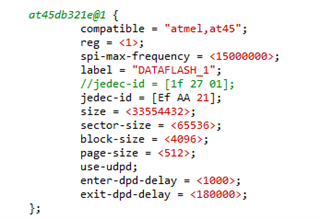
    Thank you for the explanation. My flash memory is spi flash W25N01GV. I just wanted to check whether I am sending any signal to external flash via bluetooth. I used spi_flash_45 sampke and change the jedec id of dataflash 1 to my devices' jedec id, I used scanquad to control the signals also connected the device to nrf9160 however I am not getting any signal, in the terminal it says that flash isn't found. What should I do in this case? How can I add this device to overlay file maybe I am doing that part wrong.

    Thank you for your help

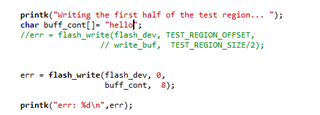
     I copied the proj.conf, overlay and main code of the spi_flash_45 to hello world sample and modified the parts that I have sent.

  • verulia said:
    in the terminal it says that flash isn't found

     Drivers in Zephyr are initialized before the application starts. If anything goes wrong during the initialization, get_device() will return 0.

    In this case, the problem is probably that you are using a W25N01GV, while you try to use the driver for an AT45DB321. These two devices are not compatible, so you will need to use a driver for the W25N01GV instead of the AT45.

    Unfortunatly, it does not look like there is a driver for the W24N01GV in NCS. You will therefore have to create one yourself.

  • Hello,

    Yeah I was also not sure about that part. I have a simple question then, I just want to start from scratch on this spi and go step by step. First I just wanted to send just a basic for instance "hello world" via spi and check the signals from scana. I found https://github.com/Rallare/fw-nrfconnect-nrf/tree/nrf9160_samples/samples/nrf9160/spi code on github and copy all of the stuff inside my hello world folder and modified it however I get an error saying that it can not found spi.h folder?(its already written #include <spi.h> in the main.How can I solve this issue?

    Question 2:

    I am only able to open the sample projects provided by the nrf sdk.(under projects folder). How I an open external projects and work on them? This spi code is not inside the nrf sdk samples for instance. When I try to access spi_flash_at45 I tried to access it by clicking ""... near projects at the beginning however, the file seemed empty and I couldn't access the files, although all the files were inside of the folder(proj.conf, overlay etc). So as a solution I copied all the overlay,proj.conf file inside spi_flash and paste it to hello worlds' files.Are there any other ways to open the projects? It would be great if you guide me in this issue.

  • verulia said:

     That project is getting quite old now, and has not been updated in a long while. It does not work with the latest (I believe at least 3) releases.

    A better place to start might be to look at zephyr/drivers/flash/spi_flash_at45.c. Your driver will probably end up looking quite a lot like the at45 driver.

     As for the specific error you get, you must now include <drivers/spi.h>. But there are other differences as well, so I do not really recommend that you start with Rallare's old SPI sample.

    verulia said:
    When I try to access spi_flash_at45 I tried to access it by clicking ""... near projects at the beginning however, the file seemed empty and I couldn't access the files

     It is enough to just select the folder. Or, you can navigate into the folder (and not select any of the files you can not see), and press 'open'.

Related