

Hi
i have installed segger emstudio and almost all dependencies but still can't able to build a project. my main target is to work with nrf9160 dk but without an hardware. Please guide me to set it up.
Hi
i have installed segger emstudio and almost all dependencies but still can't able to build a project. my main target is to work with nrf9160 dk but without an hardware. Please guide me to set it up.
Hello, Y0g1!
Could you describe how you installed SES and the dependencies? If you are using Windows we highly recommend that you use the nRF Connect Toolchain Manager, if you are on Linux or Mac you can follow the manual installation guide.
Please report what errors you are seeing as well.
Best regards,
Carl Richard

yes i used toolchain manager

I see that your "NCS" base directory is on a path that contains a "space"-character. This can lead to errors.
Could you try to remove the SDK installation (this can be done by selecting "Remove" from the dropdown list beside the installed SDK in the Toolchain manager") and then reinstall it at a different location, without a "space"-character in it?
Best regards,
Carl Richard
i removed the space but still the same issue persists.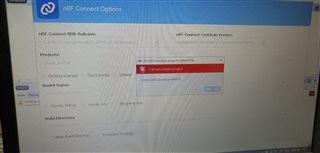
What are your options under "nRF Connect toolchain version"?
Best regards,
Carl Richard
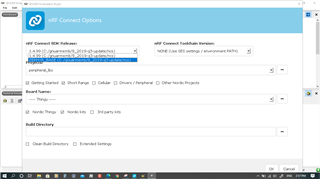
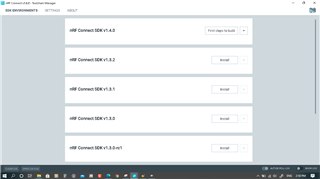
These are the screens i got on startup.
Hi again!
From what I can see there are something wrong with your installation as you aren't seeing the corrects paths and options. I also find it a bit weird that gnuarmemb is your specified installation directory.
Could you try to remove the installed NCS version again, then go to "Settings" in the Toolchain Manager app and change your installation directory to something like this "C:\nordic\ncs" before trying to install again?
Also, when a build in SES fails you are able to see the build log by double clicking at the field in the image below: 
If any more errors happen, pleas provide that log to me.
Best regards,
Carl Richard
Hi again!
From what I can see there are something wrong with your installation as you aren't seeing the corrects paths and options. I also find it a bit weird that gnuarmemb is your specified installation directory.
Could you try to remove the installed NCS version again, then go to "Settings" in the Toolchain Manager app and change your installation directory to something like this "C:\nordic\ncs" before trying to install again?
Also, when a build in SES fails you are able to see the build log by double clicking at the field in the image below:
If any more errors happen, pleas provide that log to me.
Best regards,
Carl Richard
Creating solution adc.emProject
C:/gnuarmemb/v1.4.0/toolchain/opt/bin/cmake.exe -GNinja -DBOARD=nrf9160dk_nrf9160ns -DBOARD_DIR=C:\gnuarmemb\v1.3.2\zephyr\boards\arm\nrf9160dk_nrf9160 -BC:\Users\Win8\fw-nrfconnect-nrf\fw-nrfconnect-nrf\samples\nrf9160\adc\build_nrf9160dk_nrf9160ns -SC:\Users\Win8\fw-nrfconnect-nrf\fw-nrfconnect-nrf\samples\nrf9160\adc -DNCS_TOOLCHAIN_VERSION=1.4.0 -DEXTRA_KCONFIG_TARGETS=menuconfig_ses -DEXTRA_KCONFIG_TARGET_COMMAND_FOR_menuconfig_ses=C:\gnuarmemb\EmbeddedStudio_ARM_Nordic_v510d_win_x64\arm_segger_embedded_studio_v510d_win_x64_nordic/html/configure_nordic_project_menuconfig.py
-- Application: C:/Users/Win8/fw-nrfconnect-nrf/fw-nrfconnect-nrf/samples/nrf9160/adc
-- Zephyr version: 2.3.0-rc1 (C:/gnuarmemb/v1.3.2/zephyr)
-- Found Python3: C:/gnuarmemb/v1.4.0/toolchain/opt/bin/python.exe (found suitable exact version "3.8.2") found components: Interpreter
-- Board: nrf9160dk_nrf9160ns
-- Found west: C:/gnuarmemb/v1.4.0/toolchain/opt/bin/Scripts/west.exe (found suitable version "0.7.2", minimum required is "0.7.1")
-- Found dtc: C:/gnuarmemb/v1.4.0/toolchain/opt/bin/dtc.exe (found suitable version "1.4.7", minimum required is "1.4.6")
-- Found toolchain: gnuarmemb (C:/gnuarmemb/v1.4.0/toolchain/opt)
-- Found BOARD.dts: C:/gnuarmemb/v1.3.2/zephyr/boards/arm/nrf9160dk_nrf9160/nrf9160dk_nrf9160ns.dts
-- Generated zephyr.dts: C:/Users/Win8/fw-nrfconnect-nrf/fw-nrfconnect-nrf/samples/nrf9160/adc/build_nrf9160dk_nrf9160ns/zephyr/zephyr.dts
-- Generated devicetree_unfixed.h: C:/Users/Win8/fw-nrfconnect-nrf/fw-nrfconnect-nrf/samples/nrf9160/adc/build_nrf9160dk_nrf9160ns/zephyr/include/generated/devicetree_unfixed.h
Parsing C:/gnuarmemb/v1.3.2/zephyr/Kconfig
Loaded configuration 'C:/gnuarmemb/v1.3.2/zephyr/boards/arm/nrf9160dk_nrf9160/nrf9160dk_nrf9160ns_defconfig'
Merged configuration 'C:/Users/Win8/fw-nrfconnect-nrf/fw-nrfconnect-nrf/samples/nrf9160/adc/prj.conf'
-- Configuring incomplete, errors occurred!
-- Using NCS Toolchain 1.4.0 for building. (C:/gnuarmemb/v1.4.0/toolchain/cmake)
error: NET_RAW_MODE (defined at subsys/net/ip/Kconfig:52) is assigned in a configuration file, but
is not directly user-configurable (has no prompt). It gets its value indirectly from other symbols.
See docs.zephyrproject.org/.../CONFIG_NET_RAW_MODE.html and/or look up
NET_RAW_MODE in the menuconfig/guiconfig interface. The Application Development Primer, Setting
Configuration Values, and Kconfig - Tips and Best Practices sections of the manual might be helpful
too.
CMake Error at C:/gnuarmemb/v1.3.2/zephyr/cmake/kconfig.cmake:217 (message):
command failed with return code: 1
Call Stack (most recent call first):
C:/gnuarmemb/v1.3.2/zephyr/cmake/app/boilerplate.cmake:506 (include)
CMakeLists.txt:9 (include)
error: cmake failed
create_nordic_project.py failed (1)
this the error message i am getting during building a clone project.
Hi again!
It seems like you are building for a board in version 1.3.2 of NCS. Could you try to specify the following board directory instead when opening your project:
C:\gnuarmemb\v1.4.0\zephyr\boards\arm\nrf9160dk_nrf9160