This post is older than 2 years and might not be relevant anymore
More Info: Consider searching for newer posts

How to modulate the voltage of a gpio for a louder buzzer

Good day,

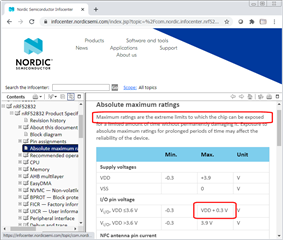
I am using a DK board with the nRF52832 (pca10040) and I am using a 4 kHz buzzer connected to the gpio 16. I have seen the examples pwm_driver and pwm_library of the SDK as well as several posts on this website. However, I only manage to get a 1.9v output and the buzzer can barely be heard. I have read in the datasheet of the nRF52832 that it is possible to obtain an output from the pins up to VDD +-0.3v, for my case I am using a CR2032 battery, but I am only getting 1.9v. I have modified the duty cycle but it has been useless.

I also tried to change NRF_GPIO_PIN_S0S1 for NRF_GPIO_PIN_H0H1 in nrf_gpio.h but it was also useless, the volume remains the same.

I will leave here the code I am using in order to know if you can help me and tell me why I am not getting the 3v or tell me some other function or some other way to be able to increase the buzzer volume.

( I know that the volume can be increased using a transistor, but I would like to leave it as a last option since I do not want to add more components to my circuit, if it is not possible to increase the volume by means of software I would choose to do this.)

I really appreciate your help.

void pwm_ready_callback(uint32_t pwm_id)    // PWM callback function
{
    ready_flag = true;
}

static void sound(uint16_t freq, uint16_t time_us){
    nrf_gpio_cfg_output(BSP_LED_2);
    app_pwm_config_t pwm1_cfg = APP_PWM_DEFAULT_CONFIG_1CH(freq, BSP_LED_2);
    pwm1_cfg.pin_polarity[1] = APP_PWM_POLARITY_ACTIVE_HIGH;
    app_pwm_init(&PWM1,&pwm1_cfg,pwm_ready_callback);
    app_pwm_enable(&PWM1);
      
    ready_flag = false;
    app_pwm_channel_duty_set(&PWM1, 0, 50);
    nrf_delay_ms(time_us);
    app_pwm_disable(&PWM1);
    app_pwm_uninit(&PWM1);
 }

static void pwm_init(){
   for(int16_t i = 15; i < 40; i++){
    int16_t val = i;
    sound(val,100);
  }
    sound(800,200);
  for(int16_t i = 40; i > 15; i--){
    int16_t val = i * 6;
    sound(val,100);
  }
  sound(800,200);
}

In this case BSP_LED_2 is pin 16.

Parents Reply Children
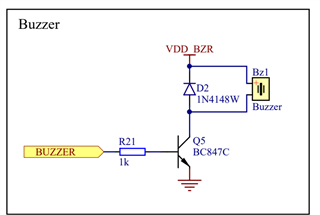
  • In addition to this I would like to add that the GPIO voltage should be equal to VDD. So I'm curious, what voltage do you measure on the VDD pin? Also, here is how we implemented it on thingy:91:

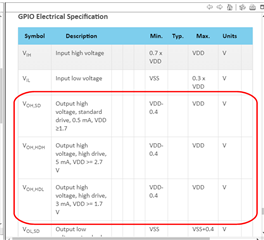
  • Hi Jared, thank you very much for the enlightening answer, about VDD +-0.3 if it was a mistake, however as you explain it can be obtained until a greater range than I had thought (VDD+-0.4).

    I have a question, in the figure you show me what BUZZER and VDD BZR means? I would understand that VDD BZR is the voltage coming from the nRF52832 pin, but BUZZER? Could you please explain it to me?

    On the other hand, to answer what you are asking me, at the moment I am connecting one side of the buzzer to the pin and the other side directly to ground and I am measuring the output voltage on the pin side.

  • An apology for the confusion, I have already seen that the voltage is VDD-0.4v. And to clarify, the buzzer is a piezoelectric.

  • Here is a good article about controlling piezoelectric buzzers.

  • Most circuits posted for buzzers are based on earlier miniature speakers, which require significant current requiring transistor drivers and - being coil devices - require stuff like reverse protection diodes to protect against back-emf when turning off the transistor drivers.

    Along came piezo buzzers, which are like capacitors, not coils,  and require very little current but instead more voltage. The best way to drive these is with a full H-bridge driver, but unlike the usual article suggestions no components are required to implement the full H-bridge driver. None; nowt; nada.

    The reason is is that there are already enough features inside the nRF52840 to create a full H-bridge driver, with sufficient current drive to satisfy the typical piezo buzzer.

    Here is the circuit; note there are no external components other than the piezo speaker:

    // Inside nRF52832/40                      Outside World
    // ====================================    =================
    //              VCC about +3 volts
    //              -------#---------#---
    //                     |         |
    //                     |         |            Piezo Buzzer
    //                   |-+         |
    //               +---|           |            +===+
    // PIN_PWM_1     |   |-+         |    Pin     |   |
    // ------------->0     #---------------O------O   O-------+
    //               |   |-+         |            |   |       |
    //               +---|           |            |   |       |
    //                   |-+         |            +===+       |
    //                     |         |                        |
    //                     |       |-+                        |
    //                     |   +---|                          |
    // PIN_PWM_2           |   |   |-+    Pin                 |
    // ----------------------->0     #-----O------------------+
    //                     |   |   |-+
    //                     |   +---|
    //                     |       |-+
    //                     |         |
    //                     |         |
    //                   =====     =====
    //                    ===       ===
    //                     =         =
    // ====================================    Outside World
    // Inside nRF52832/40                      =================

    Simply connect the piezo buzzer between any 2 nRF52840 port pins, then drive those port pins with a dual-ramp PWM. See my other posts for examples if needed, or browse the devzone. There are some posts on both music and voice.

    nrf52-midi-piano

Related