Good day,
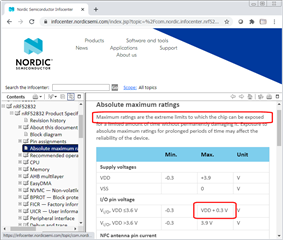
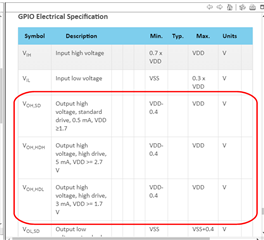
I am using a DK board with the nRF52832 (pca10040) and I am using a 4 kHz buzzer connected to the gpio 16. I have seen the examples pwm_driver and pwm_library of the SDK as well as several posts on this website. However, I only manage to get a 1.9v output and the buzzer can barely be heard. I have read in the datasheet of the nRF52832 that it is possible to obtain an output from the pins up to VDD +-0.3v, for my case I am using a CR2032 battery, but I am only getting 1.9v. I have modified the duty cycle but it has been useless.
I also tried to change NRF_GPIO_PIN_S0S1 for NRF_GPIO_PIN_H0H1 in nrf_gpio.h but it was also useless, the volume remains the same.
I will leave here the code I am using in order to know if you can help me and tell me why I am not getting the 3v or tell me some other function or some other way to be able to increase the buzzer volume.
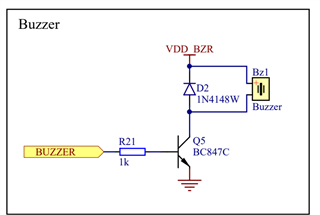
( I know that the volume can be increased using a transistor, but I would like to leave it as a last option since I do not want to add more components to my circuit, if it is not possible to increase the volume by means of software I would choose to do this.)
I really appreciate your help.
void pwm_ready_callback(uint32_t pwm_id)    // PWM callback function
{
    ready_flag = true;
}

static void sound(uint16_t freq, uint16_t time_us){
    nrf_gpio_cfg_output(BSP_LED_2);
    app_pwm_config_t pwm1_cfg = APP_PWM_DEFAULT_CONFIG_1CH(freq, BSP_LED_2);
    pwm1_cfg.pin_polarity[1] = APP_PWM_POLARITY_ACTIVE_HIGH;
    app_pwm_init(&PWM1,&pwm1_cfg,pwm_ready_callback);
    app_pwm_enable(&PWM1);

    ready_flag = false;
    app_pwm_channel_duty_set(&PWM1, 0, 50);
    nrf_delay_ms(time_us);
    app_pwm_disable(&PWM1);
    app_pwm_uninit(&PWM1);
 }

static void pwm_init(){
   for(int16_t i = 15; i < 40; i++){
    int16_t val = i;
    sound(val,100);
  }
    sound(800,200);
  for(int16_t i = 40; i > 15; i--){
    int16_t val = i * 6;
    sound(val,100);
  }
  sound(800,200);
}
In this case BSP_LED_2 is pin 16.