This post is older than 2 years and might not be relevant anymore
More Info: Consider searching for newer posts

UART Program not working with custom board

Hello,

   I designed custom board using nRF52832. BLE Blinky code is working after uploading. I can able to see my ble with NORDIC BLINKY app and I can control LED. But while uploading UART code I didn't see BLE in UART APP of nordic. Please help me regarding. Thanks.

Parents Reply Children
  • Hi,

    DD_ said:
     I don't know why breakpoint is coming

     What does this mean? Does the program stop at the breakpoint I suggested in my previous reply?

    The unmodified example uses pins 5-8 for the UART. These pins are not connected to anything in your custom board. You would therefore have to change the board file so that they are mapped appropriately. Or change the pins in the application. 

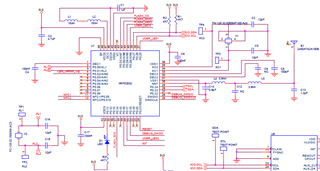
    Also, your schematic is mostly ok. Only concern is that you're using the pins on the upper side for I2C. The pins on the upper and right side of the IC is marked as low frequency/low drive, using these pins for serial communication might cause interference with the radio signal. However, I don't think your current problem is related to this. 

    regards

    Jared 

  • Dear Jared,

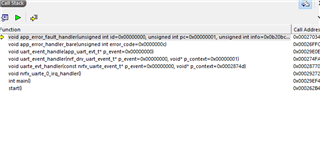
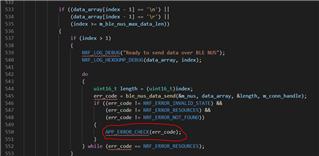
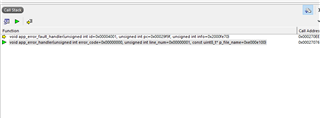
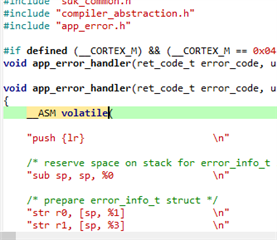
      After debug I got following error. I am attaching image. Please check. kindly help us regarding.Error in 561.


  • Hi.

    Seems like the issue is still somewhere in the uart_event_handle(). Try setting breakpoints in the various cases in the switch case and see where the application stops.

    Did you make a board file? The easiest is just to copy the PCA10040 board file and then adjust it to your board. 

    Note: Debugging Softdevice applications requires that you restart the application each time the application starts. The application will assert otherwise i.e if you try to resume the application after it has stopped at a breakpoint. This makes it not possible to step through code step-by-step in  a SD application. See this and this thread for more info.

    regards

    Jared  

  • Hi,

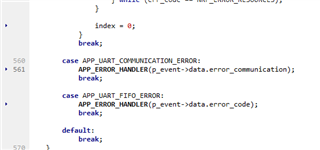
      I entered DEBUG in preprocessor definition. After that I got error in one line. Then, I commented that lines where it shown error. After commenting that line Bluetooth is advertised in Nordic toolbox app. I am attaching that lines. Please check that. Is this a temporary solution or permanent one.
    And in my laptop I can able to transmit and receive data. If am using other laptop after commenting that too line also I can't send datas. May I know why it was happening?

    break;

    //case APP_UART_COMMUNICATION_ERROR:
    // APP_ERROR_HANDLER(p_event->data.error_communication);
    break;

    case APP_UART_FIFO_ERROR:
    APP_ERROR_HANDLER(p_event->data.error_code);
    break;

    default:
    break;
    }

  • Most definitely not a permanent solution. If it works when you comment out that line then it means that you're getting an APP_UART_COMMUNICATION_ERROR. Try setting a breakpoint at  APP_ERROR_HANDLER(p_event->data.error_communication) and check the event structure p_event->data.error_communication, it should specify the error source.

Related