

Dear Sir/Madam,
I'am new to segger embedded studio.I would like to do SPI interfacing of an IC using nRF51822 with segger embedded studio.
Please guide me how to add the necessary driver files into my project.
Regards
Pavankumar S
Dear Sir/Madam,
I'am new to segger embedded studio.I would like to do SPI interfacing of an IC using nRF51822 with segger embedded studio.
Please guide me how to add the necessary driver files into my project.
Regards
Pavankumar S
Hi,
If you do not already have the SES project for nRF51 up and running, there is a tutorial on how to convert a Keil project available here.
Regarding usage of SES with our SDK, please have a look the this video tutorial playlist on YouTube.
Best regards,
Jørgen

Hi,
There is a SPI Master Example in the SDK that you can reference. The SPI master driver is found in "nRF5_SDK_12.3.0_d7731ad\components\drivers_nrf\spi_master", use the nrf_drv_spi.c/h version.
Best regards,
Jørgen
You can add the driver to the project without copying it. The following should be sufficient to use the driver:
// <e> SPI_ENABLED - nrf_drv_spi - SPI/SPIM peripheral driver
//==========================================================
#ifndef SPI_ENABLED
#define SPI_ENABLED 1
#endif
#if  SPI_ENABLED
// <o> SPI_DEFAULT_CONFIG_IRQ_PRIORITY  - Interrupt priority


// <i> Priorities 0,2 (nRF51) and 0,1,4,5 (nRF52) are reserved for SoftDevice
// <0=> 0 (highest)
// <1=> 1
// <2=> 2
// <3=> 3

#ifndef SPI_DEFAULT_CONFIG_IRQ_PRIORITY
#define SPI_DEFAULT_CONFIG_IRQ_PRIORITY 3
#endif

// <e> SPI0_ENABLED - Enable SPI0 instance
//==========================================================
#ifndef SPI0_ENABLED
#define SPI0_ENABLED 1
#endif
#if  SPI0_ENABLED
// <q> SPI0_USE_EASY_DMA  - Use EasyDMA


#ifndef SPI0_USE_EASY_DMA
#define SPI0_USE_EASY_DMA 0
#endif

// <o> SPI0_DEFAULT_FREQUENCY  - SPI frequency

// <33554432=> 125 kHz
// <67108864=> 250 kHz
// <134217728=> 500 kHz
// <268435456=> 1 MHz
// <536870912=> 2 MHz
// <1073741824=> 4 MHz
// <2147483648=> 8 MHz

#ifndef SPI0_DEFAULT_FREQUENCY
#define SPI0_DEFAULT_FREQUENCY 1073741824
#endif

#endif //SPI0_ENABLED
// </e>

// <e> SPI1_ENABLED - Enable SPI1 instance
//==========================================================
#ifndef SPI1_ENABLED
#define SPI1_ENABLED 0
#endif
#if  SPI1_ENABLED
// <q> SPI1_USE_EASY_DMA  - Use EasyDMA


#ifndef SPI1_USE_EASY_DMA
#define SPI1_USE_EASY_DMA 0
#endif

// <o> SPI1_DEFAULT_FREQUENCY  - SPI frequency

// <33554432=> 125 kHz
// <67108864=> 250 kHz
// <134217728=> 500 kHz
// <268435456=> 1 MHz
// <536870912=> 2 MHz
// <1073741824=> 4 MHz
// <2147483648=> 8 MHz

#ifndef SPI1_DEFAULT_FREQUENCY
#define SPI1_DEFAULT_FREQUENCY 1073741824
#endif

#endif //SPI1_ENABLED
// </e>

// <e> SPI2_ENABLED - Enable SPI2 instance
//==========================================================
#ifndef SPI2_ENABLED
#define SPI2_ENABLED 0
#endif
#if  SPI2_ENABLED
// <q> SPI2_USE_EASY_DMA  - Use EasyDMA


#ifndef SPI2_USE_EASY_DMA
#define SPI2_USE_EASY_DMA 0
#endif

// <q> SPI2_DEFAULT_FREQUENCY  - Use EasyDMA


#ifndef SPI2_DEFAULT_FREQUENCY
#define SPI2_DEFAULT_FREQUENCY 0
#endif

#endif //SPI2_ENABLED
// </e>

// <e> SPI_CONFIG_LOG_ENABLED - Enables logging in the module.
//==========================================================
#ifndef SPI_CONFIG_LOG_ENABLED
#define SPI_CONFIG_LOG_ENABLED 0
#endif
#if  SPI_CONFIG_LOG_ENABLED
// <o> SPI_CONFIG_LOG_LEVEL  - Default Severity level

// <0=> Off
// <1=> Error
// <2=> Warning
// <3=> Info
// <4=> Debug

#ifndef SPI_CONFIG_LOG_LEVEL
#define SPI_CONFIG_LOG_LEVEL 3
#endif

// <o> SPI_CONFIG_INFO_COLOR  - ANSI escape code prefix.

// <0=> Default
// <1=> Black
// <2=> Red
// <3=> Green
// <4=> Yellow
// <5=> Blue
// <6=> Magenta
// <7=> Cyan
// <8=> White

#ifndef SPI_CONFIG_INFO_COLOR
#define SPI_CONFIG_INFO_COLOR 0
#endif

// <o> SPI_CONFIG_DEBUG_COLOR  - ANSI escape code prefix.

// <0=> Default
// <1=> Black
// <2=> Red
// <3=> Green
// <4=> Yellow
// <5=> Blue
// <6=> Magenta
// <7=> Cyan
// <8=> White

#ifndef SPI_CONFIG_DEBUG_COLOR
#define SPI_CONFIG_DEBUG_COLOR 0
#endif

#endif //SPI_CONFIG_LOG_ENABLED
// </e>

#endif //SPI_ENABLED
// </e>
It would be easier to help you if you could post the actual error codes that you get.
Hi,
My objective is to do spi interfacing using nRF51822 module.
As suggested by you I followed the below steps.
1)Created a new project in SES.
2)Added nrf_drv_spi.c file into the Device Files folder of my project.
after this when I tried to build the project,Getting the following error.
sdk_common.h file not found.(how to resolve this error).
please tell me how to Add the path to the header file (nrf_drv_spi.h) to my project settings.
To which folder I should add sdk_config.h file and tell me how to enable it.
Regards
Pavankumar S
You can see in the image when I add nrf_drv_spi.c file,Inside the file all statements are not enabled.
Regards
PavankumarS
Hi,
I did not suggest that you create a new project from scratch. This will almost always create a lot of issues for yourself, especially if you are not experienced with Nordic SDK and SoCs.
The drivers and libraries in the SDK usually has dependencies on other libraries for error handling, utility functions, etc. If you want to create a project from scratch, you need to add all the source files and paths that are needed. It is much easier to start out with an existing example project that has all the required files added already, for instance the SPI Master example.
Paths are added in the "user include directories" configuration in project settings:

Hi,
I do agree that libraries in the sdk are having dependencies on each other.
So I,am trying to import a keil project into segger embedded studio.
/DeviceDownload/nRF5_SDK_12.3.0_d7731ad/examples/peripheral/spi/pca10028/blank
I followed the steps suggested by you in your first reply.
My Include user directories looks like this.

Even though I have followed the complete steps suggested by you,Iam getting 2 errors when I build my project.

Thank you for your patience in replying to me,I have been asking lot of questions since Iam new to SES.
Please help me out how to resolve this errors,Today is the deadline given to complete this project.
Regards
Pavankumar S
Hi,
I do agree that libraries in the sdk are having dependencies on each other.
So I,am trying to import a keil project into segger embedded studio.
/DeviceDownload/nRF5_SDK_12.3.0_d7731ad/examples/peripheral/spi/pca10028/blank
I followed the steps suggested by you in your first reply.
My Include user directories looks like this.
Even though I have followed the complete steps suggested by you,Iam getting 2 errors when I build my project.
Thank you for your patience in replying to me,I have been asking lot of questions since Iam new to SES.
Please help me out how to resolve this errors,Today is the deadline given to complete this project.
Regards
Pavankumar S
You should follow the tutorial closely, the nrf.h file is located in the components/device directory:
Project -> Edit Options... and then select the Preprocessor tab../../../../../../components/device to the User Include Directories field to include the device header files in our Embedded Studio projectYour user include directories should look like this now:

I also see that you have added system_nrf52.c and ses_startup_nrf52.s, these will not work for nRF51 chips. You may find some useful information in this post.
Dear Sir,
I had followed almost all steps to import a keil project into segger embedded studio.
Unable to perform few of them mentioned below.
1) Add SDK to "flash_placement.xml", "ses_nrf51_startup.s" and "thumb_crt0.s" to "/components/toolchain/embedded_studio" folder.
issue-Unable to find "flash_placement.xml" and "thumb_crt0.s" files in the SDK.( suggested in this link -You may find some useful information in this post.)
Currently I'am using segger embedded studio v5.2,is it compatible to develop a application of nRF51822??.
Currently I'am facing an error in the process of importing a keil project into Segger Embedded studio.
Please look at the image below to see the error generated.
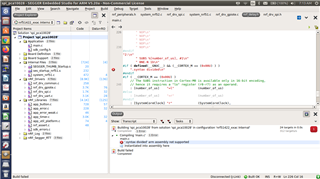
Regards
Pavankumar S
I think you should try with an older version of SES. It seems like the import is not handling paths and settings correctly. I would recommend with the version mentioned in the tutorial (3.10e), as this is the version that would likely cause the least amount of issues. I cant find this version for download from Seggers webpage, but they may be able to provide it if you contact them. After you have the project working correctly, you can switch to a more recent version of SES.
Hi,
Whom should I contact to get the older version of SES?
Regards
Pavankumar S
Hi,
I spoke to segger people,and their response is copied below.