

Dear Sir/Madam,
I'am new to segger embedded studio.I would like to do SPI interfacing of an IC using nRF51822 with segger embedded studio.
Please guide me how to add the necessary driver files into my project.
Regards
Pavankumar S
Dear Sir/Madam,
I'am new to segger embedded studio.I would like to do SPI interfacing of an IC using nRF51822 with segger embedded studio.
Please guide me how to add the necessary driver files into my project.
Regards
Pavankumar S
Hi,
If you do not already have the SES project for nRF51 up and running, there is a tutorial on how to convert a Keil project available here.
Regarding usage of SES with our SDK, please have a look the this video tutorial playlist on YouTube.
Best regards,
Jørgen

Hi,
There is a SPI Master Example in the SDK that you can reference. The SPI master driver is found in "nRF5_SDK_12.3.0_d7731ad\components\drivers_nrf\spi_master", use the nrf_drv_spi.c/h version.
Best regards,
Jørgen
You should follow the tutorial closely, the nrf.h file is located in the components/device directory:
Project -> Edit Options... and then select the Preprocessor tab../../../../../../components/device to the User Include Directories field to include the device header files in our Embedded Studio projectYour user include directories should look like this now:

I also see that you have added system_nrf52.c and ses_startup_nrf52.s, these will not work for nRF51 chips. You may find some useful information in this post.
Dear Sir,
I had followed almost all steps to import a keil project into segger embedded studio.
Unable to perform few of them mentioned below.
1) Add SDK to "flash_placement.xml", "ses_nrf51_startup.s" and "thumb_crt0.s" to "/components/toolchain/embedded_studio" folder.
issue-Unable to find "flash_placement.xml" and "thumb_crt0.s" files in the SDK.( suggested in this link -You may find some useful information in this post.)
Currently I'am using segger embedded studio v5.2,is it compatible to develop a application of nRF51822??.
Currently I'am facing an error in the process of importing a keil project into Segger Embedded studio.
Please look at the image below to see the error generated.
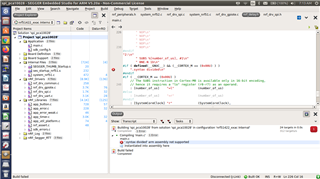
Regards
Pavankumar S
I think you should try with an older version of SES. It seems like the import is not handling paths and settings correctly. I would recommend with the version mentioned in the tutorial (3.10e), as this is the version that would likely cause the least amount of issues. I cant find this version for download from Seggers webpage, but they may be able to provide it if you contact them. After you have the project working correctly, you can switch to a more recent version of SES.
Hi,
Whom should I contact to get the older version of SES?
Regards
Pavankumar S
Hi,
I spoke to segger people,and their response is copied below.
Hi,
I spoke to segger people,and their response is copied below.