This post is older than 2 years and might not be relevant anymore
More Info: Consider searching for newer posts

nrf desktop gaming/desktop Mouse BLE advertises, but Windows 10 does not recognize it?

I have been working on porting the nrf Desktop Mouse to my custom hardware which includes an Adafruit_nrf52840 feather, and a PMW3360 motion sensor.

I ran the Peripheral HID Mouse example, and my Windows 10 PC recognized the ble advertisements, and connected and ran some demo mouse movements.

I need a basic setup that will allow a stable connection to one Windows PC.  Please let me know if additional information is needed.  I am getting

excited to get this working and get the demo models into production.  

Thanks,

Dan

Case:  I am following the "Integrating Your Hardware" instructions to use the nrf Gaming mouse project.

So far, the project is building and the device can connect via USB and runs the motion sensor.  But, I am having some trouble

getting the BLE connection right.  I think I have not configured things properly.  The advertisements are being sent out, and I can see them on a BLE sniffer and on "nrf Connect" for Ios. 

Problem_1

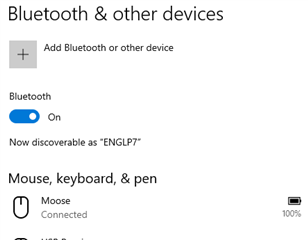
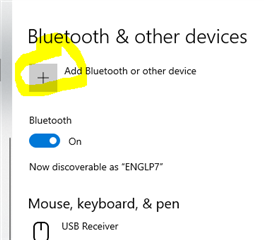
My Windows PC no longer recognizes the advertisements from the Mouse?  I think I was able to connect once to my setup, but during

testing I removed the device from Windows. The nrf52840 is advertising as shown by the BLE sniffer and my Iphone running "nrf Connect" sees them.
Problem_2

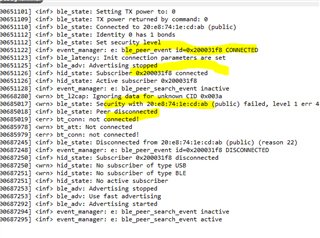
When I try to connect using "nrf Connect" on the IPhone, the connection is quickly disconnected and shows that

a security fault is the reason.

debug text during the advertisement and quick disconnect.
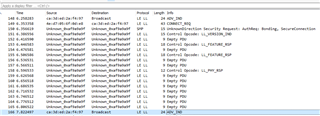
BLE sniffer
Parents
  • Hello,

    Does this behavior also occur when you run the project on a DK? Or do you suspect that this is HW specific?


    My Windows PC no longer recognizes the advertisements from the Mouse?  I think I was able to connect once to my setup, but during

    testing I removed the device from Windows. The nrf52840 is advertising as shown by the BLE sniffer and my Iphone running "nrf Connect" sees them.

     It doesn't perfectly match your description, because you can still connect from other devices, but it sounds like you have some bonding issues. Can you please try to remove the device from your PC's bluetooth list, and then erase the entire flash on the nRF52, and re program it. Are you able to connect to it again at that point?

    BR,

    Edvin

  • Edvin,

    I will try the full flash erase as you suggested.

    Thanks,

    Dan

  • Edvin,

    Thanks!  The complete erase helped.

    I did a complete erase of the target then restarted the debugger.  The PC immediately recognized the Mouse and was able to connect and run the motion sensor that is attached to the dev board.  I am using an Adafruit feather_nrf52840 connected to a PMW3360 optical sensor.

    Next, I need to connect the scroll wheel, buttons and leds...  The Zephyr configuration is new to me.  8^)

    Thanks again for your help.

    Dan

    Thanks,

    Dan

  • Hello Dan,

    Although you didn't specifically ask for it, I took the time to look into this for my own sake, and since I spent a bit of time on it, I see no reason not to share it. (I have to get more familiar with Zephyr).

    The attached project uses buttons 1 and 2 on the DK to move the mouse (left and up, respectively). Button 3 is mouse right click, and button 4 is scroll (push to scroll up, and release to scroll down). 

    This is for a DK, and not your custom HW, but if you are stuck, perhaps you can look into it.

    2500.peripheral_hids_mouse.zip

    Best regards,

    Edvin

Reply
  • Hello Dan,

    Although you didn't specifically ask for it, I took the time to look into this for my own sake, and since I spent a bit of time on it, I see no reason not to share it. (I have to get more familiar with Zephyr).

    The attached project uses buttons 1 and 2 on the DK to move the mouse (left and up, respectively). Button 3 is mouse right click, and button 4 is scroll (push to scroll up, and release to scroll down). 

    This is for a DK, and not your custom HW, but if you are stuck, perhaps you can look into it.

    2500.peripheral_hids_mouse.zip

    Best regards,

    Edvin

Children
Related