This post is older than 2 years and might not be relevant anymore
More Info: Consider searching for newer posts

Embedded Studio doesn't show any node in project tree with Options enabled

Hi there,

I just started using Embedded Studio (v5.10d on Windows 10, nRF Connect SDK version 1.4) with nRF52840dongle and nRF5340 PDK. Here is what I did

1. Copied nRF Connect SDK project from the original location to my own folder. Let's say it is blinky project from zephyr samples.

2. Run menu command "Open nRF Connect SDK project" for this new location. Selected either nrf52840dongle_nrf52840 or nrf5340pdk_nrf5340_cpuapp, makes no difference.

3. After a while project ES is created, but there is no entry where Options are enabled. I discovered when I tried to make changes recommented for dongle. Here is how project tree looks like
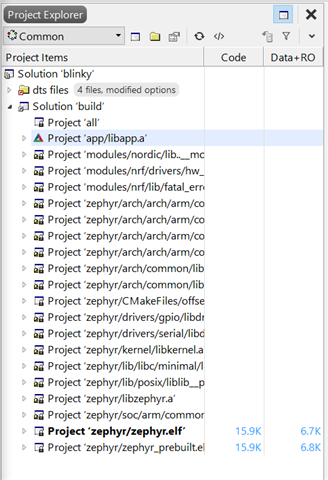
4. When built with defaults, blinky works on nRF5340, I see LED blinking. It doesn't work in case of dongle, not sure what defaults are in this case, because I don't see project options.

5. The only case when I see different picture is for the project peripheral_uart, here additional node is created and there are options enabled:
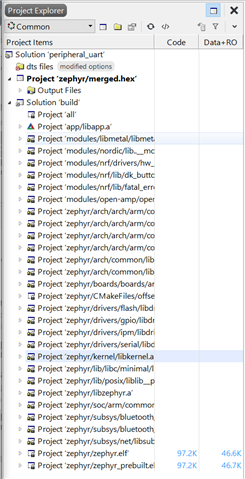
This project is not supported for dongle, so I cannot tell how recommended adaptation works. This was the only project that creates merged.hex.

I tried a number of different projects both from SDK and zephyr samples with the same result as for blinky one. I did software update today.

Am I missing something obvious? I just started with all this so it is very possible.

Thanks,

Sergei

Parents
  • After a while project ES is created, but there is no entry where Options are enabled. I discovered when I tried to make changes recommented for dongle. Here is how project tree looks like

     What options?  

    Am I missing something obvious? I just started with all this so it is very possible.

     It's not clear to us what exactly it is that you are trying to do, what you are observing, nor what it is that you expected to observe. Can you elaborate further?

Reply
  • After a while project ES is created, but there is no entry where Options are enabled. I discovered when I tried to make changes recommented for dongle. Here is how project tree looks like

     What options?  

    Am I missing something obvious? I just started with all this so it is very possible.

     It's not clear to us what exactly it is that you are trying to do, what you are observing, nor what it is that you expected to observe. Can you elaborate further?

Children
  • Sorry, I wasn't clear enough.

    I was trying to take Blinky sample program and adapt it to the nRF52840 dongle, as explained here. But I don't see how I could do this if Options context menu is disabled on all nodes in project tree in SES, so I cannot open preprocessor definitions. Then I started opening other nRF Connect SDK sample projects and I see the same behavior with almost all samples. My understanding is that the only way to make new project is to open an existing sample and then modify it. If I cannot change preprocessor definitions how could I convert sample to what I need?

    Since initial post I installed nRF5 SDK and found that samples there could be adjusted, so I am not blocked, but still confused -- why there are 3 sets of samples with different project formats?

    Thank you,

    Sergei

  • The dongle porting guide is for the nRF5 SDKs, not the nRF Connect SDK. In nRF Connect SDK you use the nrf52840dongle_nrf52840 target.

Related