This post is older than 2 years and might not be relevant anymore
More Info: Consider searching for newer posts

lte_ble_gateway sample: k_sem_take failed with err -11

I'm testing lte_ble_gateway sample (v1.4.0) on the nRF9160DK. I have followed all steps on this page https://developer.nordicsemi.com/nRF_Connect_SDK/doc/1.4.0/nrf/samples/nrf9160/lte_ble_gateway/README.html.

When I cold start the nRF9160DK I see in the console after function call sem_take_wait() this error:

assertion fail [err == 0] @ zephyr/subsys/bluetooth/host/hci_core.c:378
k_sem_take failed with err -11

I have built HCI low power UART for nrf9160dk_nrf52840 and LTE Sensor Gateway for the nrf9160dk_nrf9160ns.

If I wait for ~5 sec after a cold start and push the reset button (or watchdog expired) this error doesn't occur. 

Parents Reply Children
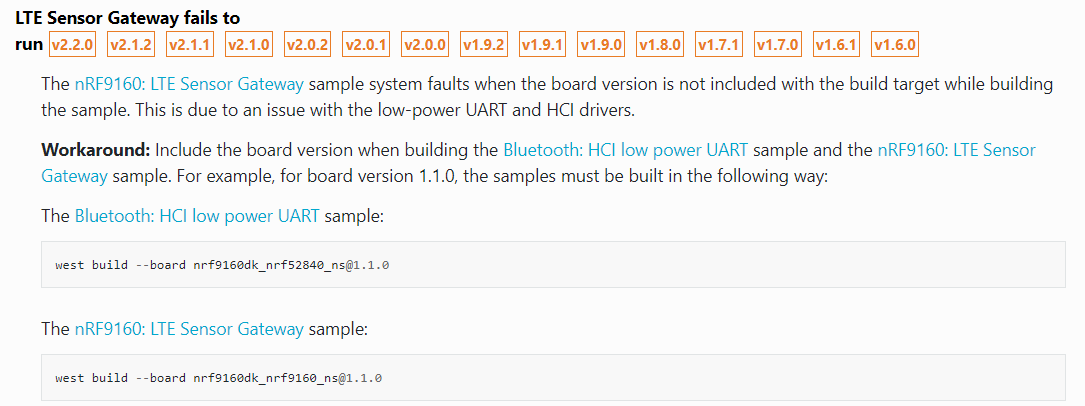
  • As advised, I included the board version(1.0.1) when building the Bluetooth: HCI low power UART sample, as follows:

    west build --pristine --board [email protected] c:\Nordic-2299\v2.2.99-dev3\nrf\samples\bluetooth\hci_lpuart

    Please note that I initially tried to use --board [email protected]  , but an error: "Invald Board" came up, so instead I selected the board: --board [email protected]  , which was a valid board.

    However, the build process was aborted due to the following three Kconfig warnings:

    1. WARNING: UART_1_ASYNC (defined at drivers/serial/Kconfig.nrfx:161) was assigned the value 'y' but got the value ;n'.  Check these unsatisfied dependencies: UART_1_ASYNC (=n).

    2. WARNING: UART_1_NRF_HW_ASYNC (defined at drivers/serial/Kconfig.nrfx:190) was assigned the value 'y' but got  the value 'n'. Check these unsatisfied dependencies: UART_1_ASYNC (=n).

    3. WARNING: UART_1_NRF_HW_ASYNC_TIMER (defined at driveParsing C:/users/zephyrproject/zephyr/Kconfig) was assigned the value '2' but got the value ''.   Check these unsatisfied dependencies: UART_1_NRF_HW_ASYNC (=n).

    I attach Screenshot_1 (6-February-2023) that shows these warnings.

    How can this problem be resolved?

    JM

    Screenshot_1 (6-February-2023).docx

  • Maybe try to do a pristine build / delete the build folder. 

    If that does not work, please create a new case

    The root cause of the issue you are seeing is not related to this 2-year old. 

Related