This post is older than 2 years and might not be relevant anymore
More Info: Consider searching for newer posts

nrf_serial_write not working

This is my code:

void send_serial_message(char *buffer, size_t length) {
	ret_code_t ret;
	
	//DEBUG
	NRF_LOG_INFO("tx buffer length = %d", length);
	for(int i=0; i<length; i++)
	{
		NRF_LOG_INFO("%02x", buffer[i]);
	}
	//DEBUG end
	
    nrf_gpio_pin_set(TRANSMIT_ENABLE);
	ret = nrf_serial_write(&serial1_uart,
	                           buffer,
	                           length,
	                           NULL,
	                           NRF_SERIAL_MAX_TIMEOUT);
	APP_ERROR_CHECK(ret);
    NRF_LOG_INFO("serial return val: 0x%x", ret);
}

This is the results of the logs in the code: 

<info> app: tx buffer length = 8
<info> app: AA
<info> app: FF
<info> app: 10
<info> app: 08
<info> app: F7
<info> app: 10
<info> app: 10
<info> app: D8
<info> app: serial return val: 0x0

The return code shows that it was "successful." However, the serial write is not working properly. Here is what I measure using a logic analyzer on the serial transmission pin:
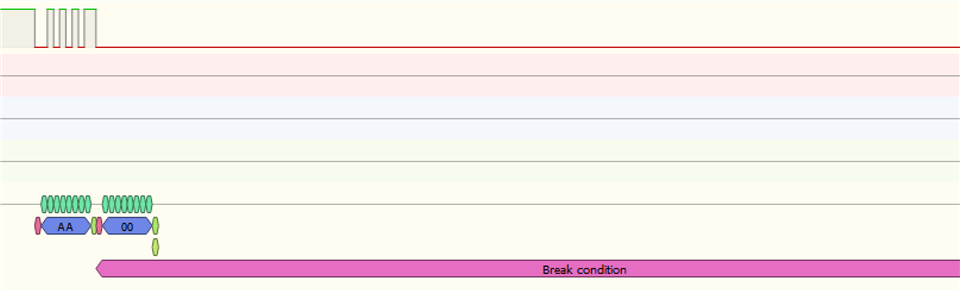
This is showing the 0xAA gets sent properly, but then the line goes low, and the rest of the sequence fails to transmit. 

What is happening??

  • Hi 

    Which Nordic chip and SDK version are you using?

    Is the UART TX pin to connected to anything externally, or is it floating?

    If it is connected to some other UART device are you able to remove this device to verify whether or not it is the nRF device pulling the TX line low?

    I don't know of any known issue with the UART where it would pull the TX line into a break condition like this, unless something is wrong with the GPIO configuration. 

    Best regards
    Torbjørn

  • Nordic chip and SDK version

    NRF52840, SDK 14.2

    Is the UART TX pin to connected to anything externally, or is it floating?

    UART TX pin is connected to a serial bus (on which other devices can also communicate) via an external serial communications chip.

    I cannot remove this device because it is a soldered-on component on my PCB.

    I am using P1.14 for the UART TX pin.

    If it is connected to some other UART device are you able to remove this device to verify whether or not it is the nRF device pulling the TX line low?

    I do have a Rigado BMD 340 development kit, which also uses the NRF52840. I can use this to see if the same result happens in the absence of the external device.

  • How about your baud rate and the NRF_SERIAL_MAX_TIMEOUT?

    If TX is latched to low, and never go up to high. I think that it must be conflicted with other function with P1.14 or the external chip latch the output level.

    You may check code for these cause.

    Another question is ....What's the TRANSMIT_ENABLE pin used for?

  • Thanks for the suggestions

    The transmit_enable pin is for the external serial comms chip that connects the TX output from NRF52840 to the serial bus. Even if data is being sent out on TX, if the transmit_enable is not on, then the data will not be received on the serial bus. 

    I've successfully used the NRF chip with the same code above with the same serial comms chip before, but somehow it's not working anymore. It doesn't seem hardware related because I've tried multiple PCBs (all containing the same serial comms chip and the same NRF chip, in the same configuration) and the result is the same. 

    I think that it must be conflicted with other function with P1.14

    From the data sheet p. 576 it looks like P1.14 has only one function. 

    Is there a way to get the serial port driver to tell me what specific error it is encountering? Right now I am not really getting any errors, I just notice a failed transmission, so it is hard to troubleshoot.

  • So...May you show the  nrf_serial_write() function? Because it's seems like TX level latched low after first byte.

    And your nrf log output is assigned by RTT or UART? If nrf log is drived by UART, you should  take care the UART initialization just one olny. And the UART handler can't be conflicted.

    Usually you can use printf() function ,if uart driver is enable.

      As my experience, there is no any  nrf_serial_write()  function in SDK17.0.2

    If you want to make the TX FIFO out function , the below example which I make in old project for reference.


    static bool uart_serial_tx(uint8_t * p_buf, uint32_t len)
    {
    bool ret = true;

    uint32_t ret_code = nrf_drv_uart_tx(&m_uart, p_buf, len);
    if (ret_code != NRF_SUCCESS)
    {
    ret = false;
    }

    return ret;
    }

    apply for nrf_uart_drv.c  nrf_drv_uart_tx() with uart fifo.

Related
