This post is older than 2 years and might not be relevant anymore
More Info: Consider searching for newer posts

nRF Connect Programmer does not recognize hardware

Have used nRF Connect V3.30 for the past year to program nRF52DK with USB and nRF52832 BLE modules with Segger J-Link Base programmer without issue.  Updated programmer app yesterday and now the programmer does not recognize the nRF52DK or the Segger programmer.  The devices show up in the Select Menu but give an "Unrecognized device.." message when selected.  Have uninstalled nRF Connect and all Segger programs and drivers and re-installed the latest versions several times but get the same results.  Tried installing old V3.30 nRF Connect but get message that Programmer app is only compatible with nRF Connect V3.60.  It appears that installing the old nRF connect still installs the latest individual apps.  How do I either get V3.61 to work or get the old Programer app?

Parents Reply Children
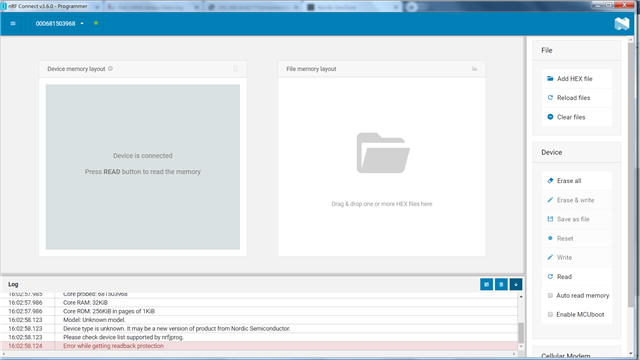
  • Another problem which I got in nRF connect programmer. The device log show that readback protection. As following:

    But it can be flash. And system code is working. The left side can't show the memory mapping on chip. Because of readback protection. But nRF studio go is the chip readable. I never do any chip protection. I think that it's a bug. Because I got the same situation with Jim R ( can't connect device). So that I replace the nRF connect v3.6.1 to old one V3.6.0. But it can't be readback.

    I wish that Nordic staff can fix the problems in V3.6.1 as soon as possible. Because the production side is applied nRF connect programmer in our company. In this case , I advice our PE group don't update the new version.

    How can I replace the programmer from 1.4.8 to 1.4.7? Because I think the readback bug is cause by programmer 1.4.8 add on protection function mention in release note.

    I can't replace the old one because the programmer is a plug app. Even through I remove the nRF connect and install old one (3.6.0). The programer verion is still higher.

  • Correction on my original post.  I originally said that both the nRF52-DK and the Segger J-Link Base hardware show up on the "Select Device" pull down menu.  That is incorrect.  Only the nRF52-DK shows up on the "Select Device" menu.

Related